
Tools to find local businesses without a website: 11 compared
Every tool’s prices and features are drawn from its own live pages, which are linked in each section.
Anyone hunting for a way to find local businesses without a website tends to be after the same thing: a list of owners with no site, so the pitch practically writes itself. That list is easy to buy, and a handful of tools below sell it well. But the list is where most of them call it a day, and a list is not a client. You still have to figure out which names are worth an hour, build something worth showing, and craft the message that actually gets opened. That gap, between a row in a spreadsheet and a business that replies, is what sets the eleven tools here apart.
This is our page, so the bias goes up front: LeadReef is one of the eleven tools here, and we reckon it comes out ahead for anyone who wants to turn up with the work already done. We will also spell out what each rival does better, because several are cheaper or freer than us and a page that concedes nothing is not worth reading. Every number below links to its source, so you can verify it in a minute.
The short version. Just one tool here carries you the whole distance: LeadReef locates the business, rates how badly it needs you from 0 to 100, builds the replacement page from that business’s own reviews and photos, and drafts the email and SMS you send. Every other tool on this page halts somewhere earlier, at a list, at a score or at a report, and hands the remainder back to you. Wherever one of them is the smarter buy, we say so and explain why. LeadReef is also among the few you can try free: the first 10 leads cost nothing.
Every tool, at a glance
Eleven tools, lined up on the six things a buyer really weighs. Two questions divide them more sharply than price does: does it only find businesses with no website, or does it also assess the sites that do exist, and does it end at a list or carry you through to a page and a pitch.
| Tool | Entry price | What it finds | Builds a page? | Drafts outreach? | Free without signup? | Best for |
|---|---|---|---|---|---|---|
| LeadReef | $14/mo | Live businesses with stale or absent sites, rated 0–100 | Yes, a prototype | Email and SMS | Yes, a first lead; 10 free on signup | A scored lead, a ready prototype and a cold email plus SMS drafted for you to send |
| SiteDrop AI | $25/mo | Surfaces leads with no website | Yes, a site | No | No | Building sites and billing clients from a single login |
| Ugly Site Scraper | $29/mo | Grades the sites businesses already run | No | Message and a branded report | No | The most thorough site audit for ranking prospects |
| GetSiteFinder | $20/mo | Missing and parked domains, confirmed live | Yes, a fuller site | No | No | The most rigorous presence checking with a site you can publish |
| LeadsByLocation | $15/mo | Missing sites and sluggish ones (PageSpeed) | No | Audit report only | No | Leads rated by PageSpeed plus a bulk CSV to churn through |
| WebLeadr | $14 / 50 leads (one-time) | No-website leads, graded A to F | No | One message per lead | No | A graded list plus a message, paid for once |
| B2B Lead Finder | $14.99/mo (7-day trial) | Missing and weak sites, complete with audits | No | AI outreach | No | Audit reports alongside decision-maker lookup |
| NoSiteSearch | $19/mo | Only missing sites, rated 1–10 | No | No | No | Instant alerts when fresh no-website leads appear |
| Grape Leads | $28 / 50 credits (one-time) | No site, or one overdue for a redesign | No | No | No | An exportable list charged per lead |
| Outscraper | Usage, $3 / 1,000 (500 free) | Unfiltered records, no verdict | No | No | No | High-volume raw data served through an API |
| Targetron | Usage, $15 / 1,000 (50 free) | Unfiltered records, no verdict | No | No | No | Inexpensive bulk records in developer-friendly formats |
LeadReef, in full
Ours, so here is the full picture rather than a single row. LeadReef finds local businesses whose website is failing them (outdated design, broken on mobile, invisible in search, slow, insecure) or missing entirely, and it confirms the business itself is still trading before the lead ever lands with you. A dead site on a dead business is no opportunity; a dead site on a restaurant with three hundred recent reviews certainly is.
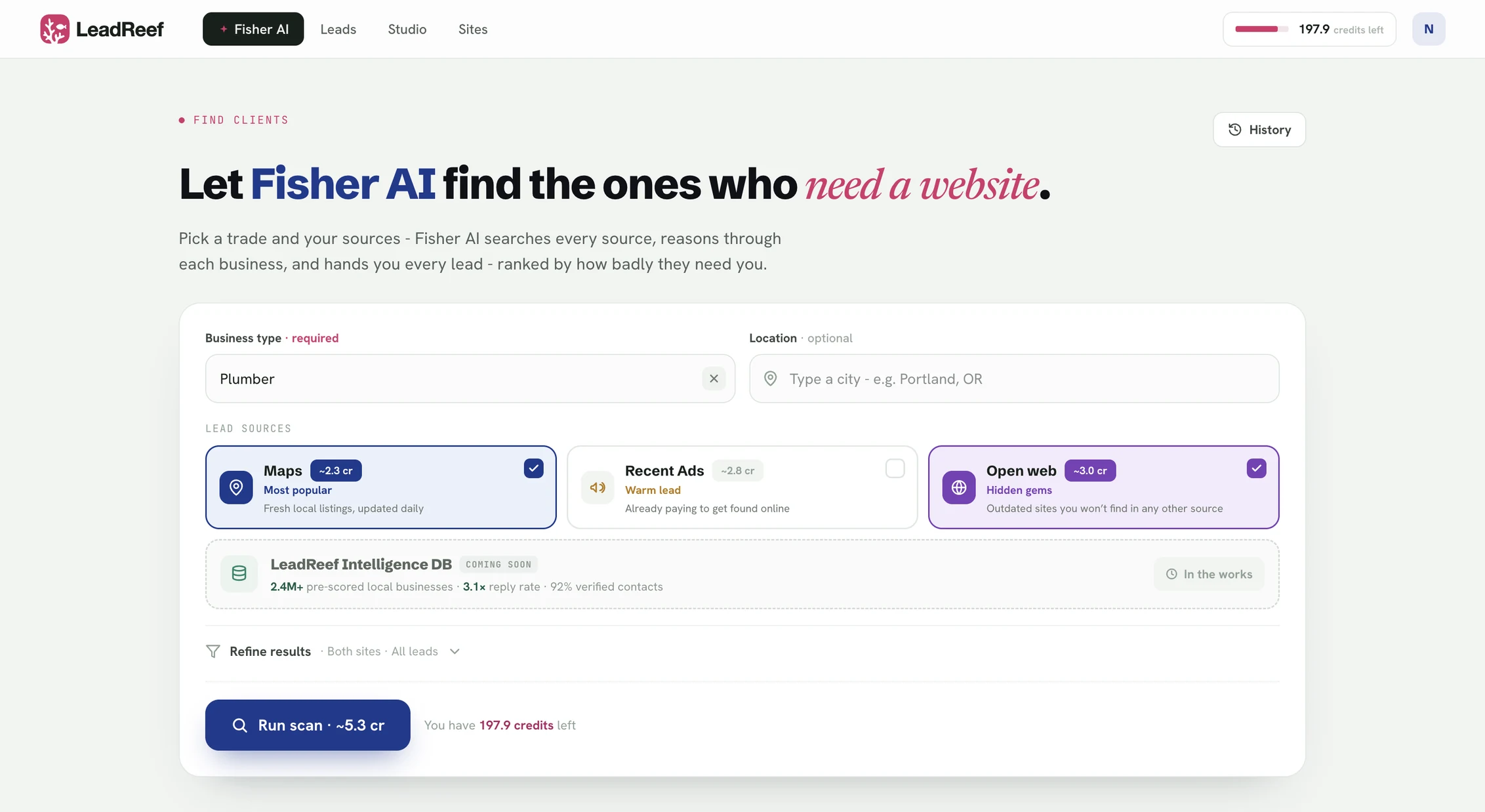
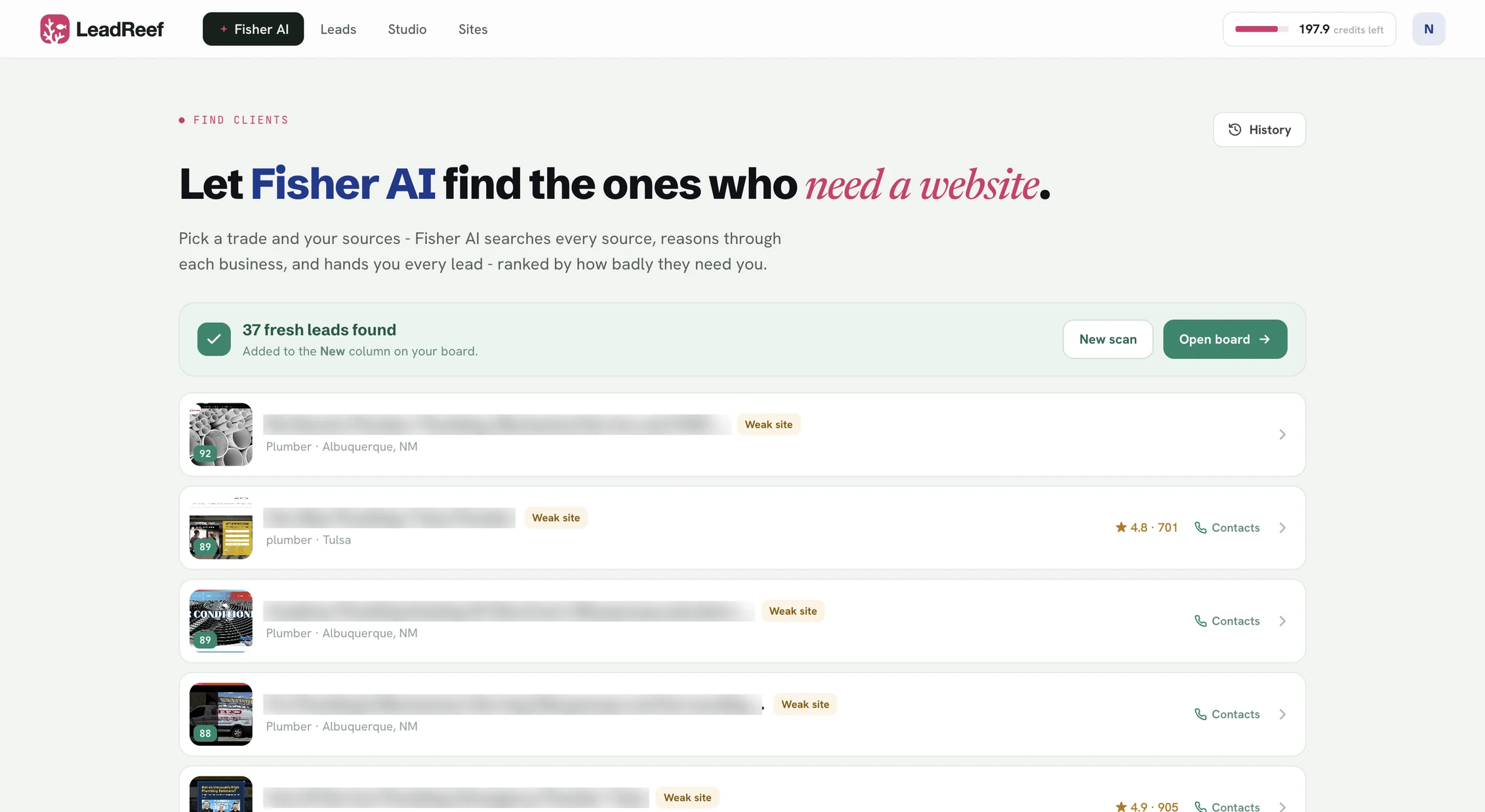
Every lead shows up with one opportunity score from 0 to 100 and plain-language problem labels across four categories: Visual, Mobile, SEO and Abandonment. Not a letter grade and not a Lighthouse number, but the sentence you can read straight to an owner: Very outdated design. Broken on mobile. No SEO, invisible to search. Site won’t load, SSL error. Outdated copyright year. You get the reason up front, so you know exactly how to open the conversation.
Three places it looks. Maps on every plan, for fresh local listings. On the $49 Pro plan it adds Recent Ads, businesses already paying to get found, so they carry a budget and a reason to care, and Open Web, failing sites that appear in no directory at all. Each surface answers a different prospecting question, and a tool that searches one surface can only ever return what that surface holds.
Then it builds the thing you actually pitch. A single click turns a lead into a prototype landing page put together from that business’s own material (its reviews, its photos, its hours, its phone number), not a template with the logo swapped in. Beside it arrive a cold email and an SMS drafted in your voice. LeadReef never sends either one. You read them, edit them, and send them yourself, so the relationship with that owner belongs to you from the first message.
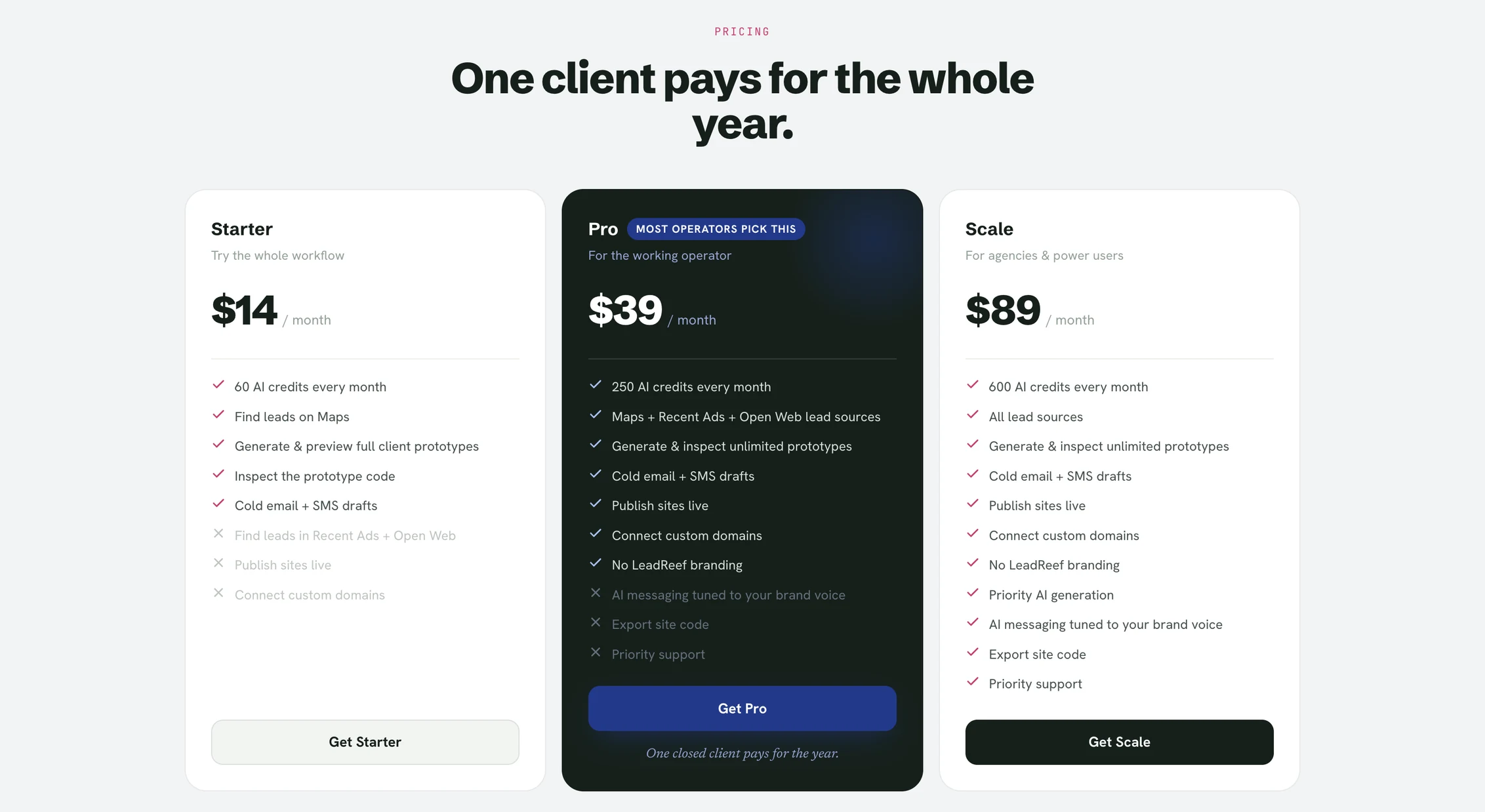
What it costs. A single pool of credits pays for everything (searching, building, drafting) at $14 a month for 60 credits on Starter, $49 for 250 on Pro, $99 for 600 on Scale. The Free plan runs a genuine search: your first 10 leads cost nothing and need no card. It ends there, because prototypes and drafts start on Starter, and we would sooner say so than dress it up as a trial. One closed client pays for the year.
One pool, not five buckets. Worth laying out, because most tools here meter each action on its own line. Thyonix’s entry plan permits 400 leads but only 3 AI websites and 10 edits a month; LeadsByLocation’s $15 tier permits 25 searches; SiteDrop’s entry tier permits 5; WebLeadr sells leads in fixed packs of 50. Whichever quota runs dry first closes out your month, no matter how much of the others is left. LeadReef keeps one balance and no per-action ceiling: pour it all into searching, all into building, or into editing the same prototype nine times. The month bends around the work rather than the reverse.
What it looks like on one business
Picture a pizzeria two towns over. Four and a half stars, three hundred reviews, open seven days. The business is thriving. The website was last touched in 2016: no HTTPS, the menu is a PDF, and on a phone the text is the size of an ant. Fisher AI surfaces it at an opportunity of 96 with four labels attached: very outdated design, broken on mobile, no HTTPS, not updated recently.
One click and Studio reads whatever the business already has (the review quotes, the food photos, the hours, the phone number) and builds a one-page site around them. A hero carrying a real dish, the menu as readable text rather than a download, a tap-to-call button, the strongest reviews as proof. A few minutes, beginning to end.
The draft that comes with it leads with what is broken, in the owner’s language rather than a developer’s: I saw your site doesn’t work on phones, and phones are how most people find you. So I built you one that does. Take a look. You tweak it if you like, send it yourself, and the link opens a real page with their own food on it. The scored-list part you can try on your own trade before paying for anything.
That is the entire difference. Every other tool on this page gives you a list, a score or a report, and the conversation still has to open with you asking an owner for something. This one opens it with you handing them something. Owners answer that.
The ones that find and build
Two others also move beyond the list and generate something to put in front of the owner. Neither assesses the site the business already runs, and neither writes the message that has to accompany the page.
SiteDrop AI. A website builder aimed at people who sell web work locally, with a lead finder that flags businesses without a site, from $25 a month. Its true edge is invoicing: you can bill a client without leaving the tool, which nothing else here manages. What it skips is assessing the site a business already runs, and it writes no outreach, so you still choose the targets and write the email yourself. Its entry tier also limits lead search to five searches a month. The full SiteDrop AI comparison goes deeper.
GetSiteFinder. Finds businesses lacking a real site, verified through live DNS, SSL and parked-domain checks rolled into a presence score, then generates a multi-page site and publishes it to a custom domain, from $20 a month. Its live verification is the most exhaustive here, and the site it produces is fuller than a prototype. It hunts only for missing sites, though, so the larger failing-site pool never reaches you. It drafts no outreach either, so the page turns up with nothing to send alongside it. More in the GetSiteFinder comparison.
The ones that judge and report
These four assess the site a business already runs, which is the right instinct: it is the larger and warmer pool. Then each hands you a list or a branded PDF and stops. The building and the pitching remain yours, and that is where the hours disappear.
Ugly Site Scraper. Audits existing sites with an AI quality score, screenshots and contact details, and lets you narrow to the businesses that most need your offer, from $29 a month. It runs the most detailed site-quality analysis of anything on this page, and it drafts a message plus a branded audit report. A genuinely strong research tool. But an audit report asks the owner to imagine the fix, and it builds no replacement page, so the most persuasive thing you could set in front of them is the one thing it never produces. At $29 it is also the priciest door here. The full Ugly Site Scraper comparison weighs it against a built prototype.
LeadsByLocation. Draws from Google’s own business listings, flags the businesses with no site and the ones failing on mobile, attaches a PageSpeed score, and generates an audit PDF, from $15 a month. The PageSpeed signal and the clean, high-confidence data are genuine strengths, and the CSV export is tidy. Read the tiers before you judge the entry price, though: $15 buys 25 searches and nothing more, the audit PDF starts on the $79 plan and the white-label version on the $149 one. And it stops at that PDF: no page is built, no message is written, and PageSpeed on its own says nothing about whether a site looks a decade old or whether the business is still trading. See the LeadsByLocation comparison.
WebLeadr. Grades each site A to F on health and 1–10 on design, flags whether a business has a real site or merely a social page, and writes one outreach message per lead, on one-time packs from $14 for 50 leads with no subscription. The map-based area search and the pay-once model are genuinely good, and for a single short campaign it can come in below a month of anything else. It builds no page, the grade is a letter rather than a reason you can read to an owner, and once the pack runs dry you buy another. More in the WebLeadr comparison.
B2B Lead Finder. Scans Maps for businesses with no website, a weak one or other digital gaps, writes an audit report for each, looks up decision-makers and layers on AI-written outreach, from $14.99 a month with a 7-day trial that needs no card. The decision-maker lookup earns its keep if you pitch businesses large enough to have more than one person in charge, and the trial is a fair way to try it. It builds no replacement page, so the audit remains the thing the owner reads.
The no-website finders
Two tools here mostly do just this, and do it cleanly. Worth knowing about if a plain list is truly all you want, though a no-website list is the smaller half of the opportunity, for reasons the missing-versus-failing section sets out.
NoSiteSearch. Finds local businesses with no website today, rates each lead 1–10, and pings you with Slack and daily-digest alerts through a built-in CRM, from $19 a month. The real-time hot-lead alerts and the tight targeting loop are its strength, and the CRM ensures nothing slips through. It looks only for missing sites, so every business with a bad one stays invisible to it, and it neither builds a page nor drafts a message. The alert gives you a name, and the work begins there. See the NoSiteSearch comparison.
Grape Leads. Pay per lead, no subscription. It finds businesses on Maps with no website or one overdue for a redesign, ready to export, with credit packs from $28 for 50 and 20 free credits on signup. Simple and cheap for a one-off list. There is no page and no message at the finish, and it does not disclose how it decides a site needs a redesign.
The raw-data platforms
A wholly different buyer. These sell records, not judgement, and on breadth and price per record nothing here comes close. They are the right call if you already own a pipeline and just need data to feed it, and the wrong one if the pipeline was what you were after.
Outscraper. A business-data and enrichment platform: scrapers spanning map listings and many other sources, with an API and prepaid credits that never expire, priced by usage from $3 per 1,000 records and the first 500 free. Its breadth and developer pipeline are things no find-and-build tool can rival, and if you are building your own stack it is the obvious pick. It makes no judgement whatsoever, though: you get every business, not the ones worth pitching, and the qualifying, the building and the writing all still lie ahead of you. See the Outscraper comparison.
Targetron. A filterable global business directory with contacts and bulk export in CSV, XLSX, JSON and Parquet, plus an API, priced by usage from $15 per 1,000 records with 50 free each cycle. Inexpensive bulk records in developer formats, backed by responsive support, is a genuine strength. Like Outscraper it is data only (no score, no page, no message), so it answers "who exists here", not "who needs me". More in the Targetron comparison.
Missing sites vs failing sites
Now the widening. Most of the tools above answer one question well: which businesses have no website whatsoever. It is a clean yes or no, and it is the query most people type. But it is also the smaller pool, and the colder pitch, because the owner never wanted a site to begin with.
The larger pool is every business whose site exists and is letting them down: outdated design, broken on mobile, invisible in search, slow to load, insecure. That owner already paid for a site once and believed in owning one, so the conversation is warmer: you are not selling them the idea of a website, you are showing them the one they already wanted. Ugly Site Scraper, LeadsByLocation, WebLeadr and B2B Lead Finder assess existing sites too. The instinct is not ours alone.
What none of them does is close the loop. Assessing a site tells you who to call; it hands you nothing to show when they pick up. That is the gap LeadReef is built across, and it is why the score arrives with the prototype and the prototype arrives with the message.
How much larger is the failing pool? Our own analysis of local businesses across 46 categories is what tells us it dwarfs the missing one. In most trades, for every business with no website whatsoever there are several more whose site is actively bleeding them customers. We publish the finding, never a business paired with it.
Which one should you pick
These are not truly the same product, so here is the honest routing.
If you want to turn a search into a sent pitch the same evening, LeadReef. It is the only tool here that assesses the existing site, builds the replacement page from that business’s own reviews and photos, and writes the email and SMS to send it with. Everything else halts earlier and hands the rest back to you.
The narrower cases, plainly: if all you need is a raw exportable list or an API to feed a pipeline you have already built, reach for Outscraper. If you want one short campaign with no subscription at all, buy a WebLeadr pack once. If a plain no-website list with Slack alerts is truly the whole job, NoSiteSearch does precisely that. And if what you sell is the audit itself, a branded PDF the owner pays you to read, Ugly Site Scraper runs the most thorough one here.
How we compared
Every fact about another tool was taken from that tool’s own live pages, linked in the section where it appears, and re-checked when this page was updated. We verified each entry price, whether a free tier or a signup-free path exists, whether the tool finds missing sites or assesses existing ones, whether it builds a page, and whether it drafts outreach. We bought none of them and screenshotted no interiors. This is a selection, not the entire category: tools come and go, and there are others we have not covered here. Prices shift, and usage-based and non-dollar prices shift most, so if a number here ever looks off, the tool’s own live page is the one that prevails. Our own figures come from LeadReef’s public pricing.
One footnote, since it is a fact about us rather than a pitch: LeadReef runs a referral program with a recurring commission and a 6-month attribution window, which only matters if you end up recommending your stack to fellow freelancers. The partner page has the details.
Frequently asked questions
What is the best tool to find local businesses without a website?
It comes down to how far you want to go. If a simple list of businesses lacking a site is enough, NoSiteSearch is purpose-built for that. If you want the finding along with a built page and a drafted pitch in a single place, LeadReef reaches furthest: it rates each lead 0 to 100, builds a replacement prototype from the business’s own reviews and photos, and drafts the cold email and SMS you send. SiteDrop AI and GetSiteFinder build a page too, yet neither writes the outreach. You can put LeadReef’s search through its paces free before paying.
How do I find businesses whose website is out of date, not just missing?
Most tools in this category filter on a single yes-or-no field: does this business have a website. To reach the far bigger pool whose site exists and is letting them down, you need a tool that assesses the site itself. LeadReef, Ugly Site Scraper, LeadsByLocation and WebLeadr all do. LeadReef reports it as one opportunity score from 0 to 100 alongside plain-language problem labels across four categories (Visual, Mobile, SEO and Abandonment), and it only surfaces businesses that are still trading.
Which of these builds the website for the prospect?
SiteDrop AI, GetSiteFinder and LeadReef put together a page or preview for the prospect. Ugly Site Scraper, LeadsByLocation, WebLeadr, B2B Lead Finder, NoSiteSearch, Grape Leads, Outscraper and Targetron end at a list, a score or an audit report. Only LeadReef assembles that page from the business’s own reviews, photos and hours and couples it with a drafted email and SMS.
Which of these is the cheapest?
Among the tools on this page, WebLeadr is the least expensive one-off at $14 for 50 leads with no subscription; Grape Leads sells 50 credits for $28. Of the monthly subscriptions listed here, LeadReef runs $14, B2B Lead Finder $14.99, LeadsByLocation $15, NoSiteSearch $19, GetSiteFinder $20, SiteDrop AI $25 and Ugly Site Scraper $29. Outscraper and Targetron charge per record instead. This page covers only a selection of the category, so cheaper choices exist beyond it.
Do any of these have a free tier?
A few do. LeadReef runs a free search: your first 10 leads cost nothing, drawn from 10 business types across 10 cities, no card. Outscraper hands you the first 500 places free, Targetron the first 50 records, Grape Leads 20 credits on signup, and B2B Lead Finder a 7-day trial. LeadReef prototypes and drafts require a paid plan.
Does LeadReef send the cold emails for me?
No. LeadReef sends nothing on your behalf. It drafts a cold email and an SMS in your voice; you review them, edit them and send them yourself, so the relationship with that business owner remains wholly yours from the very first message.
How long does it take to go from a search to something I can send?
With LeadReef, a matter of minutes: choose a city and a trade, receive a scored list, click a lead, and the prototype page plus the drafted email and SMS are built for you. Every other tool on this page finishes sooner, at a list, a score or a PDF, so the build and the writing still lie ahead of you.
Can I get a raw exportable list or an API instead?
Yes, though not from LeadReef. Outscraper and Targetron are raw-data platforms with per-record pricing and an API, made to feed a pipeline you have already assembled. LeadReef is shaped the other way round: it delivers a scored lead, a built prototype and a drafted pitch rather than rows for you to process.
The quickest way to judge any of this is on your own market. Run a free LeadReef search: pick one of 10 business types and one of 10 cities, and your first 10 leads cost nothing, no card needed. Paid plans open every business type in any city you choose.