
Web Design Client Onboarding Process for a Local Business: Domain, Email and Access Before Build Day
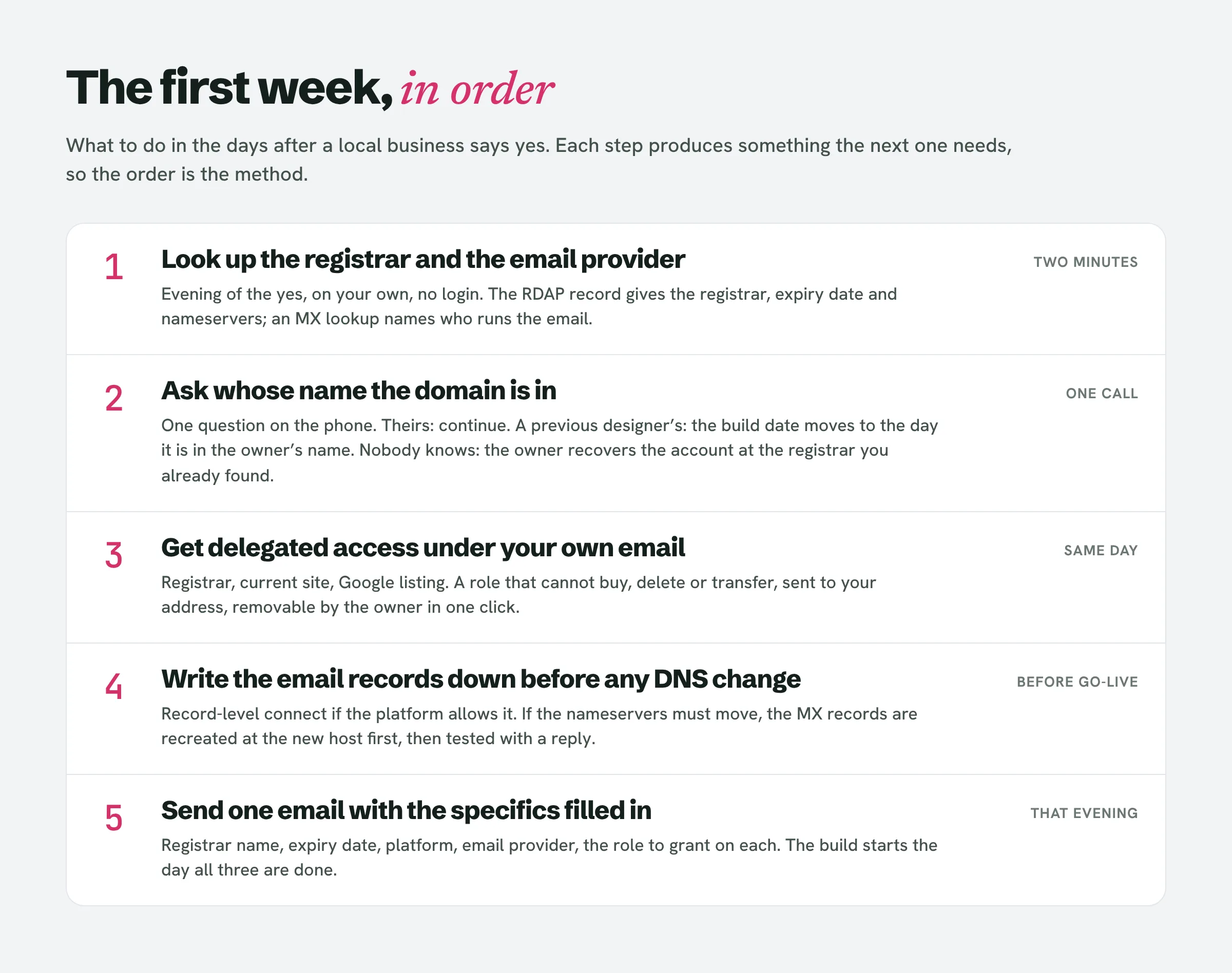
The first week after a local owner says yes is not a contract and a questionnaire. It is a registrar lookup and an MX lookup, one ownership question, access under your own email at each account, the email records written down before any DNS change, and one request email with all of it filled in.
The owner of the bakery said yes on Monday. Every web design client onboarding process you can find online now tells you what to send: the contract, the deposit link, the questionnaire, the welcome pack, the kick-off call. None of them tells you to run one lookup before you send any of it, and that lookup is the difference between a site that goes live on the day you promised and a week on the phone with a registrar while the owner’s email is down.
A local business is not the client those processes were written for. It has a domain somebody registered years ago, an email address customers already use, a Google listing that brings in most of its calls, and a current site that an old designer or a nephew still holds the keys to. The order you handle those in matters more than any welcome pack. This piece is that order: what to look up before you ask the owner anything, the one question that can stop the project, how to get into each account without ever holding a password, the email check that comes before any DNS change, what to do when there is no domain at all, and the words for the one email that asks for all of it. Contracts, deposits, photos and launch day are their own pieces.
Why the standard web design client onboarding process is in the wrong order for a local business
Eleven pages were read for this piece: the onboarding guides that rank for the process and the checklist, the ownership threads that rank for who should hold the domain, and the help-desk pieces that rank for getting access. The onboarding guides agree with each other. Self-Made Web Designer (2024) runs discovery call, contract, payments, deadlines, revisions. Alana Jade Studio (2026) runs enquiry, sales call, proposal, contract, invoicing, welcome pack, check-ins, kick-off. Lynxi (2024) runs discovery, scope, content collection, planning. The Contra checklist (2025) is the only one with a named list of accounts to collect, and its advice for getting into them is to “use a password manager to share credentials securely, and change passwords after the project.”
Counted across all eleven: none gives an order for the first days after the yes that starts with the domain, none says to check where the owner’s email lives before touching DNS, ten never mention how to find out where a domain is registered, and eight never mention delegated access. Of the three that do, one is a single line suggesting the client “add you as a collaborator,” one is a GoDaddy-only guide from a vendor that sells access software, and one is a hosting company’s argument for its own reseller plan. The ownership threads are older still: CSS-Tricks’s rule that the client should own the domain dates from 2008, and the Treehouse and Stack Exchange threads from 2013 and 2014. Google is ranking a 2008 post because nobody has written the sequence down since.
The sequence matters because a local business is attached to three things it cannot afford to lose for a day: the domain, the email on that domain, and the Google Business Profile. A questionnaire can wait. The order below cannot.
Step 1: how to find the domain registrar and email details in two minutes, before you ask the owner anything
Do this the evening they say yes, on your own, before the kick-off email. You need two lookups, and you need to write both results down.
The registrar. Go to lookup.icann.org and enter the domain. What comes back is the registry’s RDAP record. Since 2018 the owner’s name and address in it are usually redacted, but four fields are not: the registrar (Tucows, GoDaddy, Namecheap, Squarespace Domains, which is where Google’s old registrar now lives, and so on), the registration date, the expiry date, and the nameservers. The registrar tells you which account the owner has to log in to. The nameservers tell you where the DNS actually lives, which is often somewhere else: ns.cloudflare.com means the records are managed at Cloudflare, domaincontrol.com means GoDaddy, Wix and Squarespace use their own. The expiry date tells you whether the first job is a renewal. A domain that expires inside the build window is the one thing that can take the business offline without anyone changing a setting.
The email. Run an MX lookup on the domain, with nslookup -type=mx bakery.com in a terminal or any online DNS lookup. The answer tells you who handles the owner’s email. smtp.google.com, or the older aspmx records, is Google Workspace. A host ending in mail.protection.outlook.com is Microsoft 365. A host at the registrar or the old web host means the email is bundled with the thing you are about to replace. No MX record at all means the business has no email on its domain and the owner is on Gmail, which is common and fine. Write down the exact hosts and their priority numbers. You will need them in step 4.
Two minutes, no login, no questions, and you now know more about the owner’s setup than they do. If the lead came from a LeadReef scan you already know what the current site is built on and what is wrong with it; the registrar and the MX record are the two things a scan of the site cannot tell you, so this step stays yours.
Who owns my domain name? The one question that can stop the project
Now one question for the owner, on the phone, not in the questionnaire: “Whose name and whose card is the domain on?” There are three answers.
Theirs. The registrar account is in the owner’s name or the business’s, and it renews on the owner’s card. This is the good answer, and it is the one you want to leave behind if it was not true when you arrived. Go to step 3.
A previous designer’s, a nephew’s, an old agency’s. Stop. The domain is not the owner’s, whatever they paid for it, and nothing you build should go live on a domain the business does not control. The fix is a transfer or a change of registrant into the owner’s own account, and it has a clock on it: ICANN’s Transfer Policy lets the registrar impose a 60-day inter-registrar transfer lock after a change of registrant unless the owner opted out beforehand, and lets registrars deny transfers in the first 60 days after a registration. Getting a domain back from someone who has stopped answering is its own piece. For this one, the rule is simple: the build date moves to the day the domain is in the owner’s name, and you tell the owner that on the call.
Nobody knows. The owner remembers paying someone once. This is where step 1 pays: you already know the registrar. Have the owner, not you, go to that registrar and run account recovery with the email addresses the business has used. The registrar will deal with the person whose name matches the business, and that person is the owner. Your job is to say which registrar, and to wait.
What you never do, at any of the three, is take the login. CSS-Tricks’s 2008 advice was “give you the login and you can handle the DNS stuff,” and the Contra checklist’s 2025 advice is a password manager. GoDaddy’s own help pages list what a delegate cannot see, and the password and the Support PIN are on that list, because a shared login is the one thing the registrar cannot untangle later.
GoDaddy delegate access, Namecheap share access, Wix collaborator: getting in without a password
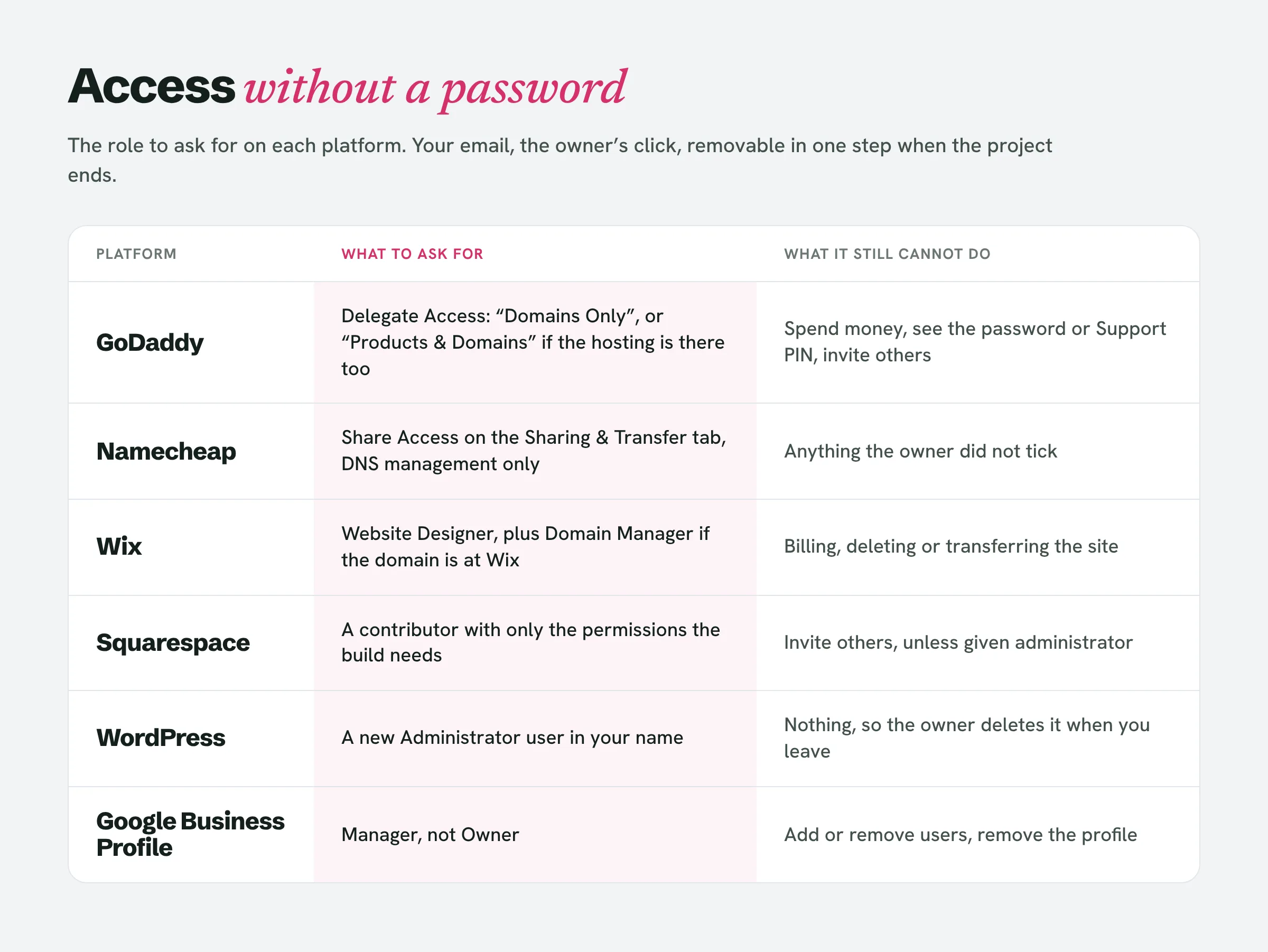
Every account you need has a way to let you in under your own name, revocable by the owner in one click. The owner sends the invitation to your email, you accept with your own account, and when the project ends the owner removes you. Ask for the narrowest role that does the job.
GoDaddy. The owner goes to Delegate Access, enters your name and email, and picks a level. The levels are “Products, Domains, & Purchase”, “Products & Domains”, “Domains Only” and “Accounts Connection Only”. Ask for “Domains Only” if all you need is DNS, or “Products & Domains” if the hosting is there too; neither can spend the owner’s money. On the domain itself, Management Access lets a delegate edit nameservers, hostnames and forwarding; Transfer Access, which you should not need, is what allows contact changes, transfers and deletion. The invitation expires in 48 to 72 hours, so send the request the same day you ask.
Namecheap. Share Access, on the domain’s Sharing & Transfer tab. The owner enters your Namecheap username or email, picks which settings to share (DNS management alone is the example Namecheap’s own guide gives), and confirms with their password. The link in your invitation is live for 7 days.
Cloudflare, if the nameservers pointed there. The owner adds you as a member of the account. Ask for the DNS role rather than Administrator.
Wix. The owner invites a collaborator by email. The roles are “Admin (Co-Owner)”, “Website Manager”, “Website Designer”, “Back Office Manager” and “Content Writer”, and even the Admin role “cannot delete or transfer the site, or connect a domain.” For a build you want Website Designer; if the domain is also at Wix, the separate “Domain Manager” role connects and manages domains without being able to buy anything. Invitations are valid for 30 days, and a regular Wix site comes with one free collaborator seat, which is you.
Squarespace. The owner invites a contributor by email; you sign in with your own Squarespace account, and the owner turns on each permission you need. Only owners and administrators can send the invitation, so if the person who set up the site was the old designer, that is the first thing to find out.
WordPress. The owner creates a new user with the Administrator role, which WordPress defines as “somebody who has access to all the administration features within a single site,” and deletes it when you are done. You never log in as them.
Google Business Profile. The owner adds you as a Manager, not an Owner. A Manager has “mostly the same access to the profile as owners,” except that they “can’t add or remove users or remove the profile,” which is exactly the limit you want attached to your name. One thing to know before you promise anything on the listing: a new owner or manager must wait 7 days before they can remove other users, delete the profile or transfer primary ownership. If the old designer is still listed as the primary owner, the owner starts that clock now.
The email check before you touch DNS
This is the step the eleven pages skip, and it is the one that produces the phone call at seven in the morning. GoDaddy’s own nameserver page says it in one line: “Changing your nameservers may break existing connections to your website or email.”
Here is why. A domain’s MX records, the ones you wrote down in step 1, live wherever the nameservers point. If you connect the new site by changing the nameservers to the new platform, that platform now answers every DNS question for the domain, including where the email goes, and unless the MX records exist there too the answer is nothing. Email does not bounce with a helpful message. It disappears for as long as it takes someone to notice, and a plumber notices when a customer rings to ask why the quote never arrived.
The rule has three parts.
Before any change, the MX hosts from step 1 are in the project notes, with their priority numbers.
If the new platform offers a record-level connection, an A or CNAME record added at the current DNS host, use it and leave the nameservers where they are. The email records never move and nothing can break them. This is the method to prefer whenever the MX lookup returned anything at all.
If you must change the nameservers, recreate the MX records at the new DNS host first, exactly as written down, then make the change. Google Workspace’s current value is a single record, smtp.google.com at priority 1, and Google’s own page says new MX records can take up to 72 hours to be recognised. Then send a test email to the owner’s address from your own and ask them to reply, and do not call the switch done until the reply arrives.
None of this is hard. It is missed because it is nobody’s step, so make it yours and put it in writing in the kick-off email, because the owner will remember who was in the DNS the week the email stopped.
When there is no domain yet
A business with a Facebook page and no site has no registrar, no MX record and nothing to look up, so step 1 is empty and step 2 is the whole job. The owner registers the domain, in their own name, on their own card, at a registrar that is not the website platform, while you are on the phone to say which boxes to tick. You pay nothing, and nothing comes out of the deposit, because a domain you bought is a domain in your name, and you have just read what that costs the next designer. Then the owner delegates access to you the same day, using whichever block above matches the registrar, and the project starts with the ownership question already answered.
If the owner wants email on the new domain, that decision comes before the site, not after, because the MX records go in at the same time as the site records and you want them in once.
The access request email, word for word
Send this the evening of the yes, after the two lookups, so every line in it is specific to their setup. Replace the bracketed parts.
Subject: Three things I need before we start on the new site
Hi [name],
Thanks again for the yes. Before I build anything I need to be let into three places, under my own email ([your email]), so you can remove me the moment we are done. Nothing here needs you to send me a password.
- Your domain. It is registered at [registrar from step 1] and expires on [date]. In your [registrar] account, go to [Delegate Access / Share Access] and invite [your email] with [role]. If you do not know the login for that account, tell me and I will walk you through recovering it; the account should be in your name.
- Your current website. It is on [platform]. Please add me as a [role] from the site’s settings. If someone else set this up and you cannot see that option, tell me who did.
- Your Google listing. In your Business Profile, under People and access, add [your email] as a Manager.
Your email at [bakery.com] runs on [provider from the MX lookup]. I will not change anything that touches it, and I will check it with you before and after the new site goes live.
The build starts the day all three are done. If any of them is a problem, call me and we will sort it out on the phone.
[you]
The email is short because the lookups were done. An owner who gets “please send me your domain login, hosting login and any other logins” sends nothing for a week. An owner who gets the name of their registrar and the date their domain expires replies the same evening, usually with “how did you know that?”
What this piece leaves to the others
The contract and whether a small project needs one, the deposit and the four conditions for the first build day, the photos and text the owner never sends, the launch checklist and handover on the last day, and the local SEO the site ships with are each a separate piece. This one ends when you are inside every account under your own name, the domain is in the owner’s, the email is written down, and the owner has a date.
People also ask
How do you give domain access to someone?
From the registrar account that owns the domain, as a delegate or shared manager, never as a shared login. GoDaddy calls it Delegate Access, Namecheap calls it Share Access. Both send an invitation to the person’s own email, and both let the owner remove the person later without changing a password.
How do I get domain access from a client?
Look up the registrar yourself first at lookup.icann.org, then ask the client to invite you from that registrar’s delegate or sharing feature with the narrowest role that covers DNS. If the client does not know the login, the client, not you, recovers the account with the registrar.
How do you connect a domain to your hosting?
Either by adding an A or CNAME record at the current DNS host that points the domain at the new site, which leaves the email records untouched, or by changing the nameservers to the new platform, which moves every record and requires the MX records to be recreated there first.
Do I need hosting for my domain?
A domain on its own is only a name; something has to answer when a visitor types it. For a local business site that is the platform the site is built on, and for email it is the provider in the MX record. Both attach to one domain and they do not have to be the same company.
How do you onboard a web design client?
For a local business, in this order: look up the registrar and the email provider before asking anything, settle whose name the domain is in, get delegated access to the domain, the current site and the Google listing under your own email, write the MX records down before any DNS change, and send one email that asks for all of it with the specifics already filled in. The contract, deposit and content collection sit around that, not in front of it.
The first week is the owner’s name on everything
Registrar and MX written down the evening of the yes; the ownership question asked once and answered before the build date; delegated access in your name at the registrar, the site and the listing; email records recreated before nameservers move, never after; a new domain on the owner’s card, never yours. That is the onboarding a local business needs and the eleven pages do not describe, and it takes an evening and one email. LeadReef does the part before the yes: it scans a city for local businesses whose sites fail the checks a customer hits, attaches the contacts it finds, builds and deploys a prototype redesign, and drafts the pitch. The first 10 leads are free, from any of 10 business types in any of 10 locations, at leadreef.ai/find. When one of them says yes, you already know what to look up first.