
How to Build Websites for Clients: Pick the Platform by Who Pays After You Leave
The editor is your problem for three weeks and the bill is the client's problem for years. Pick the platform by what happens after you leave.
Every guide on how to build websites for clients compares editors: which one drags and drops better, which has the nicer templates, which one "wins for SEO." That is the wrong comparison for a beginner, because the editor is your problem for three weeks and the bill is the client's problem for years. Pick the platform by what happens after you leave: who gets charged every month, how much, how the site moves into the client's name, and what breaks when they stop paying.
Who keeps paying for the platform afterwards
There are three shapes a client website can take once it is live, and you choose one whether you mean to or not.
The client's card is on file at the platform. They have a Squarespace, Wix or Webflow account, the subscription renews against their card, and your name appears nowhere on the bill.
You resell. Hosting client websites yourself: the site sits on your hosting account or your Vercel team, and you invoice the client a monthly or yearly fee that covers the platform and your margin. This is how most "hosting for freelancers" advice tells you to earn recurring revenue, and it is a real business — later.
You pay and forget. You built on your account with your card because it was fastest, meant to sort it out at handover, and never did. Eighteen months on, a renewal lands on your statement for a client who stopped replying in spring, and you either keep paying for a stranger's website or switch it off and take the phone call.
A beginner with no clients should default to the first shape. Not because resale is wrong, but because resale is an administrative business (invoicing, chasing, suspending, refunding) and at one to five clients the admin costs more than the margin. The third shape is what happens to people who never decide.
Best website builder for freelancers building client sites: what the client actually pays per year
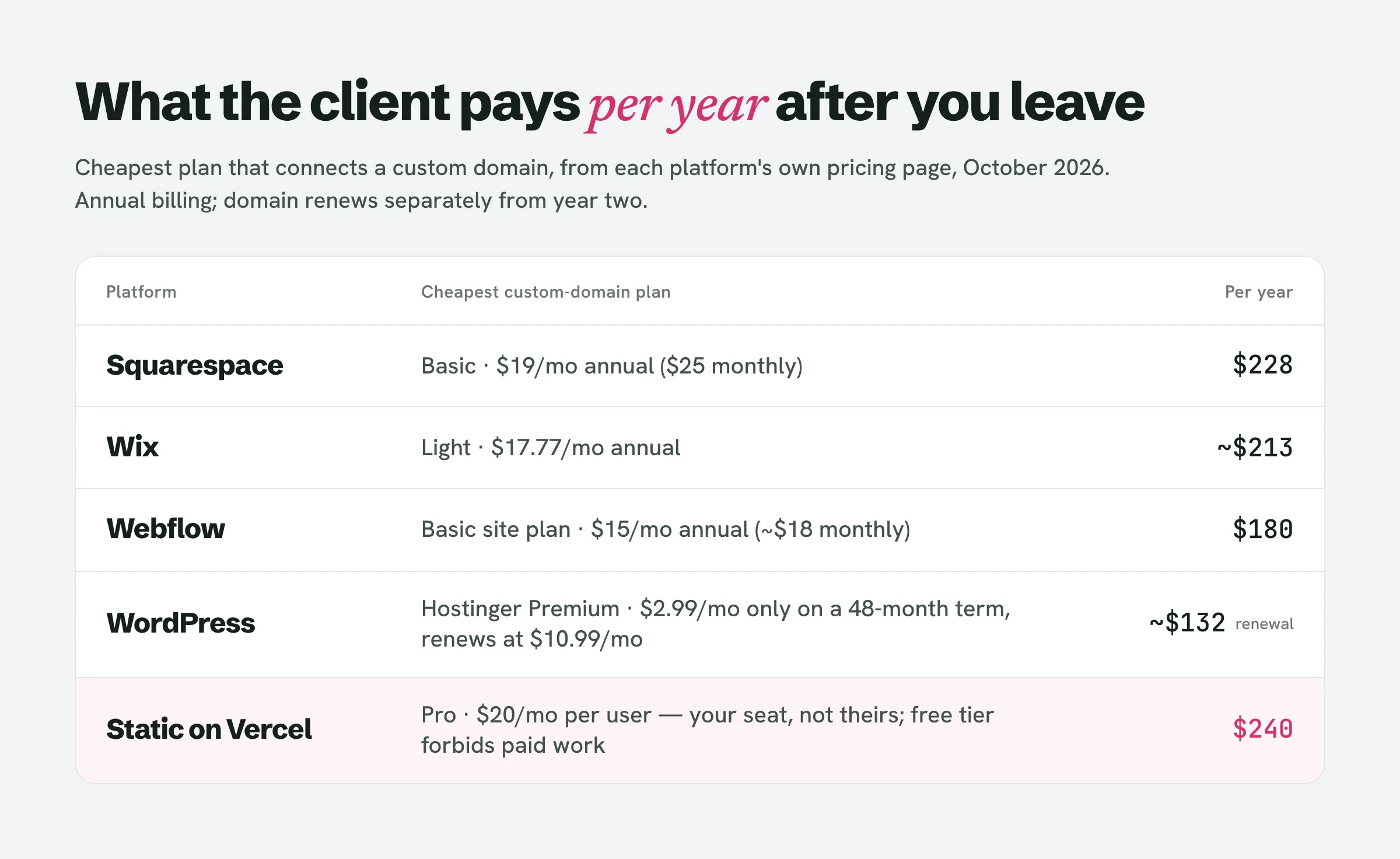
Prices below are from each platform's own pricing page as of October 2026, for the cheapest plan that connects a custom domain. The number that matters to the client is the yearly one, because that is the number they will see on a statement and ask you about.
Three things the table hides.
Squarespace and Wix bundle a free custom domain for the first year; in year two the domain renews separately, so the client's bill goes up once and you should say so in advance. The Hostinger number is the one beginners get burned by in the other direction: the $2.99 is only available with 48 months paid up front, and the renewal is more than three times the headline. Quote the renewal, not the banner.
Vercel is the odd one out. Its free Hobby tier is "restricted to non-commercial personal use only", and Vercel's own definition of commercial usage includes "receiving payment to create, update, or host the site". The moment a client pays you, a Hobby deployment is outside the rules. Pro is $20 a month per user, which makes a static host a resale shape by default: the seat is yours, so the client cannot simply "take over the account" the way they can on a builder.
What happens when the client stops paying
Nobody on page one for this topic answers this, and it decides which platform you can live with. The behaviour below is from each platform's support documentation.
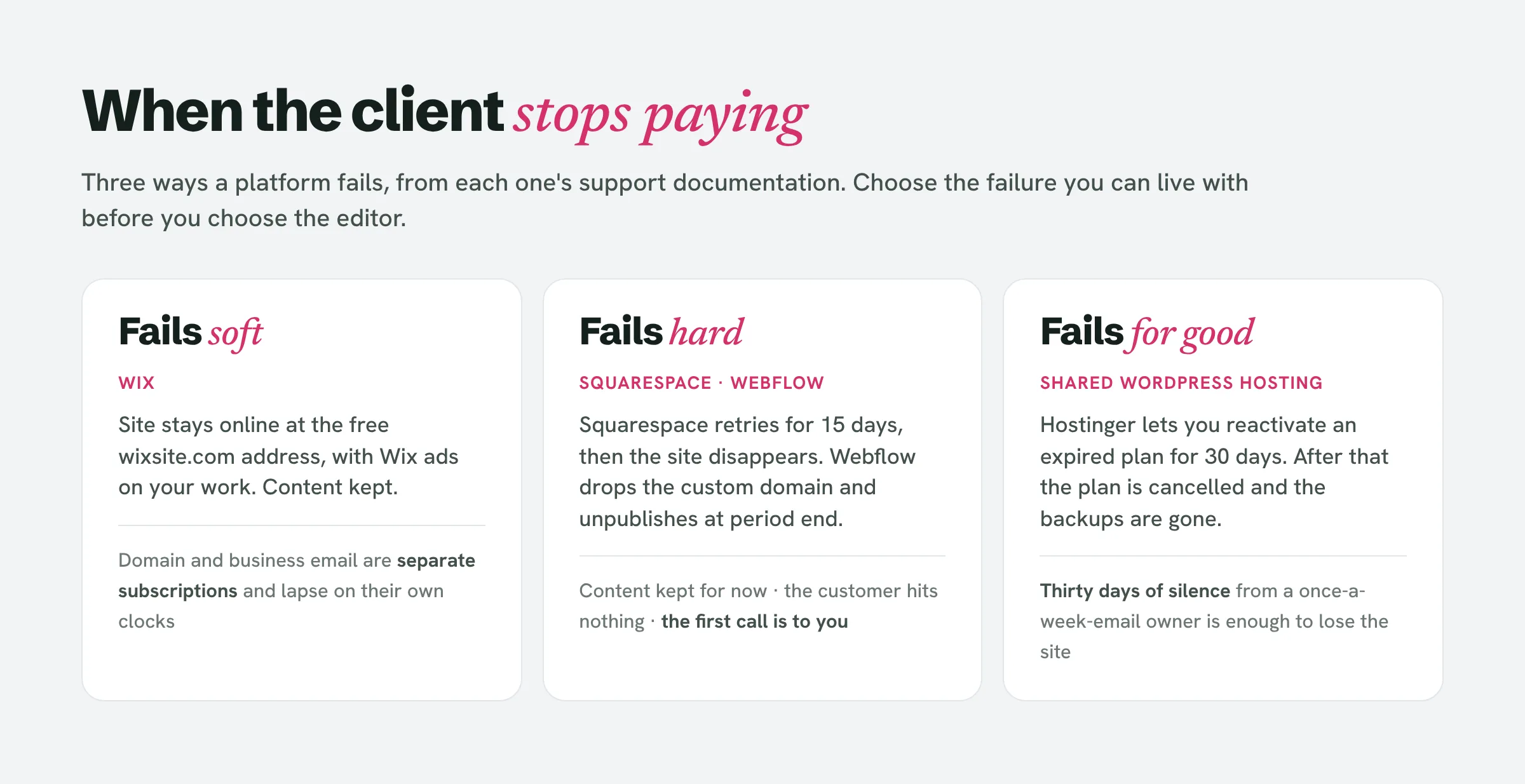
Read those as three failure modes. Wix fails soft: the site keeps working, but with another company's ads on your work, on a free address, for as long as the client ignores it. Squarespace and Webflow fail hard: the site goes dark, the client's customers hit nothing, and the first person they phone is you. Shared WordPress hosting fails permanently: thirty days of silence and the site is gone, and so is the backup.
For a local business whose owner opens email once a week, the soft failure is the kindest and the permanent one is the cruellest. That is a stronger reason to pick a platform than anything in a template gallery.
How to transfer a website to a client on each platform
Build-then-transfer is the normal sequence on a builder: you work in your own account, the client pays, the site moves. The mechanics differ, and two of them have a trap.
Squarespace. Invite the client as a contributor; they accept; in Permissions & Ownership you choose Transfer Ownership and pick them. Ownership of attached subscriptions moves with the site, including Squarespace domains and Google Workspace. The trap is billing: Squarespace's own instructions tell the new owner to update the billing information "so the previous owner isn't charged when the site renews". Ownership and the card on file are two separate things, and only the first moves automatically.
Wix. From the site dashboard you transfer the site to the client's email; the invitation is valid for three days. During the transfer you choose whether to move the site plan and the domain and business email with it; once accepted, "the new owner manages all future payments" and your payment details do not travel. There is a checkbox to keep a copy of the site in your account, which is your portfolio insurance. Wix Payments accounts, purchased logos and blog statistics do not transfer. The search most people make, transfer wix site to another account, lands on exactly this flow; the part that gets missed is that the plan and the domain only move if you tick those boxes.
Webflow. Site Settings → Billing → Transfer site. The site plan and any connected custom domains move with it; the client needs a Webflow workspace to receive it and can add you back as a guest. The cleaner option if you expect to do this more than once is Webflow client billing, now called client payments: on a Freelancer ($16/mo) or Agency ($35/mo) workspace you send a payment request and the client pays Webflow directly for their own site plan from day one. Nothing to transfer, nothing on your card.
WordPress. There is nothing to transfer inside the product, because ownership lives at the host and the registrar. Either the client buys the hosting and domain and gives you access, so the site was theirs from the first day, or you build on your own account and migrate at the end, which is work you will not be paid for and a window in which the site is yours. For a beginner, the first option.
Static on Vercel or Netlify. The site is a repository and a deployment, and transferring means the client holding an account for both, which a local business owner will not want. Treat this shape as resale or do not use it for clients.
Build on your own account or theirs?
On a builder, build on yours and transfer after final payment. Squarespace's Circle programme is free to join at the Silver tier and gives a three-month trial plus 10% off new annual subscriptions, enough runway to build a small site before the client has paid for a plan. Webflow's free Starter site plan allows two static pages on a webflow.io address: enough for a one-page prototype, not a finished site. Wix lets you build free and upgrade at transfer.
On WordPress, theirs from the start, for the reason above: the account is the ownership.
If you are pitching with a prototype before anyone has said yes, the prototype's hosting is your cost for now, not the client's, and the platform decision only arrives with the yes. LeadReef builds and deploys the prototype redesign for you and drafts the pitch, so the account question does not come up until there is a client to answer it with. Read how to pitch a website redesign for what to say once you have the prototype in hand.
The three sentences you say before the deposit
Most of the awkwardness beginners report ("why do I have to keep paying for a website I already paid for?") comes from saying this at handover instead of at the quote. Say it with the number, in writing:
The site runs on Squarespace, which costs $228 a year on their Basic plan, billed to your card, plus the domain from the second year. I build it on my account and move it into yours when the final payment clears, so the only ongoing charge you have is theirs. If the plan ever lapses, the site goes offline after 15 days, so set the renewal to your business card and not a personal one.
Swap the platform and the two numbers. A client who heard that before paying a deposit is not ambushed by a renewal, and does not phone you when a card expires, because you told them who to phone.
People also ask
Do you have to pay monthly for your own website?
Yes, on every platform in this article. The question is whose card. A client who owns the account pays the platform directly; a client on a resale arrangement pays you, and you pay the platform. Make sure they know which before the build starts.
How do I transfer a website to someone?
On Squarespace, invite them as a contributor and transfer ownership, then have them update the billing details. On Wix, transfer the site from the dashboard and tick the boxes for the plan and the domain. On Webflow, Site Settings → Billing → Transfer site, into their workspace. On WordPress, there is nothing in the product to transfer; the hosting and domain accounts are the ownership.
What is the best website builder for a freelancer?
For client sites, the one whose failure mode you can live with and whose transfer you can explain in two sentences. For your own portfolio, the one you already know.
Is making websites a good side hustle?
It is, if the recurring part is designed rather than inherited. The freelancers who regret it are usually carrying renewals for clients who vanished.
What are the downsides of using website builders?
For client work, two: the client is tied to the platform, because exporting is partial on Squarespace and not offered on Wix; and the cheapest plan rarely stays the cheapest once the domain renews in year two. Both are fine if said out loud at the quote.
Where the first client comes from
The platform question only matters once there is a yes. If you have no clients yet, start with local businesses whose current site is quietly costing them customers — the "who pays afterwards" conversation is shortest there, because the owner has already been paying for a website once. If you haven't built your proof yet, read free website in exchange for a testimonial for how to get your first case study without a paying client.
LeadReef finds those businesses, builds a prototype redesign, deploys it and drafts the cold email. The first 10 leads are free: pick from 10 business types and 10 locations, in any combination, and start with the one you would be happiest to build for, at leadreef.ai/find.