
How to Measure Website Redesign Results for a Local Business With No Analytics
Whatever you record in the short window between the yes and the switch is what settles, three months later, whether you own a case study backed by real numbers or just a good-looking concept.

Nearly every guide on how to measure website redesign results opens the same way: gather 60 to 90 days of analytics before you touch anything. That works fine for an outfit with a marketing team. It does nothing for you when your first client is a plumber whose decade-old site never had analytics on it at all, and who wants the replacement live by next week.
The owner has said yes to your prototype. That is the moment this piece is about. What you gather over the next few days is what determines whether, three months on, you hold a client case study full of real numbers or a nice-looking concept with “launched” stamped beneath it.
If the concept case study isn’t built yet, begin with how to write a web design case study — it walks through measuring the old site against your prototype before a penny changes hands. This article takes over once the yes is in.
Why website redesign metrics guides don’t fit a local business
We went through the pages ranking for redesign measurement — agency blogs, ROI guides, an analytics baseline checklist, a GA4 walkthrough. They do their job well. Every one of them takes for granted three things a small local business usually lacks:
- An analytics tool with history. The guides we found build on GA4, a CRM or “your analytics”. Not one of them says what to do when the old site carries no tracking whatsoever.
- Enough traffic for percentages to mean anything. “Conversion rate up 18%” is a genuine result at ten thousand visits a month. At three hundred, it might be two more phone calls.
- Someone on the inside. They’re aimed at the marketing lead who already holds the accounts. A freelancer has to request access, and has to request it before launch day, because once the site changes the “before” is gone.
Not one of the pages we read pointed to the Google Business Profile as a source of before-and-after data for a website. For a local business it is frequently the only record that already exists.
The website redesign baseline lives in three places
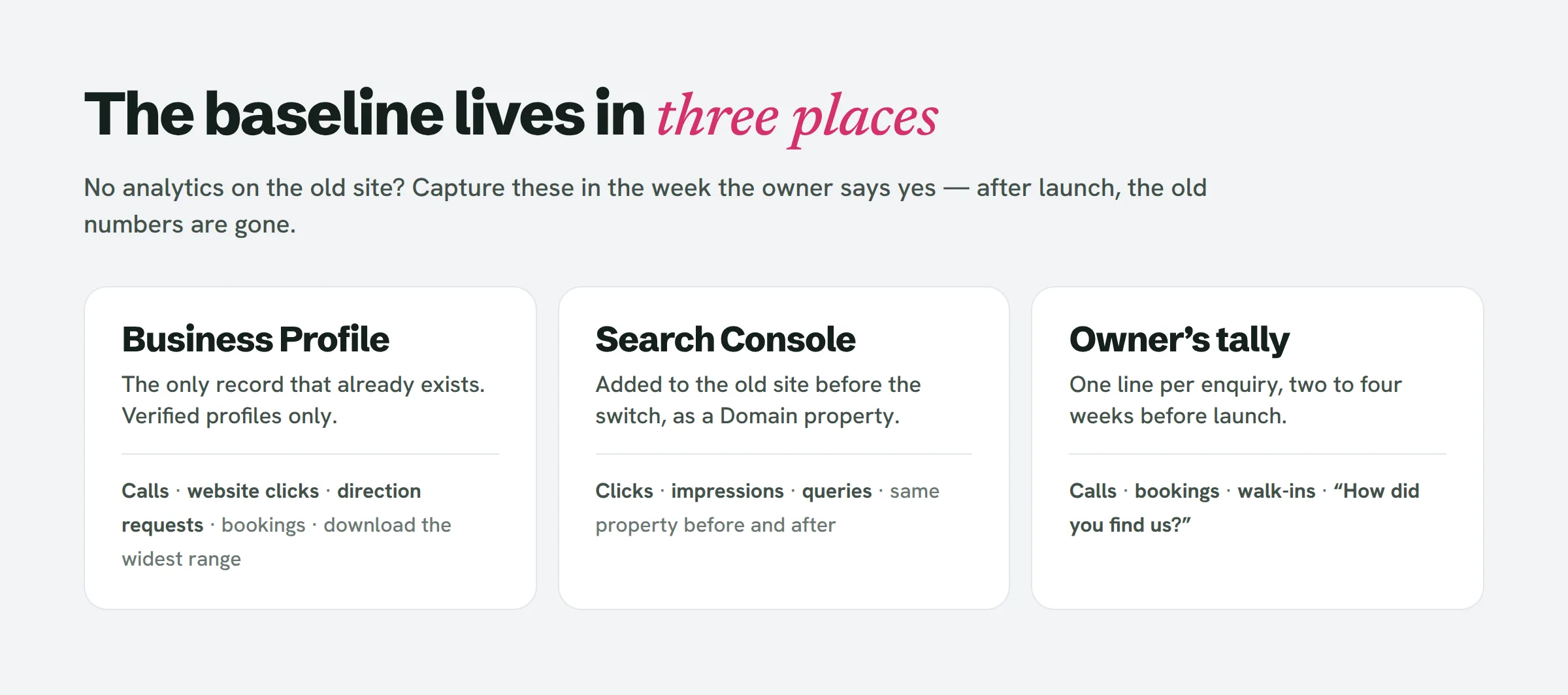
For a business with no analytics, the baseline isn’t a single report. It is three sources you assemble during the week of the yes.
Google Business Profile insights
A verified Business Profile already holds a record of how people act on it: calls, website clicks, requests for directions, and for some businesses bookings and messages too. Google surfaces this performance data only for verified profiles, and it lets you export the figures as a spreadsheet.
Get the owner to add you as a manager on the profile, or to spend ten minutes with you and pull the export themselves. Choose the widest date range the Performance view allows and download it. That file is your one window into the past, and website clicks from the profile is as near as a no-analytics business gets to a traffic history.
Search Console on the old site
If Search Console was never configured, do it now — on the old site, before anything moves. Google warns that a freshly added site can take up to a week to start producing data in Search Console, so every day you delay is a day of baseline you forfeit.
Register it as a Domain property (verified via the domain’s DNS) and keep the domain unchanged for the new site, so the property carries cleanly across the switch — even when the address shifts from http to https. That leaves you with clicks, impressions and the queries people typed, before and after, in a single report.
The owner’s tally
For a plumber, a dentist or a salon, the number that matters most isn’t clicks — it’s enquiries. No one logs them, so get the owner to begin: a pad by the phone or a note on their mobile, a line for each call, booking or walk-in, with the same question every time — “How did you find us?”
Run this for two to four weeks before launch and you’ll know roughly how many enquiries an ordinary week produces. It is the figure the owner genuinely cares about, and the only one they’ll trust.
The yes-week checklist
During the days that sit between the yes and the switch:
- Secure access. Manager rights on the Business Profile; owner or full access in Search Console. If the old site already runs any analytics, ask for that as well.
- Pull the Business Profile performance export across the widest range on offer.
- Hook Search Console up to the old site and record the date you did it.
- Kick off the tally, complete with the “how did you find us” question, and settle who keeps it up.
- Repeat your pitch measurements on the live old site — the same lab tools and task tests from the concept case study — and file the reports with the date attached.
- Note everything else in flux. Fresh photos, a wave of reviews, an ad campaign, a new service, a busy season kicking off. Any of these can shift the numbers with no help from your site.
If the lead came through LeadReef, store the weak spots it flagged on the old site alongside these files; they belong to the same before-picture.
Switch day, day 30, day 90
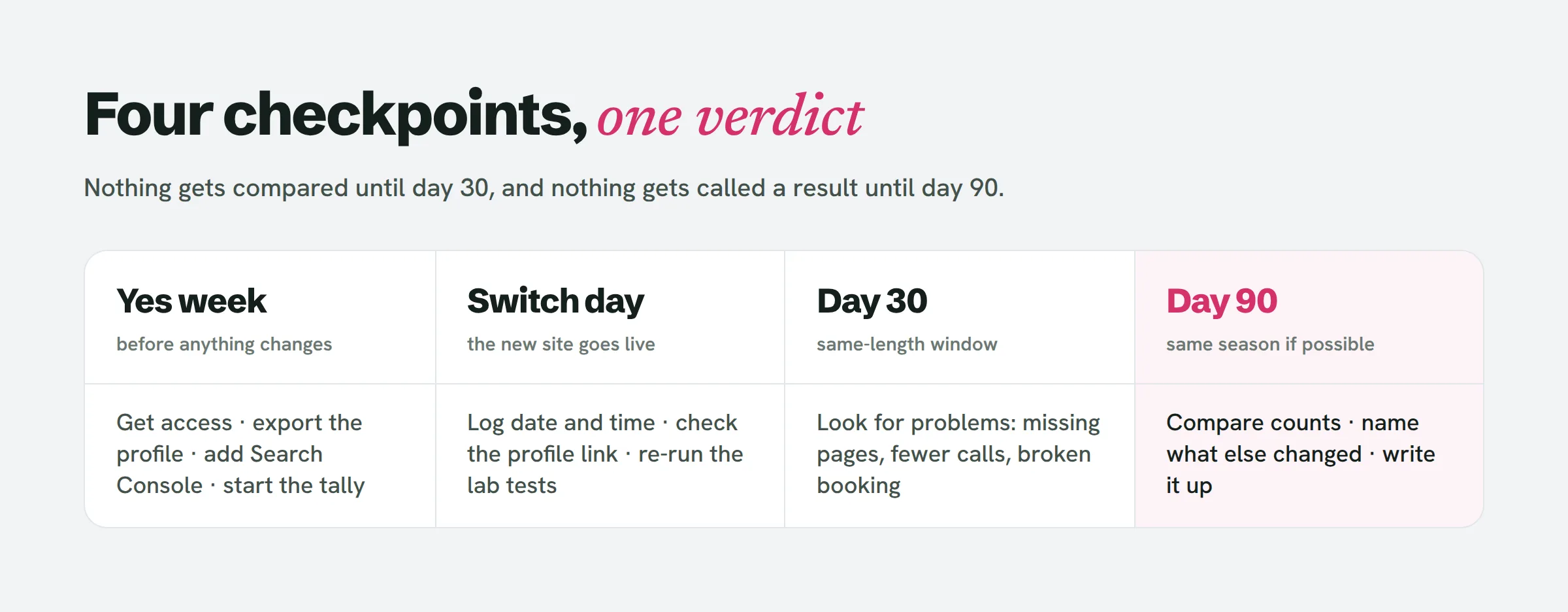
On switch day, record the date and time, confirm Search Console can still see the site, verify the Business Profile points at the right address, and rerun the lab measurements on the new site. That hands you the technical before-and-after straight away — the piece you can claim on day one.
At day 30, review the same three sources over a window the same length as your baseline. You’re hunting for trouble, not victories: pages vanished from search, calls sliding, a broken booking link.
At day 90, compare once more — and this is where the case study is born. A few of the measurement guides we read advise holding off four to six months for a full read on organic search. For a small local site that’s wise where rankings are concerned — ninety days covers enquiries and profile actions, but not SEO claims.
How to measure website redesign success when the numbers are small
This is the bit every page we read left out. When a business takes 40 calls a month, one busy week tilts the whole picture, and a percentage dresses up noise as a result. Four rules:
- Report counts, not percentages. “Calls from the profile: 31 in June last year, 38 this June” tells the truth. “Calls up 23%” is that same fact puffed up. (These figures are an example, not a result.)
- Match the season. A garden service in April outperforms its own January every year. If the Business Profile export reaches back far enough, line up the same months a year apart; if it doesn’t, say as much.
- Lean on the owner’s tally for the claim that counts. “Seven of the first month’s new enquiries said they found us on the website” lands harder than any click number, and the owner can back it up.
- Spell out what else shifted. Set the list from step six beside your numbers. If new reviews arrived that same month, the reader deserves to know.
When nothing moves, put that down too. “Enquiries held steady; the site now loads in under two seconds on a phone and booking takes two taps rather than nine” is still a case study. It’s simply an honest one.
Turning the numbers into a client case study
The concept case study already carries the measured section — old site versus prototype, same tools, same day. The client version holds on to that section and bolts on a second: the 90-day comparison, with the source of every number sitting beside it. Preserve the same divide between measured, projected and unknown that the concept version used.
Check with the owner before you publish any of their figures. Most agree once you show them the draft; a few would rather use ranges or drop the numbers entirely. Either way, you hold what a no-client designer can’t: a before and after for a real business, with the “before” taken before anything changed.
People also ask
How to measure a website’s success?
For a local business, track the things the site actually exists to produce: calls, bookings, requests for directions and enquiries that name the website. Set those alongside Search Console clicks and Business Profile website clicks, then measure the lot against a baseline you took before the redesign.
What are the top 3 website KPIs you track regularly and why?
For a small local business it comes down to three: enquiries (calls, bookings, forms), Business Profile actions (calls, website clicks, directions) and Search Console clicks. The enquiries are what the owner is buying; the other two show where those enquiries came from.
What tools can I use to measure website performance?
The free ones are enough: Google Business Profile performance, Google Search Console, PageSpeed Insights for the technical numbers, and a hand-written tally of calls and bookings. You can put an analytics tool on the new site too, but don’t rely on it for a baseline — it only begins counting the day you launch.
How do I check Google Business Profile analytics?
Go into the Business Profile, open Performance, and pick a date range. The figures show up only for verified profiles, and they export to a spreadsheet — grab that file before the new site goes live so the “before” is preserved.
Start with the yes you haven’t got yet
Every bit of this begins with an owner who has seen a better version of their site and said yes. LeadReef turns up the local businesses whose sites are quietly losing them customers, so you can build that version for the right ones. Your first 10 leads cost nothing: choose from 10 business types and 10 locations, in any mix, at leadreef.ai/find.