
How to Build a Web Design Portfolio With No Clients (Using Real Local Businesses)
One piece of work doing triple duty — portfolio entry and pitch: design the concept for a real local business stuck with a weak site, then send it straight to the owner.
Look up how to build a web design portfolio with no clients and the page-one consensus is almost total: make one up. Picture a bakery, hand it a name and a colour palette, write your own brief, and design the site. Three of the highest-ranking guides say precisely this, and most of them push for three to five such concept projects before you start hunting for work.
The advice isn’t wrong. It’s just half the story. A made-up bakery shows you can design, and after that it simply sits idle. No real business owner has any reason to look at it, and none of it moves you nearer to your first invoice.
There’s a way to do the exact same work so it pulls double duty: design the concept for a real local business whose website is visibly holding it back, add it to your portfolio, and send it to the owner. One piece of work, one portfolio entry, one pitch. This guide walks through choosing those businesses, building the piece, labelling it honestly, and knowing what to do once the owner replies.
Web design portfolio ideas: a fictional brand or a real business?
What sets them apart isn’t the look of the work. It’s where the work goes once you’re done.
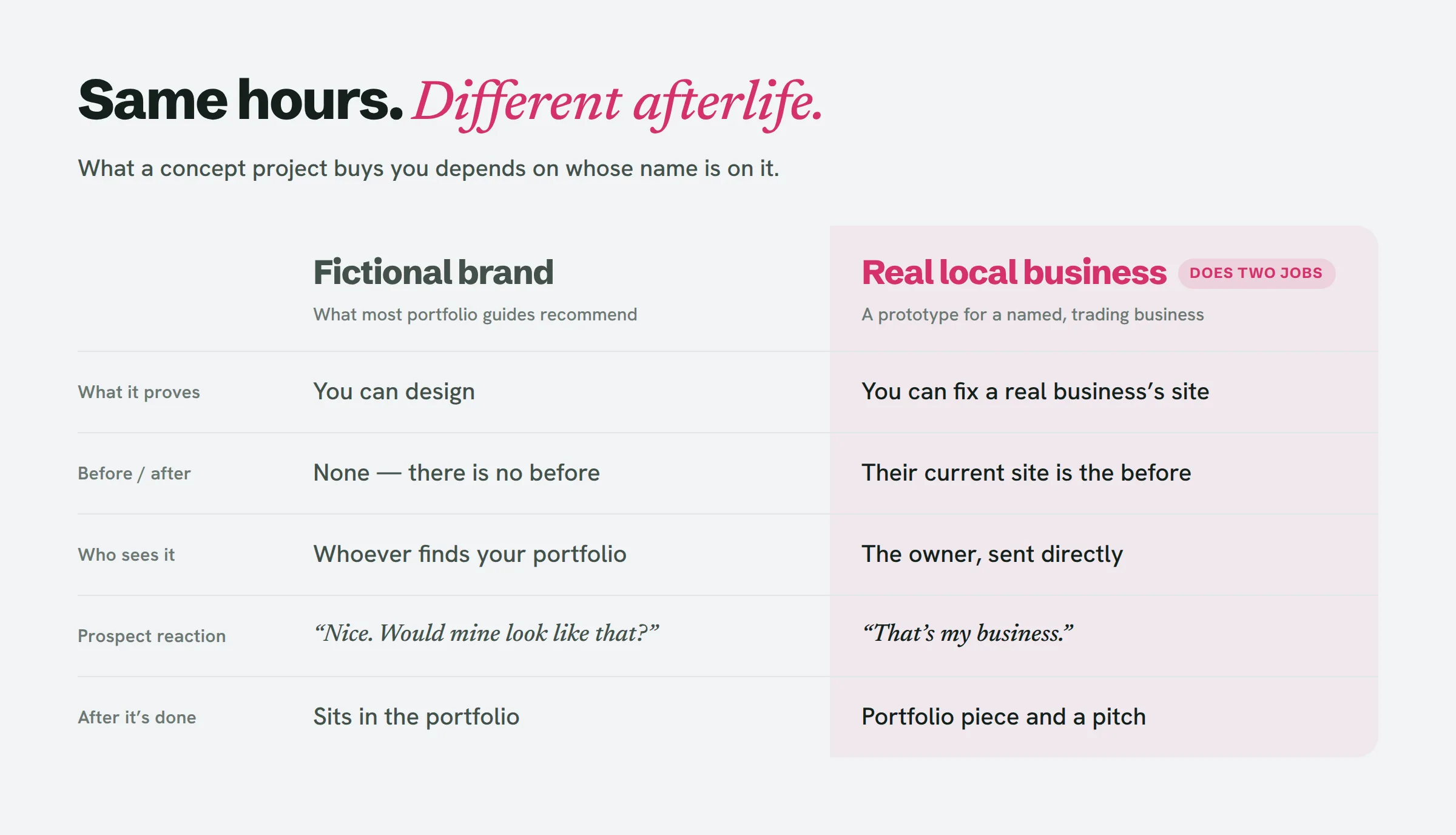
An invented brand hands you complete control, which is exactly why the guides favour it. No awkward content, no existing site to work around, no owner. Yet that same control is what makes it unconvincing. A prospect scanning your portfolio finds a gorgeous site for a business that doesn’t exist, and is left guessing how you’d treat theirs.
A real business takes the guessing away. The prospect sees their own name, their own services, their own street address, presented better than what they’ve got today. And the next prospect in the same trade sees a site for a business much like theirs, with a genuine “before” to measure it against. That before-and-after is the most persuasive thing a beginner can put on the table, and an invented brand can never have one.
How to make a web design portfolio that is also your pitch list
Pick the businesses before anything else. Most of this method’s payoff is settled before you ever open a design tool. A solid choice clears four tests:
- It sits in the niche you plan to sell into. If dentists are your target, three dentist prototypes beat a dentist, a gym and a florist. Your portfolio should read as the answer to one type of owner’s problem.
- It has a website, and that website is visibly poor. A business with no site leaves you no “before”, and its owner has already concluded they can get by without one. An outdated, mobile-broken or neglected site hands you a comparison anyone spots in five seconds. (The no-website versus bad-website distinction is covered in depth separately.)
- It’s plainly still open for business. Recent reviews, up-to-date opening hours, a working phone number. A prototype for somewhere that shut down last spring is a portfolio piece with no pitch behind it.
- There’s enough genuine content to work with. Services, prices, a menu, an about page, a few usable facts. If the current site carries next to nothing, you’ll wind up inventing a fictional business and stamping a real name on it — the worst of both worlds.
Line up more than you need. If three finished pieces is the goal, shortlist ten, because a few will flunk test 3 or 4 the moment you inspect them closely.
Web design portfolio projects: what to actually build
Make one page, not a whole site. A homepage that repairs the three most obvious problems on the current site is enough to make your case and small enough to actually finish. A five-page build for a business that never asked for anything is the point where this method stops being cheap and slides into the free-work trap.
Hold on to three things for every piece:
- The before. Full-page screenshots of the current site on desktop and on a phone, captured the day you began. Sites move on; your comparison shouldn’t.
- The after. The prototype, shipped to a real URL you control so it opens on a phone. A Figma frame gets glanced at; a link gets clicked.
- The three reasons. A single line apiece: what was broken, what you changed, why it matters to that business’s customers. “Phone number is now tappable on mobile” beats “improved UX.”
Those three reasons turn into the body of your cold email and the caption on your portfolio entry. You only write them once.
Hunting down a shortlist of weak sites in one niche and one city by hand eats an afternoon of opening tabs. LeadReef runs that sweep for you, flags what’s wrong with each site, and builds and deploys a prototype redesign for whichever ones you choose.
How to label concept work honestly
Here’s the part no portfolio guide bothers with — and the part that determines whether the method earns trust or torches it.
- State what it is, right on the piece. “Unsolicited concept — not commissioned by or affiliated with [Business].” Add it to the caption and to the prototype page. No one objects to a concept; what they object to is discovering later that it was one.
- Never suggest they hired you. No “client: [Business]”, no testimonial-style quote, no logo wall. Spelling out what you redesigned is how case studies operate. Implying a relationship that doesn’t exist is misrepresentation.
- Keep the prototype out of search. Add
noindexto the deployed page and put it on your own domain or a neutral subdomain. A page that competes with the real business in Google is a problem you’ve manufactured for them. - Rewrite the text instead of copying it, and swap their photos for placeholders in the public version. Their photos aren’t yours to republish. Keep them to the private link you send the owner, if you use them at all.
- Pull it down the instant they ask. No pushback, same day.
None of this is legal advice, and the rules vary from country to country. But a piece that’s clearly labelled, never dressed up as client work and taken down on request keeps you square with both the owner and your future clients — who’ll be reading your portfolio with precisely that question in their heads.
What happens to the piece after you send it
Once the portfolio piece is a pitch too, each possible outcome reshapes what you do with it.
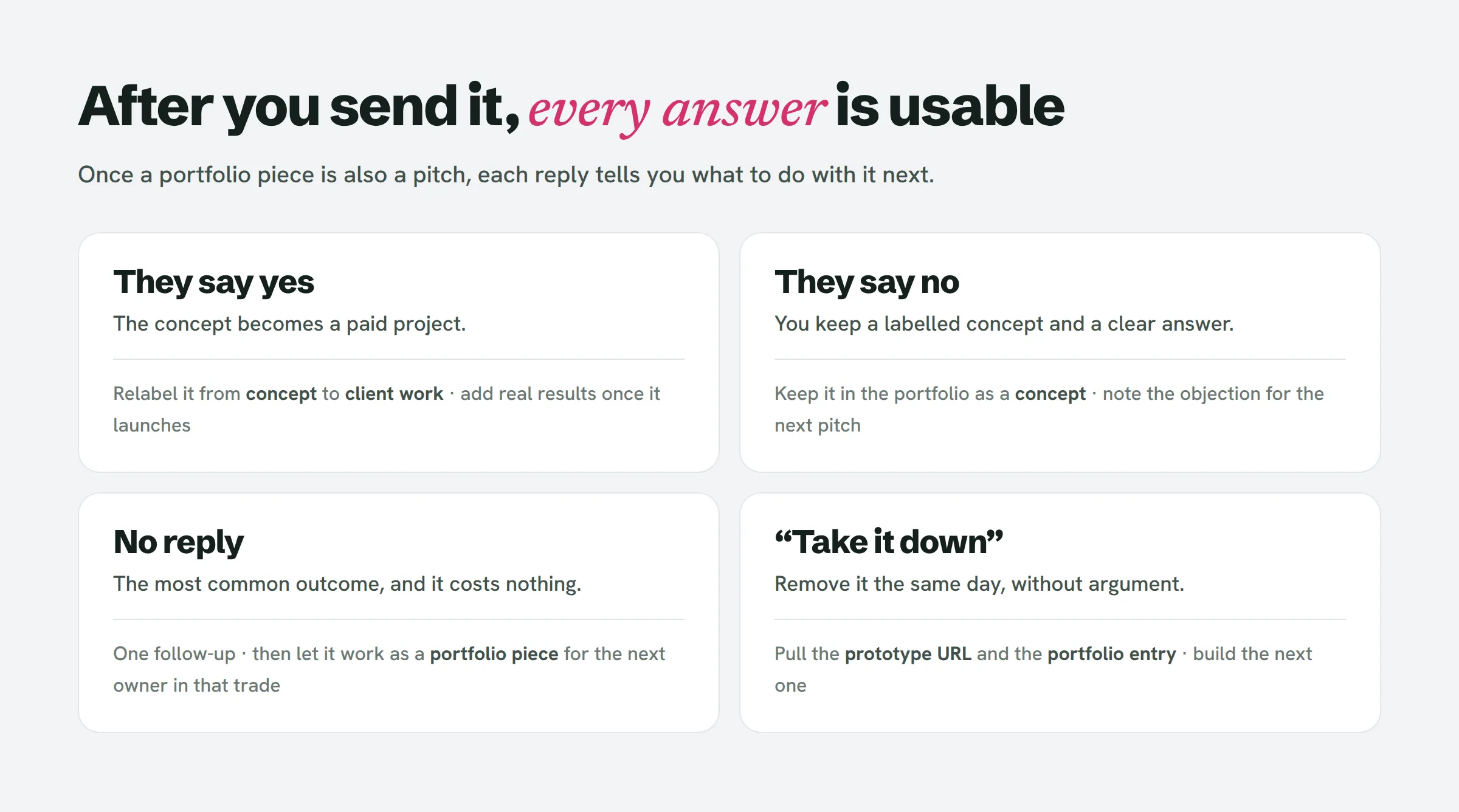
A yes is the obvious jackpot: the concept becomes a paid project, and its portfolio entry is promoted from concept to case study — this time backed by real results. A no still leaves you holding a labelled concept and a definite answer. Silence is the most likely outcome, and it costs you nothing — the piece keeps sitting in your portfolio, working for the next dentist. And if the owner asks you to take it down, you take it down and carry on.
Converting a yes into a client case study comes with its own steps — grabbing a baseline the week they agree so you can measure the redesign later.
Web design portfolio for beginners: how many pieces is enough?
Most guides land on three to five. For this method, three is the right number to open with, and for a practical reason: three prototypes in one niche make a coherent portfolio and a first round of outreach. Send them out, see what comes back, and build the next three using whatever you picked up about that niche’s objections.
Fight the temptation to polish the portfolio site itself before those three pieces exist. A bare page carrying three strong before-and-afters beats an animated portfolio with nothing real inside it.
People also ask
How do you make a portfolio if you have no experience?
The way to make a web design portfolio when you have no experience is to build concept projects — just anchor them to real businesses instead of made-up ones. Reworking a genuine, underperforming local site gives you a before-and-after, demonstrates that you can handle an actual business’s content, and doubles as a pitch you can hand straight to the owner.
How can a beginner develop a portfolio website?
Begin with three pieces inside a single niche, plus a plain page that lays out each one’s before, after and three reasons behind the changes. Save the site polish for later — it’s the pieces themselves that get judged.
How do you get your first client?
Deliver each portfolio prototype to the very business it was made for, along with a brief note listing the three things you improved. That first client tends to arrive when you show a person their own business made better — not from a generic link to your portfolio.
How do you make a dummy website?
Put together one page, ship it to a URL under your control, set it to noindex, and flag it plainly as a concept. If it’s for your portfolio, ground it in a real business’s publicly available details instead of dreaming one up.
Can AI redesign my existing website?
AI tools can spin up a first-pass redesign in no time. But for a portfolio piece the calls are still yours to make: which three problems matter most to that business’s customers, and how you frame the fix.
Start with three
Choose a niche. Shortlist ten local businesses in it with visibly weak sites, keep the three that clear all four tests, and build a single page for each. Label them, deploy them, drop them into your portfolio, and send them. By week’s end you’ve got both a portfolio and a pipeline out of the same work.
If you’d rather have the shortlist and the first prototypes handled for you, LeadReef gives you your first 10 leads completely free — pick from 10 business types and 10 locations, and every lead shows up with its weak spots flagged and contacts included. Paid plans unlock every business type worldwide, in whatever combination you like.