
Video Prospecting for Local Web Design Clients: Ninety Seconds of Their Site Failing, Recorded on a Phone
For a local business owner, the prospecting video is not your face on a webcam. It is ninety seconds of their own website failing on a phone, the way a customer meets it. It replaces the paragraph that describes the problem, not the email that carries it.
The idea is sound and the guides are written for someone else. Video prospecting, as page 1 describes it, is a sales rep’s webcam hook: your face in a bubble, thirty to sixty seconds, a GIF thumbnail with the prospect’s logo on it, sent from an outreach platform to a VP at a funded startup. The queue question here is a different one. You are a freelancer with a list of local businesses whose websites are failing on a phone, and you want to know whether a ninety-second screen recording of a prospect’s site should go out instead of the cold email you were going to write.
The answer is that it replaces the paragraph, not the email. What follows is the version of video prospecting that fits a plumber’s inbox: what the recording has to show, a shot list with a time budget, why it is recorded on a phone, where the file lives and what each home tells you afterwards, and the three lines of text that go round it. The five checks the video is built on are in our piece on telling whether a website is outdated, and the opening lines for each failure are in the redesign-pitch piece. This one is about the recording.
Why the video prospecting advice on page 1 disagrees about length
Read the ranking pages side by side and the recommended length runs from thirty seconds to five minutes. Leo Studio says thirty is the ceiling and forty-five is too long. Instantly and lemlist say thirty to sixty. Cognism’s SDR says about a minute. RecRam and VdoCipher say sixty to ninety. MySalesCoach says aim for sixty, never past ninety. Weezly says one to three minutes. Google’s AI Overview on the web-design version of the query says two to five. None of them explains where the number comes from, because in every case the thing on screen is the seller, and the length is a guess at how long a stranger will watch a face.
Your video has a different subject. The thing on screen is the owner’s own website, failing, on a phone, the way a customer would meet it. That gives the length a reason. One failure takes about twenty seconds to show properly: the page loads, you tap, the phone does the thing a customer’s phone would do, and there is a beat of silence while the owner takes it in. Two failures is the minimum worth sending, because one on its own reads as a nitpick (the same two-fails rule we use for deciding whether to pitch at all). Three is the most an owner will sit through before the point is made. Add ten seconds at the front to show you arrived the way a customer does, and fifteen at the end for the hedge and the ask, and ninety seconds is not a target. It is what two or three failures add up to. If the site only has two, the recording is seventy seconds and you do not pad it.
The video prospecting script is a shot list, not a script
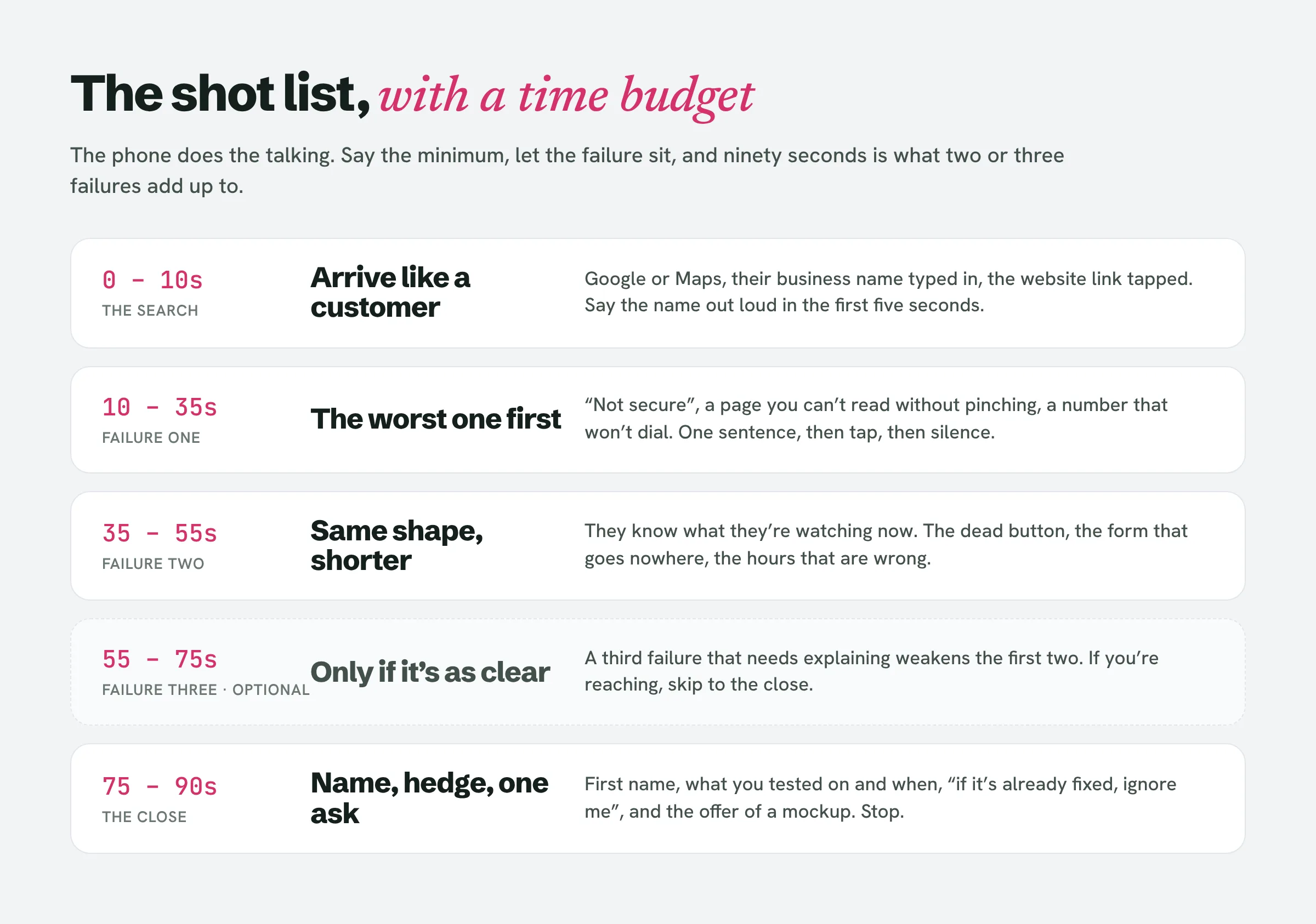
Nobody on page 1 gives you a script for walking through a website, and that is the right instinct, because a script makes you narrate. The recording works when the phone does the talking and you say the minimum. Here is the shot list. Times are where each shot should end.
0 to 10 seconds: the search. Start on Google or Maps, not on the site. Type the business name the way a customer would, say the name out loud in the first five seconds (“I searched for Ridgeway Plumbing the way someone with a burst pipe would”), and tap the website link in the listing. This is the only setup the video needs. It establishes that you came in the front door, and it is what makes the recording obviously made for this business rather than a template with a name pasted in, which every page 1 guide agrees is the thing that gets videos watched.
10 to 35 seconds: the worst failure. Lead with the one that costs the most. If the address bar says “Not secure” or the page does not load, that is first. If it loads, pinch: a page you cannot read without zooming is the failure most owners have never seen, because they look at their site on a desktop. Say what you are doing in one short sentence (“I’m going to try to call you”) and then do it. Let the silence sit while the phone fails to dial, or the tap goes nowhere, or the zoomed-out page fills the screen. Do not fill the silence. Then one sentence on what a customer does next, which is leave.
35 to 55 seconds: the second failure. Same shape, shorter, because the owner now knows what they are watching. The phone number that will not dial, the “Book now” button that opens a dead form, the opening hours that say closed on a day you know they are open.
55 to 75 seconds: the third failure, if there is one. Only if it is as clear as the first two. A third failure that needs explaining weakens the first two. If you are reaching, stop at two and go to the close.
75 to 90 seconds: the hedge and the ask. Now, and not before, say who you are: a first name and that you build sites for local businesses. Then the hedge, in one sentence, because every one of these checks has a false alarm: “I tested this on an iPhone, in Safari, on mobile data, this morning. If you’ve already fixed it, ignore me.” Then one ask, which is the same small ask as the written pitch: “If it’s useful I’ll send over a mockup of this page fixed. Reply and I’ll do it.” Stop recording. No portfolio, no years of experience, no rate.
What the recording never includes: your face (the owner does not know you, and a face bubble covers the site, which is the evidence); the desktop version of the site (the customer the owner is losing is on a phone); red circles and arrows (it reads as a teardown, and the failure is visible without help); a tour of the rest of the site; anything about colours, fonts or how dated it looks, which is taste, not evidence; and the fixes, because the fixes are the thing you sell. If you find yourself explaining what you would do differently, you have started the sales call without being asked to.
Finding which two or three failures to record is the slow part when you do it by hand across a list of fifty. LeadReef’s scan flags the problems a customer would hit on each site it finds, so the shot list for a given business is already written before you pick up the phone.
Record it on the phone, not on your desktop
Every page 1 guide assumes a desktop recorder: Loom’s app, a browser extension, a webcam. For a local business site that is the wrong device, for three reasons.
The failures are phone failures. “Not secure” in Safari’s address bar, the pinch-to-read layout, the phone number that does not dial on tap, the button that is too small to hit: these are things a phone does. Chrome’s device mode on a desktop fakes the screen size but not the behaviour, and a tap-to-call failure cannot be shown on a device that cannot call.
The recording looks like a customer, not an audit. A desktop recording with your browser tabs and your cursor says “a web designer looked at your site”. A phone recording with a thumb says “this is what happened to someone who wanted to hire you”. The second is the one the owner has been losing money to.
And it is faster. The phone’s recorder is already there, there is nothing to install, and a ninety-second take you fluff is cheaper to redo than to edit.
On an iPhone, open Control Center and tap the Record button; it counts down and records everything until you tap the red indicator at the top of the screen. To get your voice on it, press and hold the Record button first and turn the microphone on, otherwise you get a silent film. The recording lands in Photos. On Android, pull down Quick Settings twice and tap Screen record, choose whether to record audio before you start, and the file lands in your Movies folder. On both, a few things before you press record: Do Not Disturb on, so a message from a friend does not slide over the owner’s homepage halfway through; mobile data rather than wifi, because that is the connection a customer on the pavement has and a slow load is part of the evidence; other tabs closed; and the battery charged, because the status bar is in the shot and you cannot crop a video the way you crop a screenshot.
One take, start to finish. Talk as you tap. If you lose the thread, stop, delete it and go again. You will get a clean ninety seconds on the second or third attempt, and after ten businesses on the first.
Where the cold email video lives, and what each home tells you afterwards
A ninety-second phone screen recording is tens of megabytes. Gmail’s limit for a personal account is 25 MB, and above that Gmail removes the attachment and inserts a Google Drive link for you, so attaching the file does not actually attach it; it just takes the choice of host out of your hands. An attachment from a stranger also looks like malware to the person receiving it. Nobody on page 1 attaches, and neither should you. That leaves four places the file can live, and they are not interchangeable, because where it lives decides what you learn once it is sent.
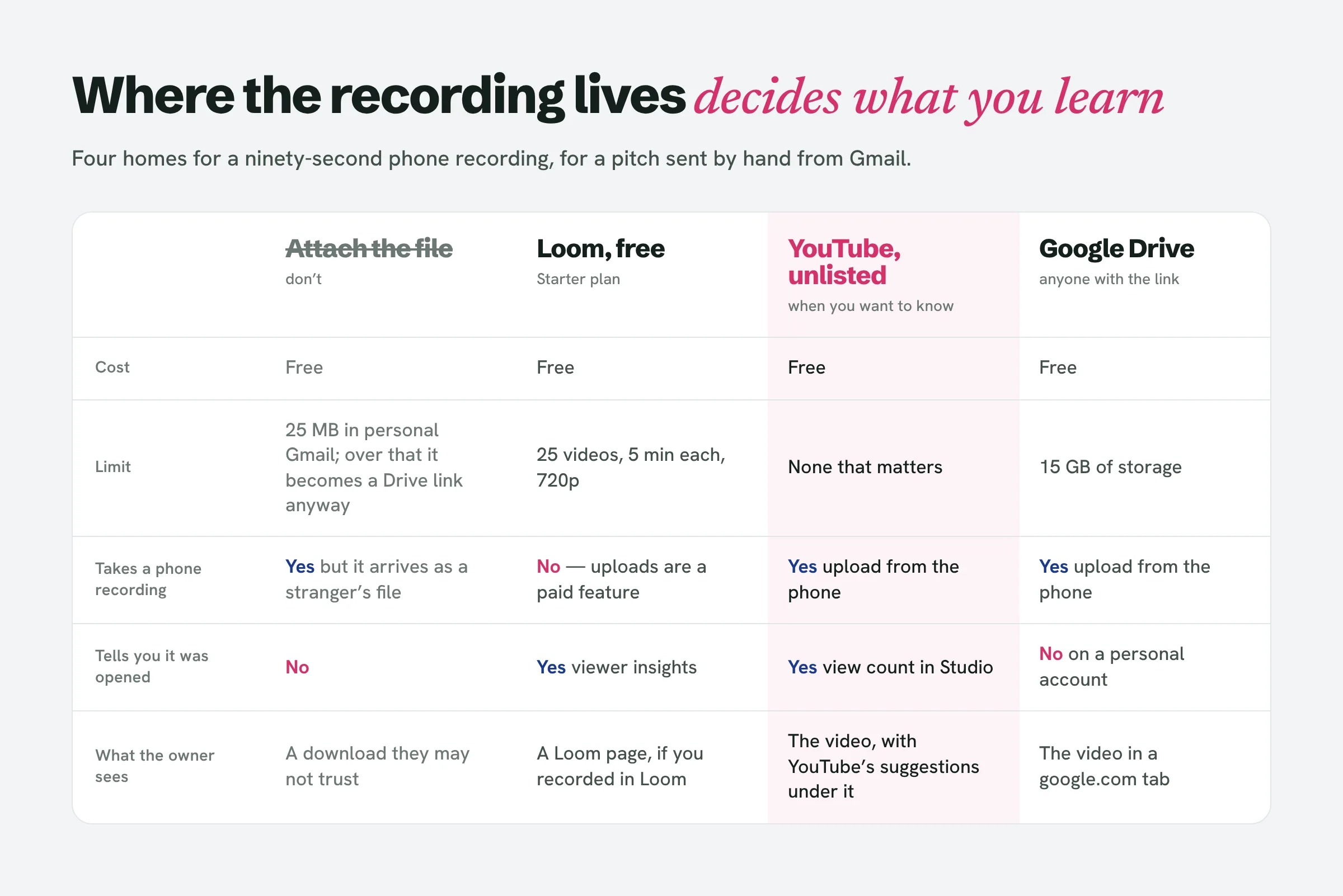
Loom, free plan. This is the tool every page 1 guide names, and its Starter plan is free: 25 videos per person, five minutes per recording, 720p, and viewer insights included, so you can see that the video was opened. The catch for this method is one line on the pricing page: video uploads are a Business feature, at $18 per user per month. A file you recorded on your phone cannot go on the free plan. Loom’s free tier is for videos recorded in Loom’s own recorder, which is the desktop recording you have just decided not to make. And 25 videos is two and a half days at ten pitches a day.
YouTube, unlisted. Free, no limit that matters, playable by anyone with the link without an account, and it will not appear in search unless someone adds it to a public playlist. Upload from the phone, title it with the business name, and YouTube Studio counts the views, so you know whether the link was opened. This is lemlist’s own recommendation for B2B, and it is the right answer here when you want to know what happened. The costs are that the owner watches it inside YouTube, with YouTube’s suggestions underneath, and that anyone with the link can reshare it, which for a video of a business’s broken website is worth a thought: keep the tone such that you would be happy for the owner to forward it.
Google Drive, “anyone with the link” as viewer. Free, plays in the browser, and the link is a google.com link, which the owner’s own Gmail has no reason to distrust. What it does not do, on a personal account, is tell you whether a stranger opened it. Pick Drive when you have decided the view count does not change what you do next.
Loom, paid. Uploads, unlimited videos, viewer insights, engagement data. Worth it once the method is working and you are sending more than 25 a week. Not before.
Whichever you pick, the link in the email is a plain URL on its own line, named in the sentence before it. Page 1’s method is a GIF thumbnail of the video, hyperlinked, inside an HTML email sent from an outreach platform. From a Gmail account sending by hand, a hosted image inside an HTML message is exactly the kind of thing we told you to strip in the piece on why Gmail pitches land in spam. The thumbnail is a volume sender’s trick for getting clicks from people who do not read; your owner reads, or the email has already failed.
Video prospecting examples that fit a local inbox: the recording replaces the paragraph, not the email
The topic was whether the recording goes instead of the email. It cannot, for a reason no page 1 guide states because their readers never pitch from a kitchen table: a local business owner reading a stranger’s email on a phone may never tap the link. Cognism’s SDR says it plainly (“people are more aware of security these days”), and that is for B2B buyers who get sent links all day. The email has to work for an owner who never watches, which means the finding goes in text, in one sentence, and the video is the proof.
The video prospecting examples that rank are template-shaped: an icebreaker line, a thumbnail, a calendar link. Yours is three lines and a URL, and it fits on one phone screen:
Subject: Your phone number doesn’t dial from your site (90-second recording)
Hi Dave, I searched for Ridgeway Plumbing on my phone this morning, and when I tapped the number on your website nothing happened; the booking button does the same. I recorded it so you can see exactly what a customer sees. Ninety seconds, your site on my phone, no pitch:
https://youtu.be/…
I tested on an iPhone in Safari, so if it’s already fixed, ignore me. If it’s useful, I’ll send a mockup of that page fixed; just reply.
Maria
The failure, the proof, the hedge, the ask. The sentence before the link says what it is and how long it is, because “watch my video” is the line that gets a stranger’s link deleted, and “ninety seconds, your site, no pitch” is the one that gets it opened. The business name goes in the video’s title and in the file name, so when the reply arrives from a different address or by phone you can match it (our cold-email-tracking piece explains why that matters more than it sounds).
Then the question of whether to ask first. Weezly’s method is the two-step: a text email asking “can I send you a quick video?”, and the recording only after a positive reply. The Reddit thread on page 1 says the same, for deliverability. Loom cold email guides from Icemail and RecRam put the link in the first message. None of them says which rule applies to whom, so here it is: the ask-first two-step is volume arithmetic. SendIQ puts a personalised Loom at two to five minutes and caps a rep at fifty to a hundred a day; a rep working a thousand-name list cannot record a thousand videos, so the permission email is a filter that tells them which fifty to record for. You are sending ten a day. Ten recordings at ninety seconds, plus a minute or two each to upload and paste the link, is under forty minutes, and it is the forty minutes you would otherwise spend writing ten paragraphs that describe what the video shows. At your volume, asking permission costs you a two-day wait and a second cold email the owner has to answer before seeing anything, in exchange for saving ninety seconds you can afford. Record it and send it in the first message.
Loom cold email or YouTube link: what the view count changes
If the video is on YouTube or Loom, you get one extra fact page 1 never tells you how to use: whether it was opened. It sorts the silence into two kinds. Not opened, no reply means the email was not read or the link was not trusted, and the follow-up repeats the finding in text with a screenshot of the failure attached, not the link again. Opened, no reply means the owner has watched their own site fail and said nothing, and the follow-up is the mockup offer made good, not “did you get a chance to watch?”, which asks them to admit they did. How many times to follow up and at what spacing is its own piece and not this one. The point here is only that the recording, hosted in the right place, tells you which of the two follow-ups to write.
People also ask
What is the best way to send a video in an email?
As a plain link to a hosted copy, not as a file. For a pitch sent by hand from Gmail, upload the recording to YouTube as unlisted (so you can see whether it was opened) or share it from Google Drive with "anyone with the link" as viewer, and put the URL on its own line under a sentence that says what it is and how long it runs. Skip the GIF-thumbnail method the outreach guides describe; it depends on an HTML email with a hosted image, which from an ordinary Gmail account is a spam signal.
How do I send a video that is too large to email?
You do not; you send a link. A personal Gmail account's attachment limit is 25 MB, and if you exceed it Gmail removes the attachment and inserts a Google Drive link for you. A ninety-second phone screen recording is usually over that limit, so decide where it lives before you write the email rather than letting Gmail decide.
Can a website know if I am screen recording?
An ordinary website cannot. Apps can detect screen capture on a phone, and some streaming video players blank the picture when it is recorded, but a local business's brochure site has neither. The only limit you will hit is the one Apple notes on its own support page: some apps block recording, which is why you record the site in the phone's browser and not inside another app.
What is an audit video?
The phrase has been taken. On YouTube an "audit video" is someone filming a police station or a security guard to test their reaction, and that is what Google returns for the term. What the sales guides call a video audit, a recording of someone's website with commentary, is better described in the email exactly as what it is, "your site on my phone, ninety seconds", than with a label the owner may search and be confused by.
How to find clients for web designing?
By being the person who noticed. Most guides send you to Upwork, networking events and your own content, which work slowly and for everyone. The direct route for local work is a list of businesses in your city whose sites fail on a phone, a ninety-second recording of each failure, and a three-line email with the recording in it. The reply rate is set by how clearly the owner can see their own site failing, which is why the recording beats the paragraph.
Ten recordings a day needs ten sites worth recording
The method above assumes you already have the list: local businesses whose websites fail the checks a customer hits, with a name to address the email to. That list is the slow part. LeadReef builds it. It scans a city, flags the sites with problems a customer would run into, attaches the contacts it finds, generates a prototype redesign you can offer as the mockup, and drafts the pitch for you to finish and sign. The first 10 leads are free, from any of 10 business types in any of 10 locations, at leadreef.ai/find. Then pick up the phone and press record.