
Cold Email Tracking for Local Outreach: Counting the Replies That Never Reach Your Inbox
You email a bakery on Tuesday about its broken menu page. Nothing comes back. On Thursday an unknown number calls: “Hi, you sent me something about the website?” Your cold email tracking says zero replies from the bakery. Your spreadsheet says the same. The one real lead of the week is missing from both.
This happens a lot when you pitch local businesses. Owners are on their feet all day. They read email on a phone between customers, and when something interests them they often do what they do with their own customers: pick up the phone. This article covers what to count as a reply, where local replies actually arrive, and how to match each one to the email that caused it, so your numbers tell you the truth.
Why cold email tracking only sees half of a local reply
We read nine pages that rank for reply-rate and tracking searches, from Instantly, Reachoutly, Belkins, Woodpecker, Danish Lead Co., Lead Scrape and UTM.io. Every one that defines a reply at all defines it the same way: a message that lands back in the inbox you sent from. Not one mentions a reply that arrives any other way. No phone calls, texts, social messages or contact forms, and no way of linking them back to an email.
That isn’t carelessness. Most of these pages are written by companies that sell sending software, and the software can only count what reaches the inbox. For a sales team emailing software buyers, that’s close enough, because those buyers answer by email. A café owner often doesn’t.
Two more things skew the picture for a solo sender:
- Opens and clicks don’t mean much. Instantly’s own tracking guide says Apple Mail Privacy Protection “pre-loads images, inflating open rates without real human engagement”, and that clicks “can be skewed by bots or accidental taps”. UTM.io warns that tracked links bring more scrutiny from Gmail and Outlook. Our guide on why Gmail emails go to spam explains why a hand-sender should switch tracking off anyway.
- One old channel is gone. You may read advice about owners replying through their Google listing. Google shut down Business Profile chat on 31 July 2024, so that route no longer exists.
So the replies that matter most in local outreach are the ones your tools can’t see. You have to catch them yourself, and that only works if you decide the rules before the first email goes out.
What counts as a reply in cold email to a local business
The rate is only useful if the rule behind it stays the same every week. Here is a rule that works for one person emailing local businesses.
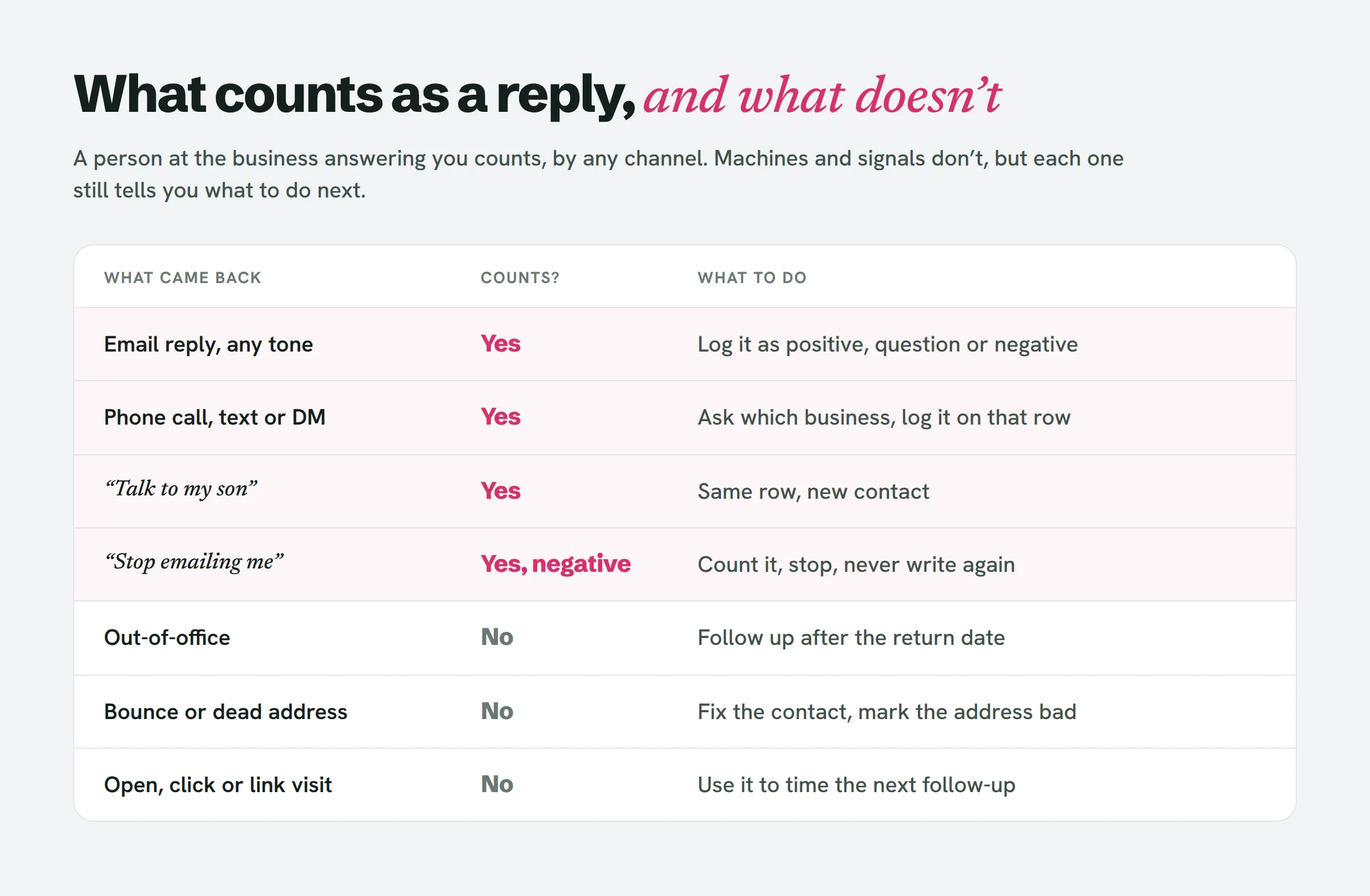
The rule has three parts.
A person answered, by any channel. An email, a call, a text, a DM, or a message through the contact form on your own site all count. A “no thanks” counts too. Reachoutly and Instantly both count negative replies in the reply rate and tag them separately, and you should do the same. A no tells you the email arrived, got read and reached the right person, which is more than silence tells you.
Machines don’t count. Out-of-office messages, delivery receipts and auto-responders are not replies. Reachoutly’s worked example makes this concrete: 18 human replies, 5 out-of-office messages and 2 delivery confirmations from 470 delivered emails is a 3.8% response rate, not 5.3%. Don’t throw the auto-replies away, though. An out-of-office with a return date tells you when to follow up. “This address is no longer monitored” means your contact is wrong, so fix it and log the address as bad, not as a reply.
Signals are not replies. An open, a click, or a visit to the prototype page you built for them might mean interest. It might also mean Apple preloading images, or a security filter checking the link. Use a visit to time your next follow-up. Never add it to the count.
Two local cases need a decision. “Talk to my son, he does the website” is a reply, because a person at the business answered, and the son becomes the contact on the same row. “Unsubscribe” or “stop emailing me” is a negative reply: count it, stop at once, and never write to that address again.
Where local replies arrive, and how to match each one
Counting an off-email reply is easy. Knowing which email caused it is the hard part. The fix is to pick one matching key that shows up in every route a reply can take. For local outreach, that key is the business name.
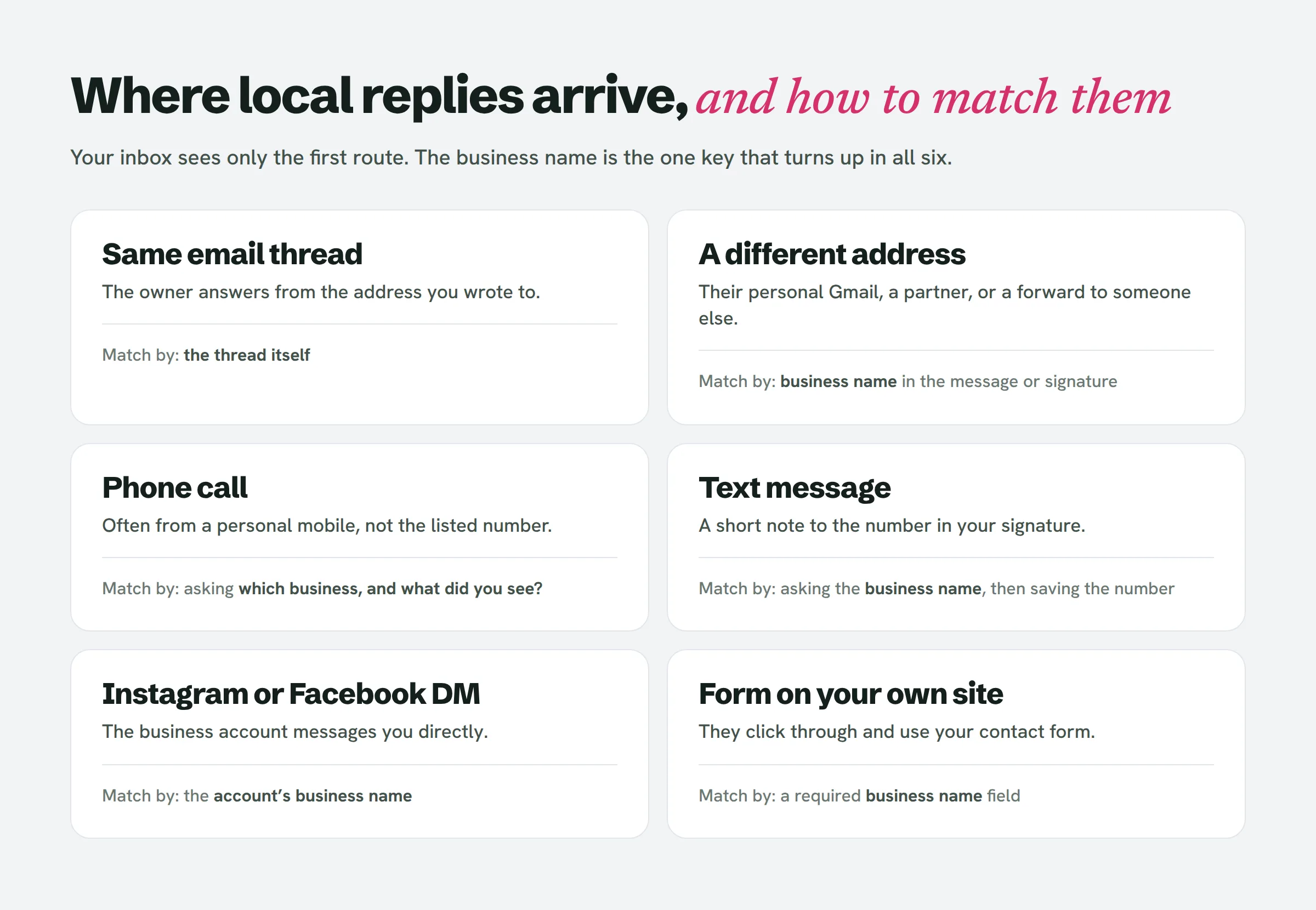
Setting that up takes three small habits:
- Put the business in the link. If you show a prototype, give each one its own address with the business name in it, such as /marios-pizza. An owner who forwards it, or mentions it on the phone, is naming their own row.
- Put one phone number in your signature and answer it the same way every time. When an unknown number calls, ask: “Which business are you calling from, and what did you see?” Owners often call from a personal mobile, so the caller’s number won’t match the number on their Google listing. The name will.
- Search the name, not the address. Owners often reply from a personal Gmail account instead of the info@ address you wrote to, or forward your email to a partner who replies. When an unknown sender writes in, search your sheet for the business name in their message or signature before deciding who they are.
Then give each reply to a single email. A simple, defensible rule is credit the last touch. Whatever you sent most recently before the reply gets the credit, whether that was the first email, the second follow-up or a visit in person. It ignores the earlier emails that may have warmed them up, but it’s consistent, and consistency is the point.
Finally, choose a window: how long after your last touch a response still counts. There’s no published figure for local owners. Pick a number that suits your follow-up rhythm, write it at the top of your sheet and don’t change it mid-campaign. A call six weeks later is still worth taking. It just shouldn’t change last month’s rate.
This is the manual version of something tools can do for you. LeadReef deploys a prototype for each business and keeps every lead on one board, so each business name already sits next to its link and its email.
Your cold email reply rate is really two numbers
Once off-email replies are in your sheet, you’ll have two rates, and you should keep both.
- Inbox rate. Email replies from the business, divided by businesses emailed. This is the only number you can compare with published benchmarks, because it’s the only thing the benchmarks measure.
- All-channel rate. Every person who answered, by any route, divided by businesses emailed. This is your real result and the one to plan around.
Keep them apart. If a quarter of your replies come by phone, your all-channel rate will beat any benchmark and make a weak campaign look fine. And a fair comparison is harder than it looks even within the benchmarks. Belkins’ 2026 study divides replies by emails sent and gets 0.45%. Instantly and Reachoutly divide by emails delivered, and Instantly counts a contact once even if they reply twice. Two of these figures can differ because of the maths alone, before anyone’s campaign is better. Our guide on how to pitch a website redesign explains why dividing by people rather than emails is the most useful choice for a solo sender.
A cold email tracker is one row per business
You don’t need software for this. You need a few columns in the sheet you already keep, set up so that off-email replies have somewhere to go:
- Business name, exactly as it appears in the prototype link.
- Last touch and its date, so the credit rule has something to point at.
- Reply channel: email, call, text, DM, form, in person.
- Reply type: positive, question, negative, wrong person, referred on.
- Machine response, kept apart: out-of-office with a return date, bad address.
That’s the whole system. It works because every reply, however it arrives, lands on one row, and the row already knows what you last sent.
Lead source tracking for a team of one
Big sales teams spend real money on lead source tracking to work out which channel created a lead. You have a simpler version of the same problem, and a better tool: you can ask. The question local businesses put on their own forms, “How did you hear about us?”, works in reverse for you. When someone gets in touch, ask what they saw. “The email about the menu page” tells you the channel and which opening line worked, in one sentence.
Log the answer in their words. After twenty replies you’ll know which problems make owners pick up the phone, and that’s worth more than any open rate.
People also ask
What is a reply in an email?
In cold outreach, a reply is a person answering your message. Most tools only count answers that come back to your inbox, and they exclude out-of-office messages and bounces. When you pitch local businesses, count a person answering by any route, including a phone call or text, and keep automated responses separate.
What’s a good reply rate for cold email?
Only compare your inbox rate with benchmarks, since that’s all they measure. Published figures range from Belkins’ 0.45% per email sent to 5–10% on well-targeted campaigns in Instantly’s data. Check whether a figure is per email sent, per email delivered or per person before comparing it with yours.
Will the recipient know I’m using MailTrack?
A tracking pixel is invisible in the email, but it isn’t reliable. Apple Mail preloads images and records opens nobody made, and tracked links can hurt deliverability. For a hand-sent pitch to a local business, a reply or a phone call is the only signal worth counting, and neither needs a tracker.
What are examples of lead sources?
For a freelancer, two things together make the source of a lead: the list the business came from, and the opening line that got the response. Record both on the business’s row so you can see which list and which line produce replies.
The short version
Your tools only see replies that land in your inbox. Local owners often answer by phone, from another address or through a friend. Write your reply rule down before you send: a person answering by any channel counts, machines don’t, and signals like opens and link visits never do. Use the business name as the matching key, put it in every prototype link and ask for it on every call. Give the credit to your last touch, and keep your inbox rate and your all-channel rate side by side.
If you want a list where every business already comes with a visible website problem to write about, LeadReef gives you your first 10 leads completely free. Pick from 10 business types and 10 locations in any combination, and each lead comes with its website problems flagged and contacts attached. Paid plans open up every business type worldwide, in any combination.