
How to Tell If a Website Is Outdated: Five Signs You Can Check From a Phone in 60 Seconds
A short, ordered sequence anyone can run against a stranger’s site straight from a phone — and, for each one, the trap that fools it.

Nearly every piece on how to tell if a website is outdated speaks to the person who runs the site. It probes your bounce rate, how painful your CMS is to edit, whether the branding still fits the company. Fair questions — when the site is yours. But a freelancer sizing up a lead has access to none of it. All you hold is a company name, a link, a phone in your palm, and roughly sixty seconds before the next listing calls.
Here is the version built for them: five sequential checks anyone can run on another person’s site from a phone, without any tooling or accounts. Each ships with the trap that can mislead it, because a test you can’t rely on is worse than skipping the test entirely.
Why a phone, and why sixty seconds
There are two reasons, and neither has anything to do with convenience.
First, the phone is where the company’s customers actually are. Nobody typing “plumber near me” at 7pm is sitting at a desktop. If the site breaks, it breaks there — so that is where you put it to the test, and a defect you caught on the very screen the customer uses is far harder for an owner to shrug off.
Second, the clock is a filter rather than a corner cut. When a flaw needs ten minutes and a speed-testing tool to surface, a browsing customer never trips over it and the owner never feels it. The flaws worth raising are the ones that show up inside that first minute, because those are the ones bleeding calls today.
Run every check over mobile data, never Wi-Fi. Your home line is quicker than what most of the company’s customers get, and it will paper over the very first item on this list.
The five signs of a bad website you can check from a phone
Kick off a timer the moment you tap the link. Grab a screenshot of every failure as you hit it — that screenshot becomes your proof afterward, and you will never recall which of forty sites had the busted form.
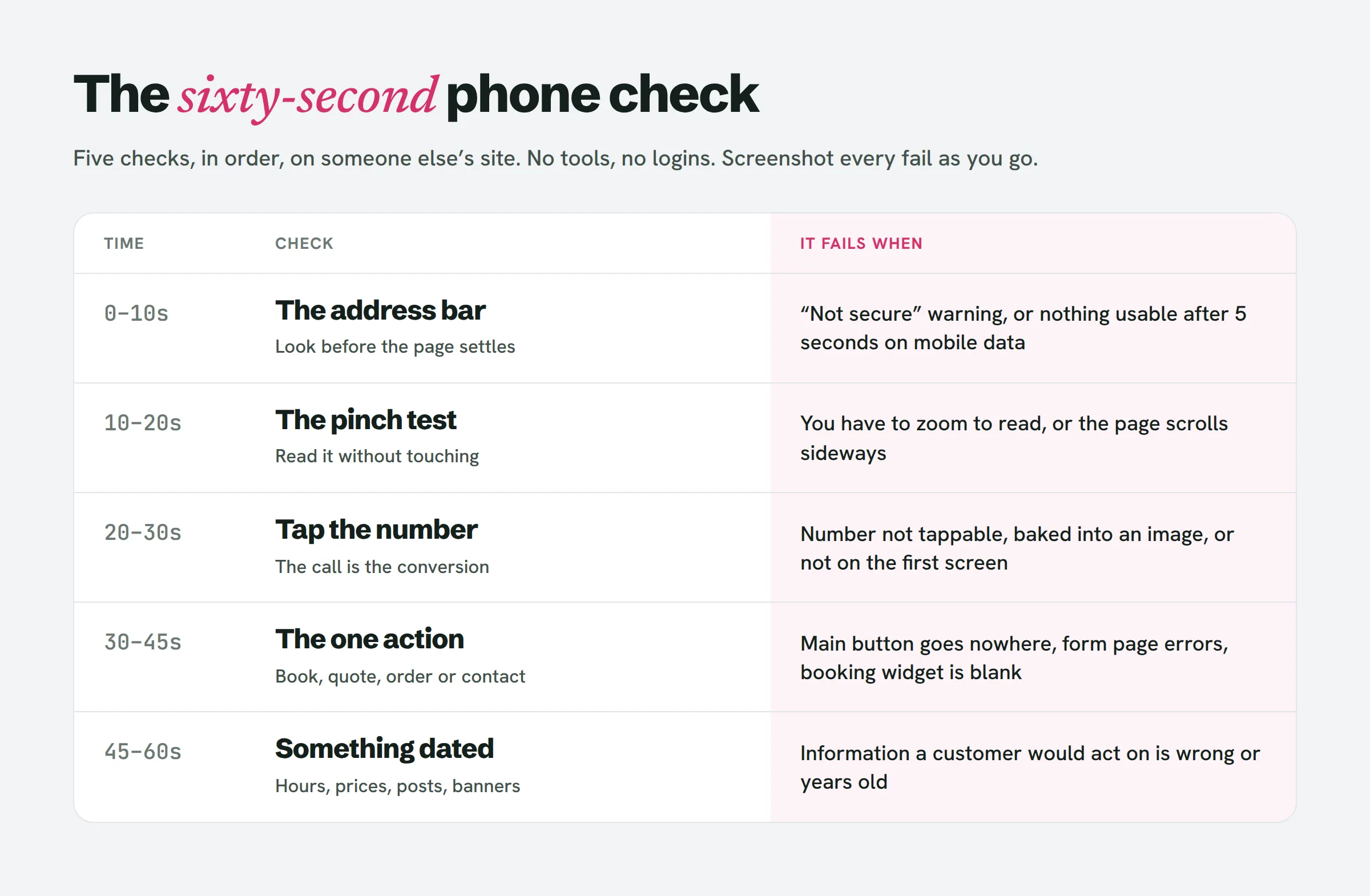
1 · The address bar (0–10 seconds)
Two signals land before the page has even finished drawing. Does the browser flag “Not secure” beside the URL? And on mobile data, does anything usable show up inside roughly five seconds?
Fail: a “Not secure” warning, or a blank or half-rendered page once your timer crosses five seconds.
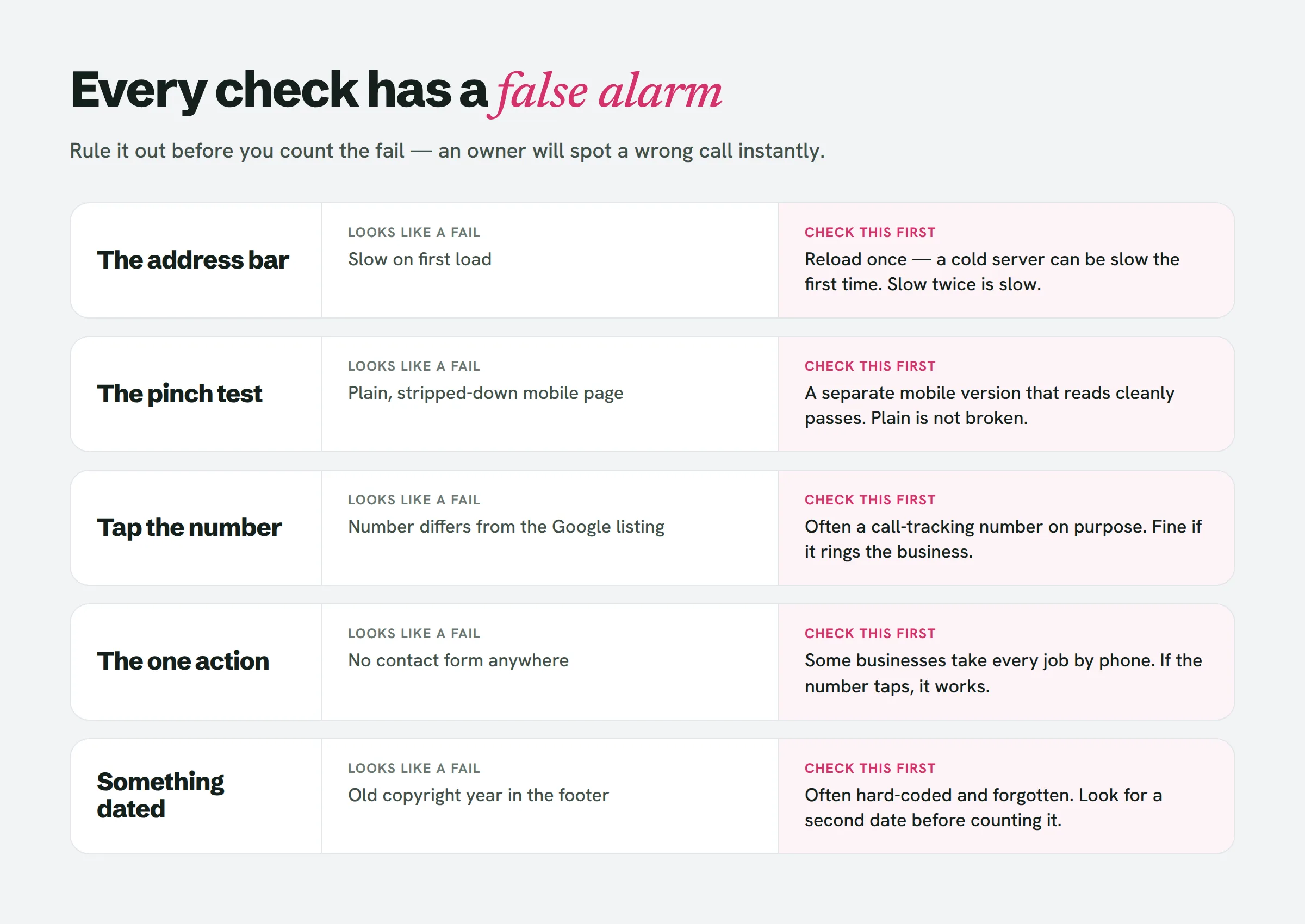
The false alarm: the homepage may be secure while the contact page isn’t, or vice versa. Test the page where a customer would enter their details, not merely the front door. And when a site drags, reload it once — a cold server can lag on the first request and behave on the second. Slow both times is genuinely slow.
2 · The pinch test: how to check if a website is mobile friendly (10–20 seconds)
Keep your hands still and simply read. Is the body copy legible without zooming? Does any element spill past the right edge of the screen, so the page shudders sideways as you scroll?
Fail: you need to pinch before you can read, or the page slides sideways.
The false alarm: a handful of older sites serve a distinct mobile build — the URL shifts to something like m.example.com. It might look bare, but if it reads cleanly, it passes. Plain isn’t the same as broken. This is likewise the honest reply to the mobile-friendly question now that Google retired its Mobile-Friendly Test in December 2023: pull it up on a phone and try to read it.
3 · Tap the phone number (20–30 seconds)
At most local businesses, the phone call is the conversion. Locate the number and tap it. Does your phone offer to place the call?
Fail: the number won’t respond to a tap, it’s embedded inside an image, or there’s no number at all on the first screen.
The false alarm: resist lining the number up against the Google listing and branding a mismatch an error. Plenty of businesses run a call-tracking number on the site on purpose, so they can see which calls it drove. Two separate numbers that both reach the business are perfectly fine. A number you can’t tap is not.
4 · The one action (30–45 seconds)
Every local business site exists to do a single thing: book, quote, order, or call. Spot the main button and tap it. Does it take you somewhere that functions — a form that loads, a booking page that opens, a menu that’s genuinely present?
Fail: the button leads nowhere, the form page throws an error, the booking widget is empty, or there’s no clear action anywhere.
The false alarm: some businesses handle everything by phone by design, so no form exists to hunt for. That’s a decision, not a defect — if check 3 passed, the action works. And never fire off a bogus enquiry to probe a form. Confirming the form page loads and the fields render is plenty; stuffing a real business’s inbox with test messages is exactly how you get your email address blocked before you’ve pitched a thing.
5 · Something with a date on it (45–60 seconds)
Scroll all the way down and hunt for anything that pins the page to a moment: the copyright year, opening hours citing a holiday two years past, a “we’re open during COVID” banner, a price list, a most-recent post from 2021, an events page holding nothing but past events.
Fail: details a customer would act on are plainly wrong or years stale.
The false alarm: the footer year is the flimsiest signal in the set. Loads of well-maintained sites carry a hard-coded year no one bothered to update, and loads of abandoned ones spit out the current year on their own. Read the footer as a hint and go looking for a second date. Wrong opening hours cost the business a wasted trip and a sour review. A stale footer costs it nothing.
Pitch or skip: when an outdated website is worth a pitch
A single failure is just noise. Every site has one. Two failures off the list above, on a business with a genuine review history, is a prospect. Three or more is a business shedding customers right now without realizing it.
The principle beneath all five checks never changes: judge on what breaks for a customer, not on what rubs you the wrong way. That’s exactly where most outdated website lists stumble — they burn half their word count on fonts, stock photography and gradients. Those are matters of taste. An owner is free to disagree with your taste. What they can’t argue with is a screenshot of their own contact form throwing an error.
That same distinction is why the no-website list and the bad-website list act so differently as sources of leads. We walked through that divide — along with the wider set of signals worth checking at a desk — in how to find local businesses without a website.
What the minute does not tell you
Be candid about the boundaries, because the owner certainly will be.
A minute reveals nothing about search rankings, traffic or whether the site actually pulls in work. Don’t pretend otherwise. It also can’t confirm the business is still trading — scan the review dates on the listing before you pitch a place that shut its doors in the spring.
What it does reveal, dependably, is what a customer on a phone actually meets. That’s enough to decide who earns a pitch, and enough evidence to start one.
Running this across twenty businesses is an agreeable half hour. Running it across every roofer in a metro is a week — and that is precisely the part LeadReef automates: it sweeps a city, marks what fails on each site and bundles in the contact details.
People also ask
How do I know if a website is bad?
Load it on a phone over mobile data and attempt what a customer would: read the page, place a call, and use the main button. If two of those break down, or you see a “Not secure” warning, the site is shedding customers.
Is it possible to tell when a website was last updated?
Not precisely, from the outside. Hunt for dated content — hours, prices, blog posts, events — instead of the footer year, which is frequently hard-coded or produced automatically.
How to find an outdated website?
Grab a list of local businesses that have a website link on Google Maps for one trade in one city, then run the five checks above against each. Hold on to any with two or more fails.
Is there a way to tell how old a website is?
The design offers loose hints, but age isn’t the issue — breakage is. A five-year-old site that loads quickly and works on a phone isn’t your prospect.
What makes a poorly designed website?
For a local business: a phone number that won’t respond to a tap, text you can’t read without zooming, a main button that leads nowhere, and details that are out of date. Visual style counts for far less than any of those.
Start with ten
Choose a single trade in your city. Pull ten sites. Spend the minute on each, screenshot the fails and hold on to the ones with two or more. By lunchtime you’ll have a tight list and a folder of proof, and every pitch will open with something the owner can verify for themselves. Once you’ve got the failures, there’s a first line for each one.
If you’d sooner begin with the list already assembled, LeadReef gives you your first 10 leads completely free — choose from any of 10 business types and 10 locations, and each lead arrives with its weak spots flagged and contacts attached. Paid plans unlock every business type worldwide, in any combination.