
How to Tell What Platform a Website Is Built On, and What It Says About Whether the Owner Will Pay
The platform is only half the answer. The other half is what it says about the person who owns the site. Has this owner ever paid for a website? Is anyone being paid to look after it now?
Knowing how to tell what platform a website is built on takes about two minutes. Every guide on page 1 stops there: it tells you the site runs on Wix or WordPress, and that’s the end of it.
If you sell websites to local businesses, the platform is only half the answer. The other half is what it says about the person who owns the site. Has this owner ever paid for a website? Is anyone being paid to look after it now? Those two questions decide whether a redesign pitch lands. The platform, and the state it’s in, answers both.
This guide covers the quick check first, then how to read what you find.
How to tell what platform a website is built on in two minutes
You don’t need to be a developer. Work through these in order and stop as soon as one gives you an answer.
- Read the address bar. A free Wix site lives at
name.wixsite.com/site. That alone tells you the platform and the plan. - Scroll to the footer. Look for “Powered by”, a builder’s banner, or a “Website by” credit naming a designer or agency.
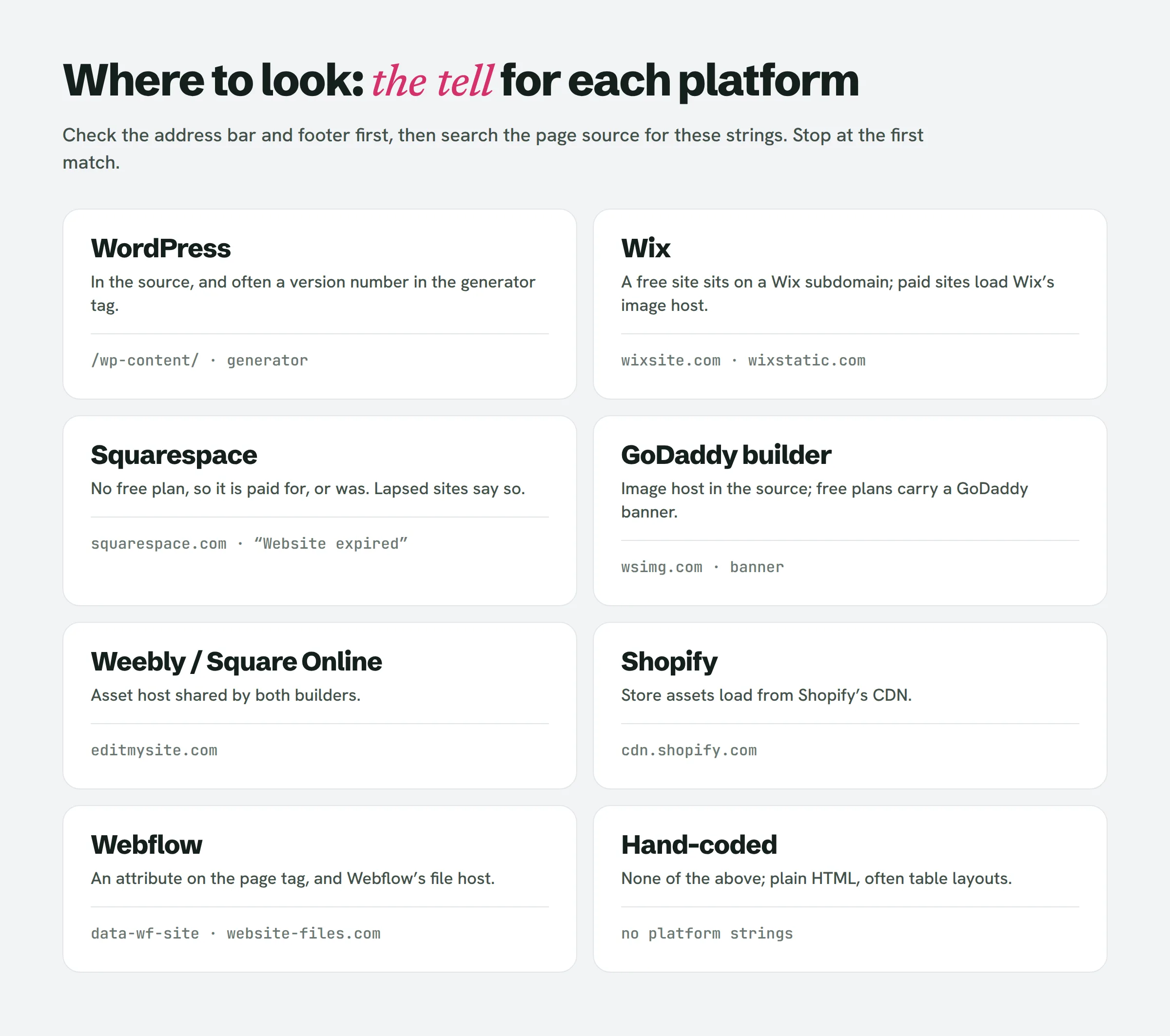
- View the page source. On a laptop, press Ctrl+U (Cmd+Option+U on a Mac), then search the page (Ctrl+F) for the strings in the table below.
- Use a lookup tool. BuiltWith or the free Wappalyzer browser extension will name the platform in one click. Both are useful, but both occasionally guess wrong on sites behind a CDN, so treat them as a second opinion.
| Platform | What to search the source for |
|---|---|
| WordPress | /wp-content/, and <meta name="generator" content="WordPress x.y"> |
| Wix | wixstatic.com, or a wixsite.com address |
| Squarespace | squarespace.com (usually static1.squarespace.com) |
| GoDaddy builder | wsimg.com |
| Weebly / Square Online | editmysite.com |
| Shopify | cdn.shopify.com |
| Webflow | data-wf-site or website-files.com |
If none of these appear and the source is plain HTML with old table layouts, it’s probably a hand-coded site.
How to check if a website is WordPress
Search the source for wp-content. If it’s there, the site runs on WordPress. Then search for generator. Many WordPress sites still print their core version in a meta tag, for example WordPress 5.8. Compare that number with the current release on wordpress.org’s releases page, which states that only the latest branch is actively maintained. A site several major versions behind hasn’t had anyone logged in to update it in a long time. That single line is one of the most useful things you’ll find, and no ranking guide explains what it means.
How to tell if a website is Wix or Squarespace
Wix is easy: a wixsite.com address, or wixstatic.com all over the source. Squarespace has no free plan, so every Squarespace site you see is paid for, or has been. If a Squarespace subscription or trial lapses, visitors see a page that says “Website expired”.
What the platform says about whether the owner will pay
Here is the part page 1 skips. We read eight pages that rank for these searches: Computan, Minima Designs, Liquid Web, OSTraining, The WP Guy, DitLead, Jess Creatives and Omnyra. All eight explain how to detect a platform or compare builders for an owner. None of them reads the result as evidence about the owner’s budget. DitLead comes closest, calling technology data “one of the highest-intent B2B signals”, but it’s written for software sales teams, not for someone pitching a dentist.
To read a local business site, ask two questions:
- Has this owner ever paid for a website? Someone who paid once already believes a website is worth money. You don’t have to sell them the idea.
- Is anyone being paid to look after it now? If someone is, you’re competing with a relationship. If nobody is, the owner is on their own with a site they can’t change.
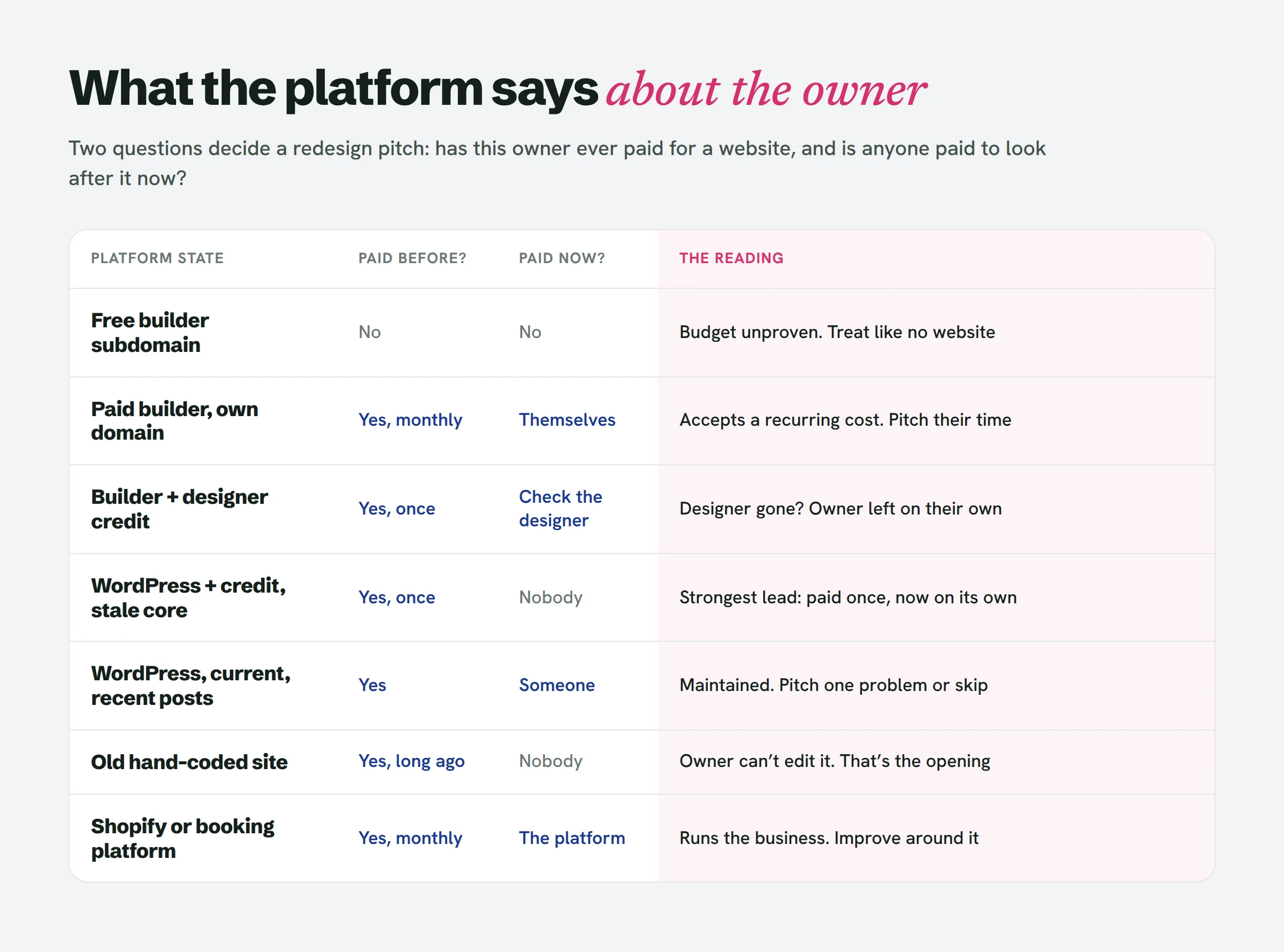
Each platform state answers those two questions differently.
Free builder subdomain (name.wixsite.com, a GoDaddy banner on a free plan). The owner has never paid, not even for a domain. Wix needs a paid plan to connect a custom domain and remove its ads, and GoDaddy’s free plan keeps its banner until you upgrade. Treat these like businesses with no website. They’re real leads, but budget is unproven, so start with a small, cheap offer.
Paid builder, own domain, no designer credit. The owner pays every month. Jess Creatives lists Wix’s Light plan at $17 a month billed annually, and Omnyra puts entry plans in the high teens. So the owner already accepts that a website is a recurring cost. They chose to build it themselves, though, so the pitch is about their time rather than technology. Don’t criticise the platform they picked. It was their decision, and attacking it puts them on the defensive.
Builder site with a “Website by” credit. The owner paid a designer to build on a builder. Before you pitch, open the designer’s own site. If it’s still active, the owner may have someone to call and you’re the second opinion. If the designer’s site is dead or the domain has lapsed, the client has been left without support, which is a better opening.
WordPress with a designer credit and an old core version. This is usually the strongest lead on the list. The owner paid a real sum once, since a designer-built WordPress site costs more than a builder subscription. The stale version shows that nobody has been paid to maintain it since. So the budget has been proven, and nobody is looking after the site.
WordPress on a current version with recent posts. Someone is maintaining it, whether the owner, a family member or a paid retainer. Skip it, or pitch one specific problem rather than a rebuild.
Old hand-coded site. Someone was paid to write it years ago, probably someone who has since moved on. The owner almost certainly can’t change their own opening hours. That’s a pain they feel every time something changes, and it gives your pitch its opening.
Shopify, or a booking or ordering platform. This is operational software, not a brochure site. Orders, bookings and payments run through it, so replacing it is a big risk for the owner. Pitch improvements around it, not a replacement.
A caution: nobody has published close rates by platform. This is a reading of what each state proves about past spending, not a measured ranking. It tells you where to start, not who will buy.
What is this website built with? Using the answer to choose who to pitch first
Put the readings in order and you have a pitch order for a list:
- WordPress with a designer credit and a stale core version
- Old hand-coded site the owner can’t edit
- Builder site whose credited designer has disappeared
- Paid do-it-yourself builder site
- Free builder subdomain
- Anything clearly maintained, commerce platforms included: pitch narrowly or skip
Checking the platform takes a couple of minutes a site, which adds up across a fifty-business list. LeadReef does the first pass for you: it sweeps a city and flags each site’s weak spots, so you only read platforms on the leads worth a closer look. Your first 10 leads are free.
Two more signals shift the order. A business on Google Maps whose website link is dead may be one of the owners who used Google’s free Business Profile sites. Google switched those off in March 2024 and stopped redirecting them to the profile on 10 June 2024. And a Squarespace “Website expired” page means the owner stopped paying. Before pitching either, check the business is still trading.
What the platform does not tell you
The platform tells you about spending. It doesn’t tell you whether the site is failing. A tidy Squarespace site that loads fast and has a working call button doesn’t need you, whatever it runs on. Run the platform check together with the sixty-second phone check from our guide on how to tell if a website is outdated: the platform shows whether there’s money, and the phone check shows whether there’s a problem. You need both before you write.
It doesn’t tell you how hard switching will be, either. Omnyra notes there is “no export to standard hosting” for Wix, and that GoDaddy’s builder sites “aren’t portable”, so a move off either means a rebuild. That affects your quote and the owner’s objections. Our article on web design client objections covers what to say to “I’m on Wix for another year”.
People also ask
How can I check the platform of a website?
Check the address bar and footer first, then view the page source and search for platform strings such as wp-content (WordPress), wixstatic (Wix) or squarespace (Squarespace). If you’d rather not read code, a lookup tool like BuiltWith or the Wappalyzer extension will name it in one click.
How to tell what CMS a website is built on?
View the source and look for the CMS’s file paths or a generator meta tag. WordPress, for example, often prints its name and version there. Lookup tools read the same clues automatically.
How can I tell if a website is Shopify or WordPress?
Search the source. cdn.shopify.com means Shopify; /wp-content/ means WordPress. A store running WooCommerce shows both WordPress paths and WooCommerce files, so it’s WordPress rather than Shopify.
Is WordPress outdated in 2026?
No. It’s still actively released, and wordpress.org lists a current version. What’s often outdated is an individual WordPress site: if its generator tag shows a version several major releases behind, nobody has updated it in a long time. For a designer, that’s a signal worth noting.
What is the downside to Wix?
For an owner, the main downside is lock-in. Sites built in the Wix Editor can’t be exported and hosted elsewhere, so moving means rebuilding. For a designer pitching that owner, it means any redesign is a rebuild, and you should price it as one.
What Chrome extension can I use to check the technology used by a website?
Wappalyzer and BuiltWith both have free Chrome extensions that show a site’s platform, analytics and hosting in one click.
The short version
Finding the platform takes two minutes: the address bar, the footer, the page source, or a lookup tool. Then read it. A free subdomain means the owner has never paid. A paid builder means they pay monthly and built it themselves. A designer credit on an out-of-date WordPress site means they paid properly once and nobody has looked after it since. That last one is where to start.
If you want a list of local businesses with their website problems already found, LeadReef gives you your first 10 leads completely free. Pick from 10 business types and 10 locations in any combination, and each lead comes with its weak spots flagged and contacts attached. leadreef.ai/find.