
BuiltWith Lead Generation for Local Web Design Clients: Why the City Filter Misses the Leads You Want
Every guide on page one is written for a software sales team. For a freelancer selling to plumbers, salons and dentists, the same list has four problems — and the biggest one quietly removes the sites you most want to pitch.
BuiltWith lead generation sounds like a shortcut for anyone selling websites. Pick a platform, say Wix or an old version of WordPress, filter to your city, export the list, start pitching. In September 2026 BuiltWith’s own list page for Wix, as it appeared in Google, advertised 8,765,848 current Wix sites. Surely a few hundred of them are in your town and need a redesign.
Every guide on page one is written for a different buyer: a software sales team hunting companies that use a competitor’s product. For a freelancer selling to plumbers, salons and dentists, the same list has four problems. The biggest one is that the city filter quietly removes many of the sites you would most want to pitch.
This guide covers what the tools cost, where the list goes wrong for local work, the free order that works better, and the one situation where paying for a month makes sense.
What BuiltWith lead generation is built for
BuiltWith and Wappalyzer sell technographic data: which technologies a website runs, gathered by crawling the web and reading each site’s code. Their lead lists turn that into “every site using technology X”, with filters for traffic, country, spend and company size, plus contact names and emails where they have them.
That is ideal if you sell an app that plugs into Shopify, or a replacement for a competitor’s live chat widget. The buyer is a company with staff, a job title to email and a technology you can see from outside.
Page one is written for that buyer. We read six of the top results in full: BuiltWith’s own lead generation page, Kinsta’s guide to generating leads with BuiltWith (last updated 2022), a 6,500-word review from ZoomInfo, and three 2025–2026 comparisons of alternatives from Bloomberry, Web Reveal and Miniloop. All six cover features and prices. None looks at a small local business, whether small builder sites show up, or how a city filter decides who is in the city.
BuiltWith pricing for a solo freelancer
The prices below are from the vendors’ own pricing pages in September 2026.
- BuiltWith free: individual site lookups, “free to use for individual site lookups forever”, plus a browser extension.
- BuiltWith Basic, $295/month: list reports limited to two technologies, and you can upload up to 2,000 of your own domains a month to have them analysed.
- BuiltWith Pro, $495/month: unlimited technologies. Team is $995/month.
- Wappalyzer free: 50 lookups and 50 email verifications a month, plus free sample lead lists.
- Wappalyzer Pro, $250/month: two lead list technology targets and 5,000 lookups.
BuiltWith is unusually honest about one-off use. Its plans page says you can sign up for Basic, get the report you want and cancel. So the realistic question isn’t whether you can afford a subscription. It’s whether one paid month produces enough leads you will actually work to justify it.
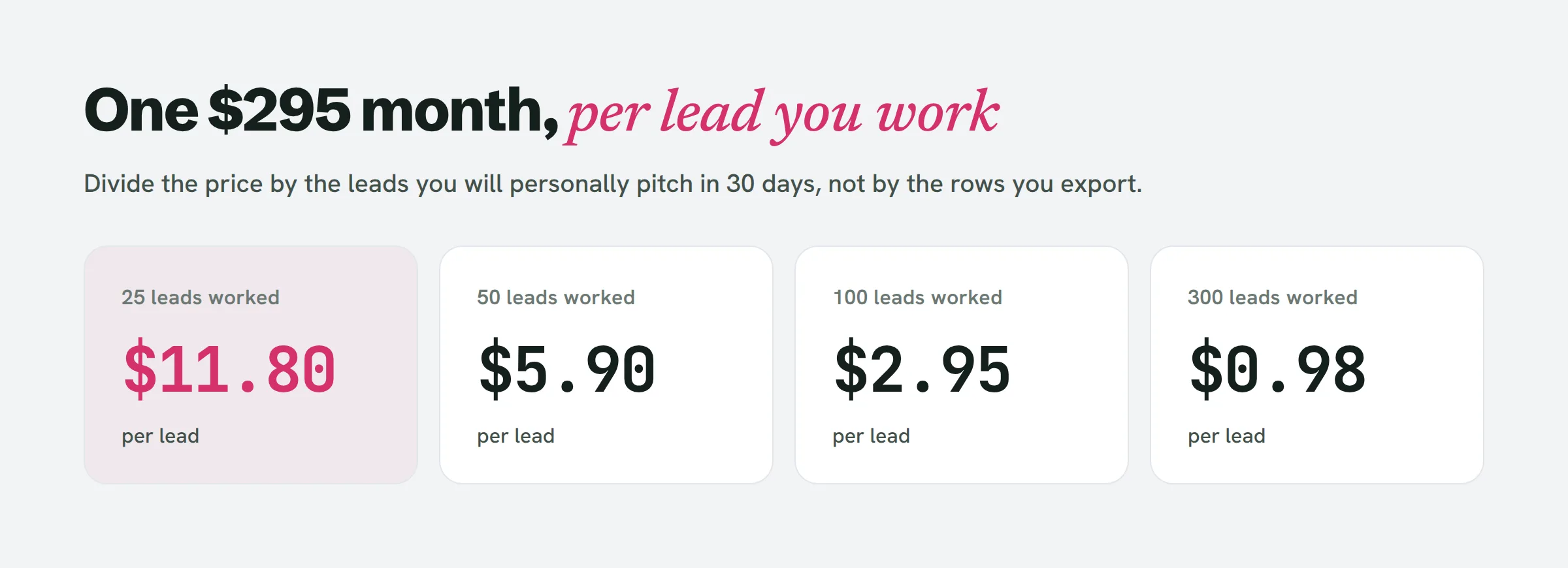
The number that matters is the leads you work, not the rows you export. A solo designer who writes a personal pitch and builds a prototype for each prospect gets through a few dozen a month, not a few thousand.
Four ways technographic data goes wrong for local clients
1. The city filter depends on an address the site publishes
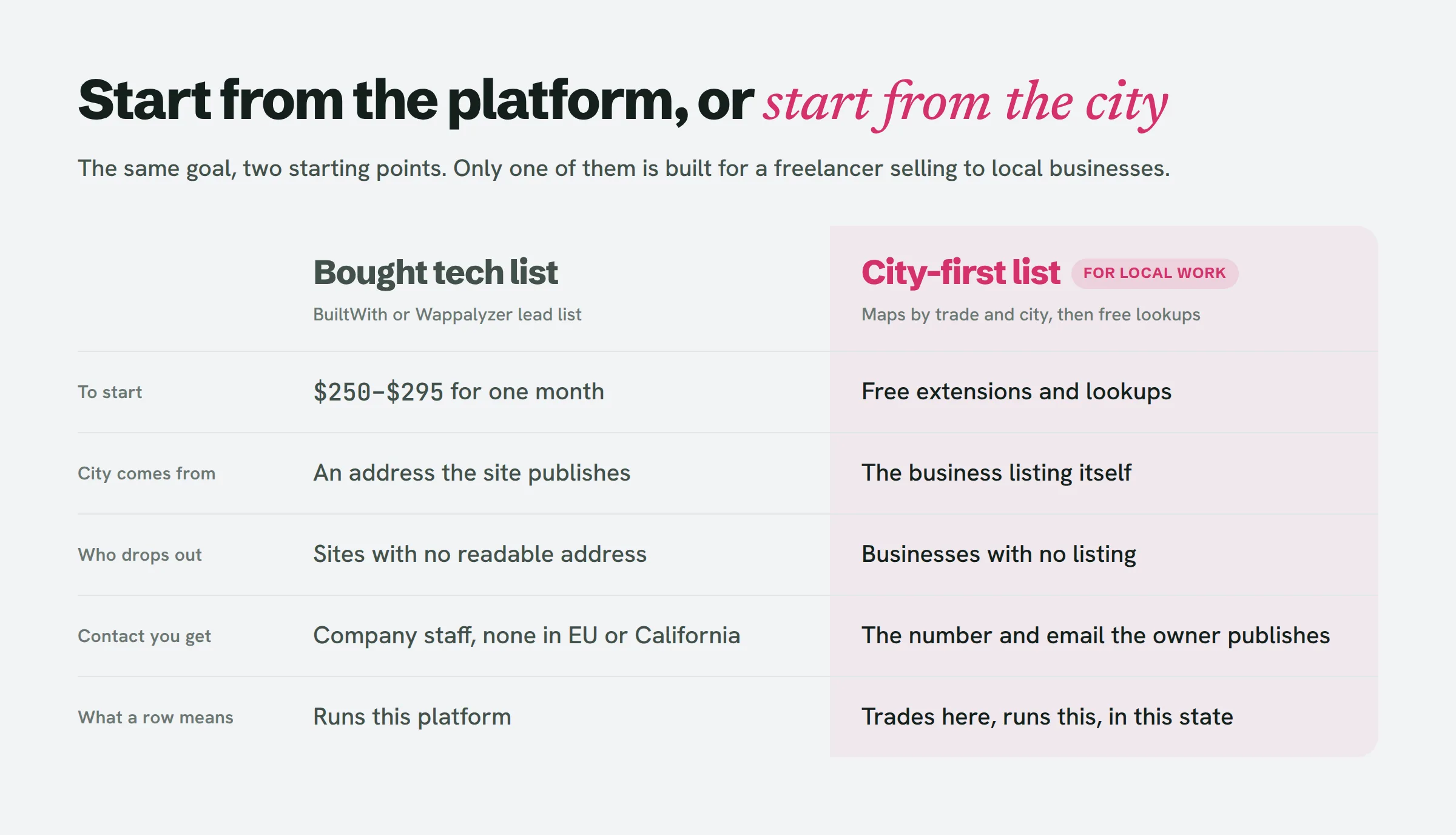
BuiltWith’s knowledge base explains how location is decided: “For all sites in our database we attempt to find a verifiable address on the website. If we cannot find an address that we can validate we will not add address information to that lead.” Business location is “based on the physical location of the business and not the web server location.”
That is sensible for a data company. For you, it means a site with no readable address never makes it into a city-filtered list. A business site with no address on it is often a neglected one: a one-page builder site with a phone number, an old site where the contact page broke, a site made by a nephew who never added the footer. Those are exactly the sites a redesign would fix. A city filter doesn’t sample the local market evenly. It favours the businesses whose sites were built properly.
Wappalyzer’s lead list page offers location among its filters but doesn’t say how location is worked out or how fine-grained it gets.
2. It is a platform list, not a need list
“Every Wix site in Denver” includes the florist with a well-kept Wix site she pays for every year, and the restaurant whose site is a template nobody has touched. Platform alone says very little. What matters is the platform plus the state it is in: a free subdomain, a designer credit in the footer, a WordPress core that is years behind. Reading those takes a look at each site.
A list of 400 Wix sites is not 400 leads. It is 400 sites you still have to open.
3. The contacts are for companies with staff
The lists attach names, titles and emails because their buyers email the head of marketing or the IT manager. A local business with four employees has no such person. The one you need is the owner, and the owner’s direct email is rarely in a technographic database. BuiltWith also says it does not provide personal information for people in the EU or California, for GDPR and CCPA reasons. You’ll often end up with the business’s info@ address, which you could have copied off the site yourself.
4. The data lags the site
Detection databases are refreshed on a crawl schedule, not live. Web Reveal’s comparison gives the example of a site that moved from WordPress to Webflow three weeks earlier and still showed as WordPress in a database lookup. For B2B sellers that is a rounding error. For you, pitching a “rebuild off your old WordPress” to someone who relaunched last month is a first email you can’t recover from.
The BuiltWith free alternative: city first, platform second
The fix is to reverse the order. Build the list the way a customer would find these businesses, then use the free lookups to add the platform.
- Pick one trade and one city. “Dentists in Boise”, not “all Wix sites in Idaho”. A trade gives you one pitch that works across the list.
- Pull the list from Google Maps. Every business with a listing has a city by definition, whether or not its site has an address. The method, including how to check each listing, is in how to find local businesses without a website. Keep the ones that do have a site.
- Add a platform column. Open each site with the free BuiltWith or Wappalyzer extension, or view the source and search for wp-content, wixstatic or squarespace. Thirty sites take roughly half an hour. A free Wappalyzer account covers 50 lookups a month on top of the extension.
- Add a state column next to it. Free subdomain, builder with a designer credit, stale WordPress, maintained. This is the column that ranks the list.
- Sort by state, then work from the top. The sites where nobody seems to be paid to look after anything come first.
At this size a spreadsheet is enough, and every row is a business you know is in your city, in your trade, and running on something you’ve actually seen.
This is also the sweep LeadReef runs for you: it pulls local businesses by trade and city, checks each site, and flags the ones that are quietly losing customers. If you want to see what a ready-made list looks like, the tools comparison at tools to find local businesses to pitch covers how each approach stacks up.
When one paid month is worth it
A bought list earns its $295 in one situation: you already have a pitch that converts for one specific platform, and you intend to work a whole region, not one town.
Two examples. You’ve rebuilt three sites off a discontinued builder and your email for it gets replies. A full list of sites still on that builder, across a state, is worth a month. Or you specialise in one platform and sell migrations off an old version of it, where the version number really is the need.
Before paying, do the division. Take the price and divide it by the number of leads you’ll personally work in the next 30 days, not the number you’ll export. If the answer is more than you’d pay for an hour of your own time, stay with the free order. And if you do buy, remember BuiltWith Basic lets you upload up to 2,000 of your own domains a month. Paying to analyse your city-first list in bulk keeps the location problem out, which is a better use of the month than buying a list.
People also ask
Is BuiltWith free?
Individual lookups are free with no end date, on the website and through the browser extension. Lead lists and bulk reports need a paid plan, starting at $295 a month for Basic. You can take one month and cancel.
Is BuiltWith API free?
No. API access comes with paid plans, and BuiltWith’s plans explainer counts API credits per month (100,000 on the plan that includes them). For a local freelancer checking a few dozen sites, the free lookup or extension is enough.
What are some alternatives to BuiltWith?
Wappalyzer (free extension, 50 free lookups a month, paid lists from $250 a month), WhatRuns and Web Reveal (free lookups), and TechPeeker (paid from $99 a month, according to Bloomberry’s comparison). All of them detect platforms well. None of their public pages explains how a small local site gets a city, so the location problem above applies to any bought list.
How to tell if a website was built with Wix?
Look for a wixsite.com address, or view the source and search for “wixstatic”. The free extensions will also tell you.
How much should you pay for lead generation?
Work it out per lead you’ll actually work, not per row. A $295 month is $11.80 a lead at 25 worked leads and $2.95 at 100. If you’ll only reach a few dozen businesses this month, a free city-first list costs you an evening instead.
Start from the city, not the platform
Technographic data is a good tool pointed at the wrong buyer. For local web design clients, the list you want starts with a place and a trade, and the platform is one column you fill in afterwards. Once you’ve found a site that looks neglected, our guide on how to tell if a website is outdated gives you a 60-second checklist to confirm it before you write a word.
If you’d rather not build that list by hand, LeadReef does it for you: your first 10 leads are free, from 10 business types and 10 locations of your choice, each one checked and flagged for what its site is getting wrong. Find your first client at leadreef.ai/find.