
How to Find the Owner of a Business Before You Pitch It: The Name First, Then the Inbox They Actually Read
Before you hunt for a different address, work out who reads the one you have. At a shop with no front desk, info@ already is the owner. This piece covers that test, where a local owner’s name is actually written, and the ladder from a name to the inbox they read.
You have the business name from a Maps listing, a website with a contact page, and the one address on it is info@. The guides on how to find the owner of a business answer a different question from yours. Half of them are written for a consumer with a complaint or a buyer checking a company’s registration, and they walk you to a Secretary of State search. The other half are written for B2B sales teams and list email-finder tools that assume a corporate domain with forty staff on LinkedIn. Neither tells a freelancer pitching a plumber or a bakery the two things that matter: whether info@ is already the owner, and where the owner’s name is actually written when it is not on the site.
This piece does both, in that order, for a business with somewhere between one and fifteen people. It is not about how to write the pitch (we have covered the opening lines for a redesign separately) or about the rules for cold email (covered in our pieces on whether cold emailing is legal and the CAN-SPAM footer). It is about getting from a business name to a named person and the inbox that person reads.
How to find out who owns a local business starts with who reads info@: the who-reads-it test
The advice to “skip the generic inbox and reach the decision-maker” comes from selling to companies, where info@ is read by whoever is on the front desk rota and the decision-maker is three floors up. At a one-van plumbing business, info@ forwards to the owner’s phone, and the owner reads it between jobs. Treating that address as a gatekeeper to get around is wasted effort, and sometimes worse than wasted: the owner who gets your email at info@ and then sees the same pitch arrive at a personal Gmail they never published knows exactly what you did.
So the first job is not finding a different address. It is working out who reads the one you have. Three shapes cover almost every local business, and each has visible tells.
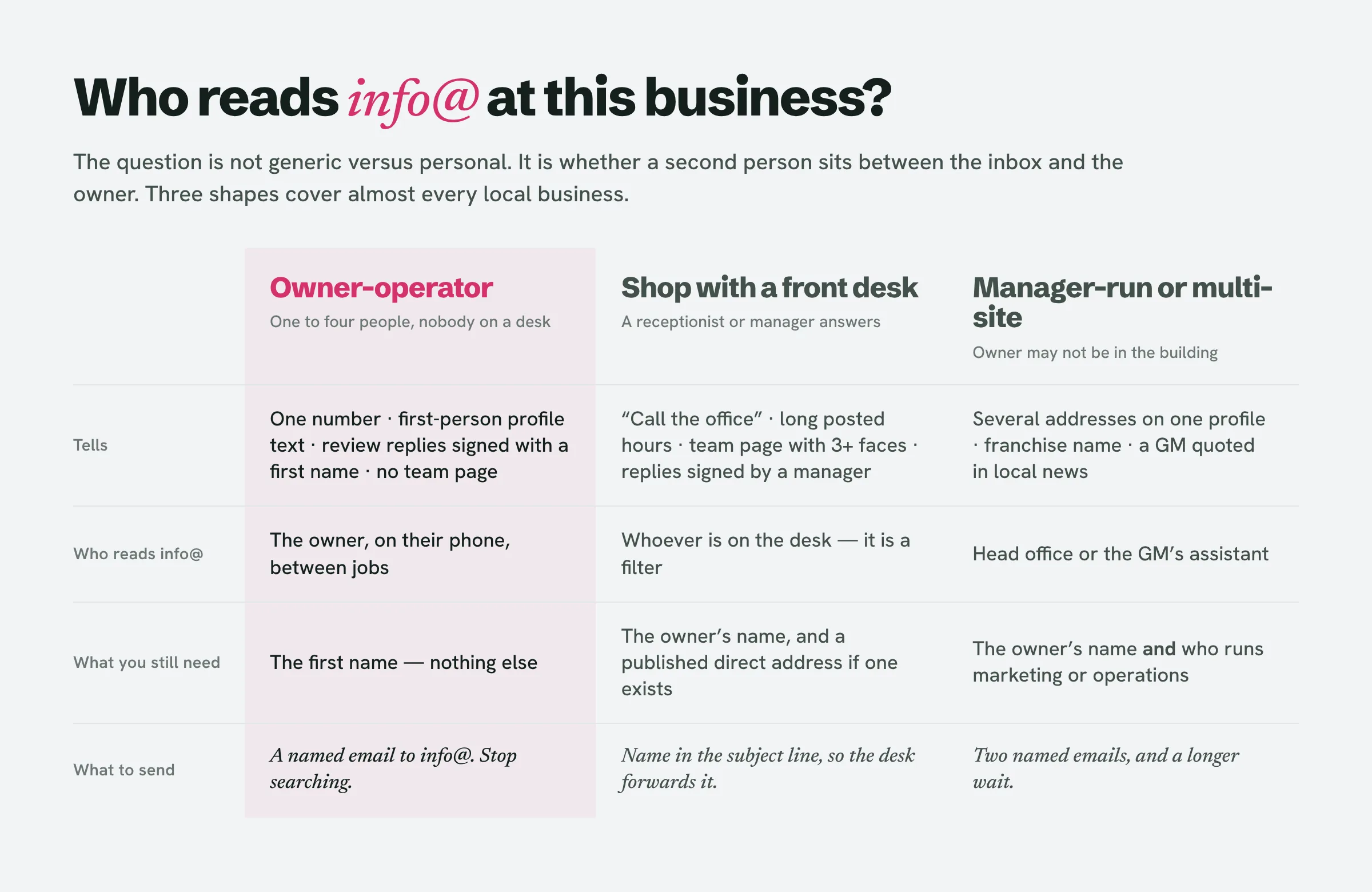
The owner-operator. One phone number, hours that say “by appointment” or match one person’s working day, a Google Business Profile description written in the first person (“I’ve been fixing boilers in Dayton since 2009”), review replies signed with a first name, no staff page. Here info@ is the owner. Do not look for another address. Spend the effort on the name instead, so that the first line of the email is addressed to a person, and on a subject line that reads like it came from a customer rather than a vendor.
The shop with a front desk. A receptionist, an office manager or a shop manager answers the phone and the inbox. Tells: a “call the office” line, posted hours that run longer than any one person works, a team page with three or more faces, review replies signed “the team at” or by a manager’s name, a booking widget. Here info@ is a filter, and a named owner changes the odds: an email with the owner’s name in the subject gets forwarded; “To whom it may concern” gets filed. You want the name, and if you can get it, a direct channel.
The manager-run or multi-location business. Several addresses on one Business Profile, a franchise name, a general manager quoted in local news, a head office elsewhere. The owner may not be in the building and may not be the person who buys a website at all. Find the name, but also find out who runs marketing or operations, because that is often the person who says yes, and expect the decision to take longer.
Spend sixty seconds on the tells before you spend an hour on sources. Most of the businesses you are pitching (the ones whose website nobody has touched in four years) are in the first group.
How to find business owner name when it is not on the website
The ranking pages send you to the Secretary of State first. For a local shop that is the wrong order, because the business you are looking at is often not in there at all, and when it is, the name you find is frequently not the owner’s. Here are the sources in the order they actually pay off for a small local business, with what each one tells you and what it does not.
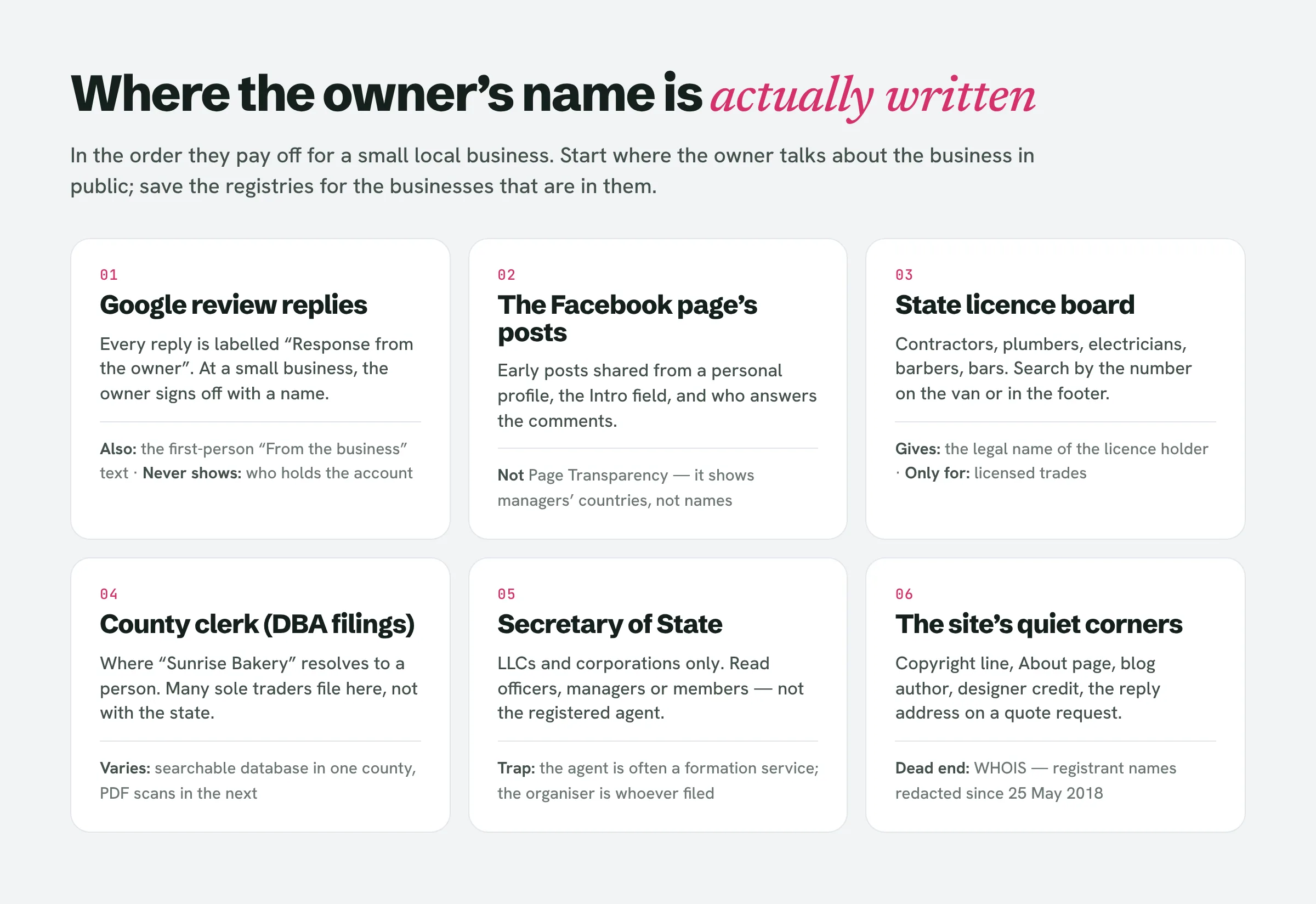
The replies to Google reviews. On a Business Profile, a reply to a review is labelled “Response from the owner”, whoever typed it. At a small business the person who typed it is the owner, and owners sign: “Thanks, Maria — glad the sink held up. Dave.” Read the last ten replies, and the first name is usually there, often with a surname where the owner has replied to a complaint formally. The description under “From the business” is the second place to look, because owners write it in the first person and introduce themselves. Neither tells you who holds the Google account, and there is no public way to see that; the sign-off is what you get, and it is usually enough.
The Facebook page, but not where people expect. The Page Transparency panel is what the forums point to, and it does not give names: it shows when the page was created, earlier names, whether it is running ads and the primary country of the people who manage it. The name is in the content. Early posts on a small business page are often shared from the owner’s personal profile, with the profile linked. The “Intro” and “About” fields frequently say “Owner: ...” or are written as a bio. Comments under posts are answered by a person, not a brand, and the person is tagged. Scroll to the first year of the page and read who is talking.
A state licence board, if the trade is licensed. This is the source none of the guides mention, and for trades it is the best one. Contractors, electricians, plumbers, HVAC installers, barbers and cosmetologists, real-estate agents, and the people serving alcohol are licensed by the state, and the licence records are public and searchable. The California Contractors State License Board lets you search by licence number, business name or the name of the personnel attached to the licence, and the licence number is printed on the van, in the website footer and on the yard sign because the law requires it to be. Most state liquor authorities publish a licence lookup that names the licensee and often the principals behind a bar or restaurant. Cosmetology and barber boards list the licence holder. The person on the licence is usually the owner or the owner’s partner, and it is a legal name rather than a nickname, which matters when you go looking for an email.
The county clerk, for sole proprietors. A business trading under a name that is not the owner’s own name files an assumed-name (DBA, fictitious business name) certificate, and in many states a sole proprietor files it with the county clerk rather than the state. This is where “Sunrise Bakery” resolves to a person. County clerk sites vary from searchable databases to PDF scans, so this is a five-minute job in some counties and a dead end in others, but it covers exactly the businesses the Secretary of State search misses.
The Secretary of State, read correctly. If the business is an LLC or corporation, the state’s business entity search has a record. What the guides do not say is which name on the record to trust. The registered agent is frequently a formation service or a lawyer. The organiser or incorporator can be whoever filed the paperwork. The names you want are under officers, managers or members, which appear on the annual report or statement of information in many states and not in others. The mailing or principal address is often the owner’s, but that is not a contact you should use, which we come to below. Treat the registry as a confirmation of a name you found elsewhere rather than as the place to start.
The site itself, including the bits nobody reads. The copyright line, the About page, a “Meet the team” that has one person on it, the author of the blog’s three posts from 2019, the designer credit in the footer (which tells you who built the site and when, and is a different kind of lead), and the quote-request confirmation email, which often comes from the owner’s actual address rather than info@. One thing to stop doing: WHOIS. Since 25 May 2018 registrant names, addresses and phone numbers in public WHOIS have been redacted under ICANN’s rules, and most registrars add privacy on top. The guides that still list it as a method were written before that.
Two dead ends the ranking pages treat as live. The FinCEN beneficial ownership registry created by the Corporate Transparency Act is not public, and in March 2025 FinCEN exempted US companies and US persons from reporting into it at all, so it will never tell you who owns the bakery. And “Is the CEO the owner?” is a question for a company with a board; at a local business there is no CEO, there is a person whose name is on the licence.
How to find the owner of a Facebook business page, and how to find owner of Google Business account details: what the platforms will and will not show
These two queries get asked separately, and the honest answer is the same for both: the platforms do not expose account ownership, and the methods that claim to are reading content, not account data. Google will never show you which account manages a Business Profile; the “Response from the owner” label appears on every reply regardless of who typed it, so the sign-off is the evidence, and a reply signed by a manager is a tell that there is a front desk. Facebook’s Page Transparency shows location of page managers by country and nothing about who they are; a page’s owner shows up in what the page posts and who is tagged, not in the panel. If you have read the review replies and the first year of posts and there is still no name, the business is probably in the front-desk or manager-run group, and the licence board or county clerk is the next stop.
Find business owner contact info once you have the name: the ladder from name to inbox
Now the part the email-finder articles are built for, and the reason they fail here. Tools like Hunter, Apollo and RocketReach work by finding addresses at a company’s domain: pages across the web that mention [email protected], plus whatever their databases have bought or crawled. A corporate domain with forty staff gives them a pattern (first.last@) and dozens of confirmations. A local business with one domain and one published address gives them info@, which you already had, or nothing. Many owners do not even use the domain for mail: the Business Profile and Facebook page carry a Gmail address, and that is the address the owner reads. So the ladder for a small business is not “guess the pattern and verify”. It is this, in order.
The address the owner already published somewhere else. The email field on the Facebook page is set by whoever set up the page, which at a small business is the owner, and is often a personal Gmail. The same goes for the contact email on Yelp, Nextdoor or the Chamber of Commerce member directory, and for some licence records. Any address you find this way is one the owner chose to publish for the business, which is the only kind you should use.
The address the business sends from. Request a quote through the form, or ask a real question. The reply tells you who answers (owner or front desk) and comes from the address they actually use. One honest enquiry is also the fastest way to run the who-reads-it test.
A guess at the domain, verified before you send. If the business has its own domain and the owner’s first name, try firstname@ and the usual initials, and run them through an email verification tool before sending anything. Many small-business domains are catch-alls, which verifiers report as “accept all” or “risky”, meaning the domain swallows any address and the tool cannot tell you whether a human reads it. Treat a risky result as a no and go back to the published addresses.
The phone number on the listing. At a one-van trade the number on the Business Profile is usually the owner’s mobile, because there is no office line to publish. A carrier or line-type lookup will tell you whether a number is a mobile or a landline, which is useful for deciding whether a short text is even possible. The rules for texting and cold-calling a business owner deserve their own piece and are not this one; the point here is that at an owner-operator, the published number already is the direct line, and nothing needs to be found.
Back to info@, with the name in it. If the ladder gives you nothing, info@ with the owner’s name in the subject and the first line is still a named email, and at a front-desk business a named email gets forwarded. Finding a name and then addressing the email “Hi there” wastes the only thing you found.
Working this ladder by hand, for every business on a list of fifty, is most of an afternoon. It is the step LeadReef’s lead finder does for you: when it flags a local business whose site is losing customers, it attaches the contacts it can find for that business alongside the problems it found on the site, so the pitch starts with a name rather than a search.
Use what the business publishes, not what the registry leaks
A rule that keeps this on the right side of both the law and ordinary decency. The sources above fall into two groups: things the business says about itself in public (its reviews, posts, bio, licence, website) and things the state collects about the person behind it (the home address on a DBA filing, the mailing address in the entity record, the date of birth on a licence). Use the first group to address a person by name and mention something real about the business. Do not use the second group for anything but confirming you have the right name. Nobody wants a pitch that opens by proving you know where they live, and an owner who notices will remember the designer, not the website. For what the law allows once you have the address, read our pieces on whether cold emailing a published address is legal and on the footer a hand-sent pitch needs.
People also ask
How to find the name of a business owner?
Start with the business’s own public voice: the sign-offs on “Response from the owner” replies on Google, the first-person description on the Business Profile, and the early posts and About field on the Facebook page. If the trade is licensed, search the state licence board by the number on the van or website. For a business trading under a name that is not a person’s name, the county clerk’s assumed-name filings usually resolve it. Use the Secretary of State search last, and read the officers or managers, not the registered agent.
How do I get in contact with a business owner?
Work out who reads the published inbox first. At a business with no front desk, info@ or the listed number already reaches the owner; put their name in the first line and you are done. At a business with a desk or a manager, find the name, then look for an address the owner has published elsewhere (the Facebook page’s email field, a directory listing, the reply address on a quote), and fall back to a named email at info@ if none exists.
Is the CEO the owner of a company?
At a company with shareholders and a board, often not; the CEO is an employee. At a local business the question does not arise: there is no CEO, and the owner is the person on the licence, the assumed-name filing or the entity’s list of members or officers. If a local business lists a “CEO” on its website, read it as a title the owner gave themselves.
How to get business contact details?
The published ones are on the Google Business Profile, the website’s contact page and the Facebook page, and for a small business that is usually one email and one phone number. Paid email-finder tools add little for a business with a single domain and a single address, because they work from patterns and crawled mentions of addresses at the domain, and a small business gives them neither. Bought “business owner” lists are built for volume and rarely include the one-person trades you want.
Find the business first, then the owner
Everything above assumes you already know which business to pitch. The slower job sits in front of it: finding the local businesses in a city whose website is quietly losing them customers, and checking each one before you spend an hour on its owner’s name. LeadReef does that first part. It scans a city, flags the sites with problems a customer would hit, attaches the contacts it finds, builds a prototype redesign and drafts the pitch for you to finish and sign. The first 10 leads are free, from any of 10 business types in any of 10 locations, at leadreef.ai/find. Then address the email to a person.