
CAN-SPAM Physical Address and Opt-Out When You Cold Email From Your Kitchen: The Footer for a Hand-Sent Pitch
A freelancer hand-sending pitches from home has two questions the compliance guides never answer: does the CAN-SPAM physical address have to be your home, and is “reply no and I’ll stop” a lawful opt-out? This is the statute, the FTC’s rule and the Postal Service’s rules read for a solo sender, ending in a three-line footer.
The compliance guides agree on the list. A commercial email in the United States needs an honest header and subject line, a line saying it is an ad, a way to opt out, and a valid postal address. What they never do is answer the two questions a freelancer sending pitches from a laptop at the kitchen table actually has. The CAN-SPAM physical address: does it have to be your home, and if not, what else counts? And the opt-out: is a sentence saying “reply no and I’ll stop” enough, when every example they show is a grey unsubscribe link generated by marketing software you do not use? This is the practical kit for a solo sender. It is not legal advice; it is the statute, the FTC’s rule and the Postal Service’s own rules read for your situation, so that you can take a specific question to a lawyer if you need one.
Who is subject to CAN-SPAM? One pitch typed by hand, from Gmail, to one plumber
Start with the thing the guides half-say and then undercut. The FTC’s compliance guide is blunt: “Despite its name, the CAN-SPAM Act doesn’t apply just to bulk email. It covers all commercial messages,” and “The law makes no exception for business-to-business email.” Whether a message is commercial is a primary-purpose test, and an email whose purpose is to sell a website redesign is commercial by any reading. The fact that you typed it yourself, personalised it, and sent it from a plain Gmail account does not take it outside the Act. There is no volume threshold in the statute.
What people are confusing this with is Google’s own bulk-sender rules, which require one-click unsubscribe headers and authenticated domains from anyone sending around 5,000 messages a day to Gmail users. Those are a mailbox provider’s conditions for delivery, not law, and they do not apply to you, as our piece on why Gmail pitches land in spam spells out. The law applies to you. The bulk-sender rules do not. Keep the two apart, because the rest of this article is about what the law wants from a sender who has none of the machinery the bulk rules assume.
Under 15 U.S.C. § 7704(a)(5)(A), every commercial message has to carry three things: “clear and conspicuous identification that the message is an advertisement or solicitation”, “clear and conspicuous notice of the opportunity” to decline further email, and “a valid physical postal address of the sender.” The header information has to be accurate and the subject line honest. That is the whole content checklist. The two items that cause the trouble at home are the address and the mechanism.
The CAN-SPAM physical address when your office is your kitchen: street, PO box or private mailbox
The FTC’s rule defines the term. Under 16 C.F.R. § 316.2(p), a valid physical postal address is the sender’s current street address, “a Post Office box the sender has accurately registered with the United States Postal Service”, or “a private mailbox the sender has accurately registered with a commercial mail receiving agency that is established pursuant to United States Postal Service regulations.” Three forms, and the ranking pages all list them. None of them tells you which to pick, and the pick is the whole question when the only street address you have is where you sleep.
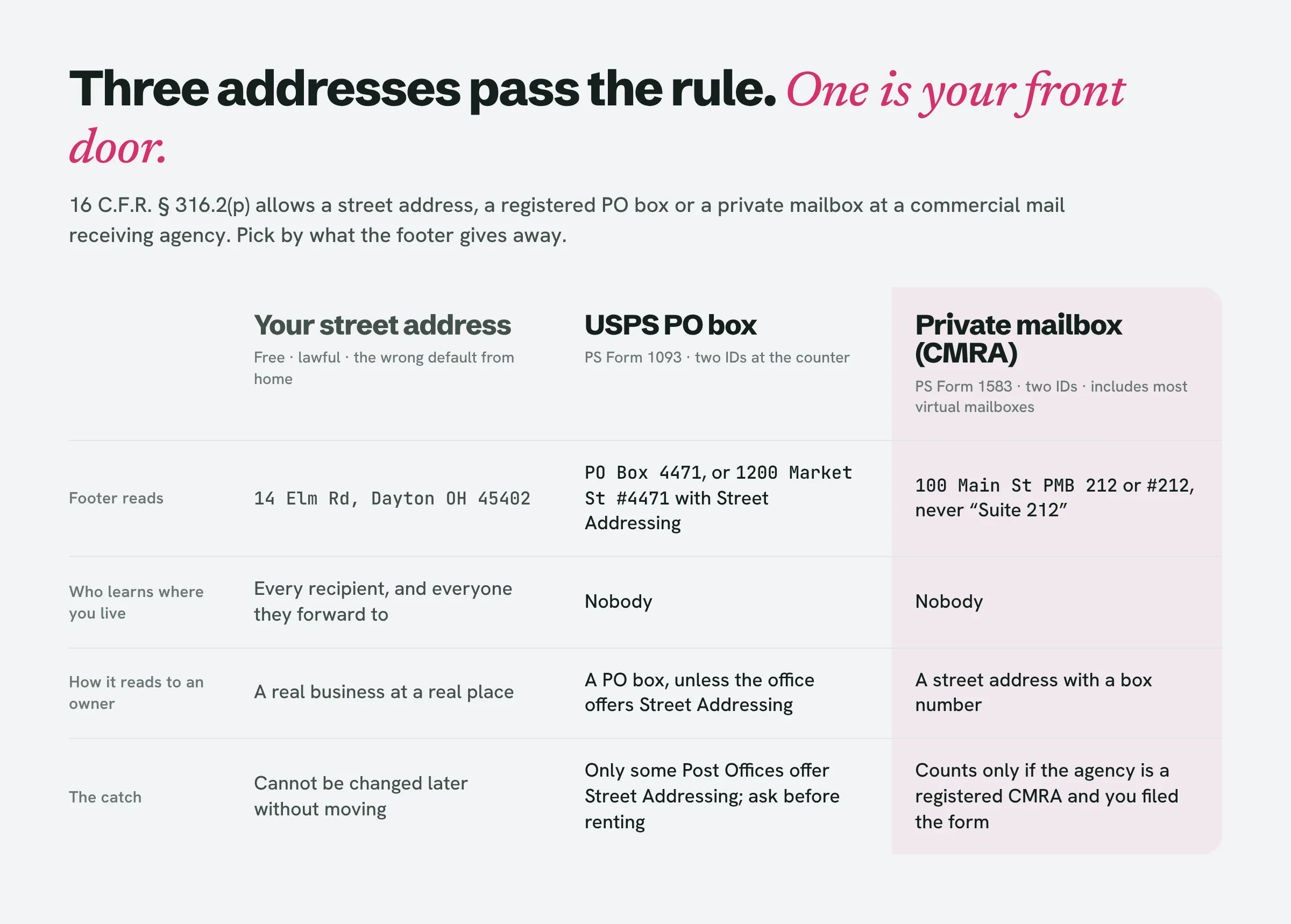
Your own street address is lawful and free, and it is the wrong default for most people reading this. Once it is in the footer, it is in every copy of every pitch you send, forwarded to whoever the owner forwards it to. A home address is also the one thing you cannot change afterwards without moving. Use it only if you already run the business from a studio, shop or coworking desk that receives mail for you, in which case that is your street address and the question is closed.
A USPS PO box is the cheapest way to get a real postal address that is not your home. You apply with PS Form 1093 (generated automatically if you apply online) and show two forms of acceptable identification at the counter; prices depend on the location. The weak point of a PO box in a footer is that it looks like a PO box, and a small-business owner reading “PO Box 4471” under a pitch about trust and professionalism may draw their own conclusion. The fix the guides never mention is the Postal Service’s Street Addressing option, available at some locations under a customer agreement: you use the Post Office’s own street address with your box number after a “#” sign, so the line reads “1200 Market St #4471” rather than “PO Box 4471”, and private carriers can deliver there too. Ask whether the office you are renting from offers it before you sign.
A private mailbox at a commercial mail receiving agency, which is what a UPS Store-type mailbox is, and what most “virtual mailbox for business” apps are selling underneath the scanning and forwarding. Two things make it count under the rule. The agency has to be a CMRA operating under Postal Service regulations, and you have to be properly registered with it, which in practice means PS Form 1583 and two current forms of acceptable identification. The Postal Service’s addressing standards also require the box to be shown as “PMB” or a “#” sign followed by the number, and they do not allow the box number to be dressed up as a suite of the building (so “100 Main St, Suite 212” for box 212 is out; “100 Main St PMB 212” or “100 Main St #212” is right). A virtual mailbox provider that never asked you for Form 1583 is not giving you a CMRA address, whatever its website says, and it is the form, not the app, that makes the address accurately registered.
What does not satisfy the rule at all: a website URL in place of an address, “address available on request”, an address you cannot actually receive mail at (a friend’s house that has not agreed to it, a coworking space you are not a member of), and anything you have stopped paying for. The point of the requirement, as the FTC and the oldest page on this subject both put it, is a place where a real letter can reach you.
CAN-SPAM opt-out requirements for a reply-based opt-out: is an unsubscribe link required by law? No
Every example footer on page 1 ends in a hyperlinked word “Unsubscribe”. That is what marketing software produces, and it is why solo senders assume the law wants a link they have no way to make. Read the statute instead. Section 7704(a)(3)(A) requires “a functioning return electronic mail address or other Internet-based mechanism, clearly and conspicuously displayed, that a recipient may use to submit, in a manner specified in the message, a reply electronic mail message or one or more other communications” asking not to be emailed again. The FTC’s rule, § 316.5, says you may not make anyone “take any other steps except sending a reply electronic mail message or visiting a single Internet Web page” to opt out, and may not charge a fee or ask for anything beyond the email address and their preference.
A reply is therefore a lawful mechanism, and it is the natural one for a message typed by hand: “If you’d rather not hear from me again, reply ‘no thanks’ and I won’t write twice.” That sentence does the job the link does. Gmail’s small grey “Unsubscribe” at the top of some messages is generated from list headers that bulk tools add; a hand-sent email never gets one and does not need one.
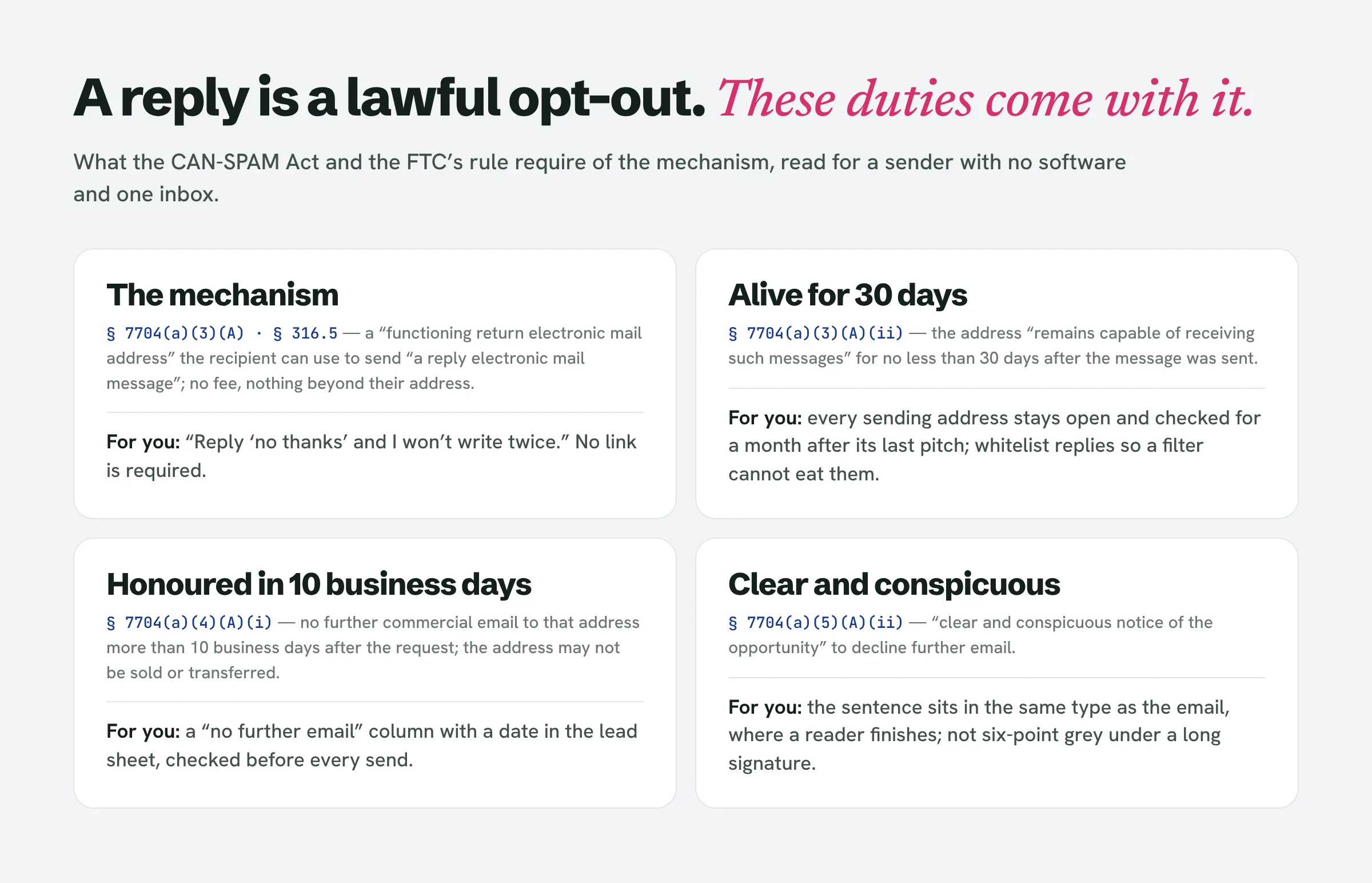
The sentence brings three operating duties that the link-based guides never translate for someone without software.
The address must keep working. Section 7704(a)(3)(A)(ii) says the mechanism “remains capable of receiving such messages or communications for no less than 30 days after the transmission of the original message.” For you that means the account you sent from stays open, logged into and checked for a month after the last pitch left it. The deliverability advice to spread sending across several addresses is fine, but every one of those addresses is now a mechanism with a 30-day life it must serve. Deleting an alias the week after a campaign is a violation on every email that alias sent. The FTC adds the practical half: “Make sure your spam filter doesn’t block these opt-out requests.” Whitelist replies, and look in the spam folder before you archive anything.
The request must be honoured within 10 business days, under § 7704(a)(4)(A)(i), and after that you may not sell or transfer that address, even as part of a list. The tool for this at your scale is a column in the spreadsheet you already track leads in, as described in our cold email tracking piece: a “no further email” flag with the date, checked before every send. A “no” from the owner’s personal address covers that address; the sensible reading for a one-person business is to stop writing to the business at all, because the person who said no is the business.
The notice has to be clear and conspicuous. A sentence in the same type as the rest of the email, placed where a reader finishes, qualifies. Six-point grey text under a long signature does not, whatever the software vendors ship by default.
The footer, line by line
Put together, the bottom of a hand-sent pitch to a local business looks like this, and every line is there for a reason.
This is a sales email. I build websites for [trade] businesses in [city], and I’m writing to offer one.
If you’d rather not hear from me again, reply “no thanks” and I won’t write twice.
[Your full name] · 100 Main St PMB 212, [City, ST ZIP]
The first line is the identification as an advertisement or solicitation. The FTC says the law “gives you a lot of leeway in how to do this”; it does not have to be the word “ADVERTISEMENT” in the subject line, and for a pitch that opens with a specific observation about the owner’s website, a plain sentence saying what the email is for reads better than a label would. The only time the identification can be dropped is under § 7704(a)(5)(B), when “the recipient has given prior affirmative consent to receipt of the message”, which for you means after they have replied and asked for more. The second line is the opt-out notice and mechanism in one. The third is the valid physical postal address, written the way the Postal Service wants it written.
The “From” line and the subject are the other half of the content rules and cost nothing: your real name, an address that is really yours, and a subject that describes what is in the email. A subject line that pretends to be a reply or an invoice is a deception violation before the footer is even read.
The body of the email is yours to write; what a tool drafts for you is a starting point, not a compliant message. LeadReef drafts the pitch from the problems it finds on the business’s site; the footer lines above and the inbox that watches for “no thanks” are still yours to supply, because the address and the mechanism belong to the sender, and the sender is you.
If the business is in Canada, the same footer needs two numbers changed
The pitch to a plumber in Buffalo and a plumber in Toronto can share a body, but not a footer. Canada’s Anti-Spam Legislation requires the message to carry an unsubscribe mechanism the recipient can use “at no cost to them”, using the same electronic means the message came by, and section 11(2) requires the electronic address or web page you give for it to remain valid “for a minimum of 60 days after the message has been sent”, twice the US period. Section 11(3) requires you to act on the request “without delay, and in any event no later than 10 business days.” Whether you may send to that Canadian address at all is a separate consent question, covered in our country-by-country piece on whether cold emailing is illegal; this article is only about what the footer must say once the answer is yes.
The penalty figure the US guides quote is real but it is not the point. The FTC’s guide puts each separate non-compliant email at up to $53,088 as of its January 2024 adjustment. The reason a freelancer gets the footer right is smaller and nearer: the owner who replies “please stop” and then gets a follow-up a week later has a complaint to make, and a sender working from a kitchen with a Gmail account has no legal department to make it go away.
People also ask
Who is subject to CAN-SPAM?
Anyone who initiates a commercial email to a US recipient, in any volume, from any kind of account. The FTC’s guide says the Act covers “all commercial messages” and makes “no exception for business-to-business email.” A freelancer hand-sending one pitch is a sender in exactly the way a marketing department is.
Is there a law about unsubscribe from emails?
In the US, § 7704(a)(3) of the CAN-SPAM Act requires every commercial email to carry a mechanism for declining further email, and § 7704(a)(4) requires the request to be honoured within 10 business days. The law does not require a link. A reply to the sending address is one of the two mechanisms the FTC’s rule names.
What are the legal requirements for email marketing?
For US recipients: accurate header information, a non-deceptive subject line, identification as an advertisement, an opt-out mechanism that works for 30 days and is honoured within 10 business days, and a valid physical postal address, which may be a street address, a registered PO box or a private mailbox at a commercial mail receiving agency. Other countries add consent requirements; Canada’s are summarised above.
Can you buy email addresses for marketing?
Buying a list does not break CAN-SPAM by itself, because the Act regulates the message rather than how the address was obtained; the aggravated-violation provision applies to addresses harvested by automated means from sites with a no-transfer notice, and only when the message is already non-compliant. A bought list of local business owners does raise the consent question in Canada and the UK, and its contacts are rarely the owner anyway.
What is opt-in in email marketing?
Permission obtained before the first message. The US does not require it for commercial email, which is what makes cold email lawful there; it is a defence under the identification rule (prior affirmative consent) and the basis the Canadian, UK and EU regimes require in some form. Nothing in this article relies on it.
Set the footer once, then find the businesses
The address and the opt-out are set once and reused on every pitch, which is the easy part. The slow part is the one in front of it: finding the local businesses whose website is losing them customers, getting the right contact for each, and writing a pitch that names a real problem. LeadReef does that part: it scans a city, flags the sites with visible problems, attaches the contacts it finds and drafts the pitch for you to finish and sign. The first 10 leads are free, from any of 10 business types in any of 10 locations, at leadreef.ai/find. Add your footer, then press send.